In my tests: refs ate itself. Leaving nothing to deduplicate.
what do you mean leaving?
leaving to whom/what?
you have data on refs, and data is either dedupable or not.
storj data isnt but my other data is and is very well, it saved over a tb as i said before.
You make a refs filesystem.
You copy data to it.
It completely shits-the-bed: nothing is recoverable.
Leaving nothing to deduplicate.
It’s all gone.
ah, you just mean that it collapses.
dedupe is a bit something else.
it is when you have identical logical data in the files, but the filesystem stores only one instance of this data physically, making only references to file metadata in its internal structures.
it does not leave anything else to anywhom else to dedupe.
it does not leave anything else to anywhom else to dedupe, it just presents the same physical data as if it is in all files that contain it, so the logical amount can be considerably bigger than the physical amount if some of that data is identical.
so when you have many very similar files, you save many physical storage space.
the roots of my cases with refs collapses were defer-write in primocache, combined with mishandling of synchronisation of dma transfers with cpu caches.
disabled defer-write and fixed the dma data sync options in bios setup, so far so good.
of course a filesystem that calls itself resilient should have tolerated it better or at least without global boo-boo, here i concur.
okay guys.
thanks for your input.
i moved all dedupable data from the hdd to the ssd and left there only storj and system recovery archives.
if system collapses, i can restore from the hdd.
if hdd collapses, i will recreate the recovery archives.
very little chance for them to collapse both because the system is on ntfs and it is nvme so it has enough performance without being at all referenced in primocache.
what is on the bigger sata ssd with all the vms, now contains also some stuff that is either archived onto storj cloud, or synced with other computers with resilio sync, so it is not only one instance of that data and i can recover.
and speaking of resilio.
a couple weeks ago i tried to sync that data not onto local storage, but directly into the bucket mounted with rclone.
for each synced file resilio creates first a temporary file where it downloads the data, then rename-moves that file into the user dir so that it appears to the user instantly.
and the problem with all that directly on cloud, is that the temp file is a sparse file of course but cloud storage has no idea about sparse files and rclone begins to upload that file with zeroes in place of gaps and creates a lot of useless upload traffic for data that is still being synced.
there is no way in resilio to specify temp location on a drive or folder different than the .sync folder inside the user dir, so i have to periodically copy those files manually if i want them on storj and cannot make resilio do this automatically.
any ideas how i could automate this, maybe with some other software involved?
or maybe better i should start another topic with this resilio question because it falls outside of the intent of the current topic and represents me as a user and not as a sno.
well here it is, please answer there: Syncing files from several other computers but i want to put them into the storj bucket automatically and not to local storage
Yes, that’s true. NTFS is actually based on HPFS. But they used an earlier build, not the one used in OS/2. At the time, it was the file system with the best fault tolerance, unlike NTFS or FAT.
very little from hpfs in ntfs, especially the added mft bullshit.
they only kept the idea of b-trees but completely trashed the entire hpfs’s distributed architecture.
used in os2 1.x, not the later 2.1 that i started with (you too?).
and that inheritance was kept up until at least nt 4.0 named as pinball.sys
I started with 3.0 Warp on my home computer as a main OS (it’s also was able to run Windows/DOS games and did it faster than Windows  , so my wife was happy to game her lovely Heroes of Might and Magic).
Then I used it on my work as a server OS (then upgraded to 4.0) and as a client OS on some workstations, including mine.
oh.
3.0 warp in my case was a bit after i tried 2.1 at work and that was already on my first own computer at home.
btw, i still have an 2.1 original box, with all the manuals and floppies that it had.
no idea if floppies are still readable, but the manuals are still readable, lol.
the boss from work gave it to me as a souvenir when there was already warp4 on the planet.
and also btw.
first windows i saw and put my hands on was also numbered 2.1
what a coincidence?
For OS/2 enthusiasts like you, there’s ArcaOS:
i know about its existence, but dont have much will to put my hands on it now, maybe another time.
last ive tried more recently was latest warp4 and it successfully ran in a virtualbox vm, then ecomstation and it failed to install.
now i have only hyperv and neither of them works under it.
and if back to our topic, at first impressions, ReFS was an attempt to repeat the hpfs’s fame, right?
regarding your seemingy high extress…
a) how much egress did you get last month with how many TB of average storage?
b) where is your node located? You may be in a particularly choice location.
for may:
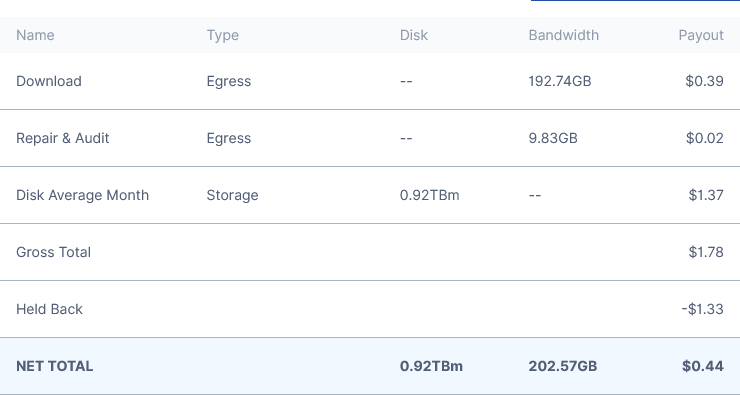
located in chisinau, moldova (that small country between ukraine and romania, that is always hard to select with the mouse on a world map).
nothing particularly choice, given that are very very many nodes in our european vicinity.
now how these numbers compare to yours, also your geo details?
It seems you are right, or, to be exact, Copilot is.
You do realy have a high egress for the amount of stored data.
Here is one of mine with the best internet connection I have. Location EU, system Syno NAS, ext4, 10GB RAM, fully migrated to hashstore.

But… I’m not sure if your optimised setup is the cause, or you have some lucky pieces that get downloaded fequently.
I had those too, and the egress was a few TB/month.
so nases have enough ram for hashstore and my concern was more of imaginary or outdated?
my hardware except for the hdd is a lot more performant, but it is also used quite a lot for things outside storj.
and what is your node’s net upload speed?
mine is only 100/100mbps but raaarely anything else on that link except storj.
i have another 500/500mbps link that is the default one for my lan but which cannot host storjnode, so my net activity as a user does not interfere.
also concerning the net speed, i think that the luckiest nodes are of course those very close to the clients, and among the further ones - those whos regional net rush hours do NOT overlap with storj clients rush hours.
i mean the less rush time overlap, the better the result.
No. It’s more like jfs, which wasn’t stable by the way.