5GB free space is hardcoded in the storagenode software. You can’t make it smaller. It’s for safety reasons. Just ignore it. It’s worthless anyways.
5GB of used space at $1.50/TB/month… earns less than a penny per month?
also you got a lot more change of that data actually doing upload, still pennies but I want those pennies.
This is simply not true and wishful thinking. Here is the illustration of how payment for storage compares with that for traffic for established nodes
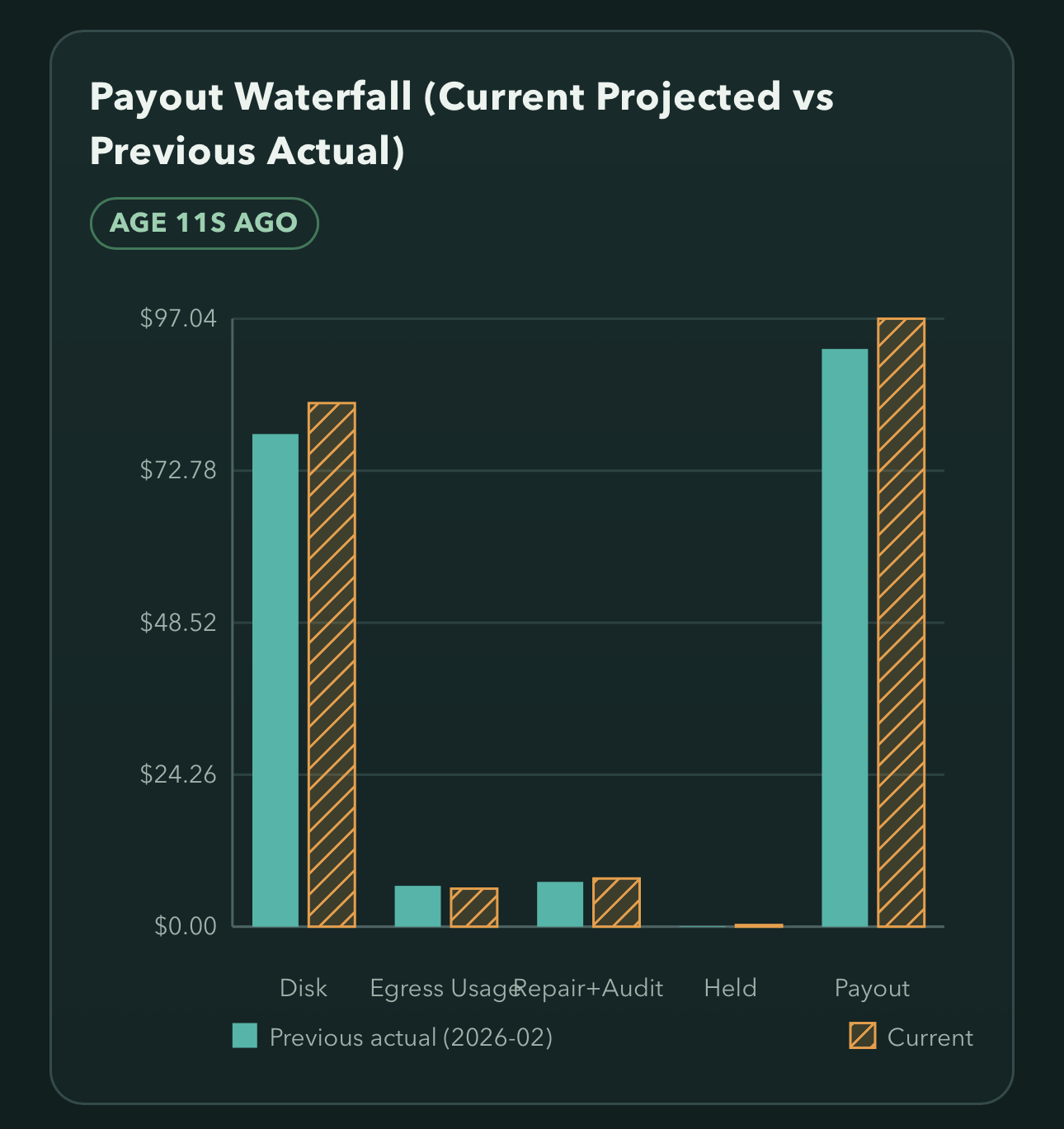
And on younger nodes egress will be proportionally smaller, even if it will be larger portion of storage compensation.
I strongly recommend not penny pinching and just let node work. You shall leave a buffer of 20% space on a drive anyway, for pretty much any filesystem to work properly, these 5GB are inconsequential.
Depends, if you are talking about one node yes it’s inconsequential, in fact you might not even fill the one node.
Now if you make the math with more nodes, some full and some drives that are SMR, having those 5GB per node, while inconsequential on a single node, it makes at least a nice buffer for slower drive, and with enough drives it’s not longer 5GB, it’s 50 or 100.
Now I am not saying that you should not have a 5GB unused space in case something goes wrong, you totally should have that buffer and let it be, but I was not asking if we needed the 5GB was I? I was asking if we need dedicated disk reserved space at 20GB, having 5GB plus 20GB per node starts to amount to quite a bit, given enough nodes, might even go to a full TB.
So 20* 10 is 200GB, inconsequential, maybe, hard work to change a line and get a few more pennies per node? No?! At least I don’t think so.
So, do we need the 5GB hardcoded buffer along with the default 20GB dedicated disk reserved space or can we just have the 5GB hardcoded?
And IMO 20% of the hard drive is a lot of reserve space for dedicated nodes.
Scaling factor does not change proportion.
SMR drives are not suitable for anythign but archival data storage.
You are going to run 20 nodes, on 20 different IP addresses, orchestrate all of that, to gain what, 0.1 of $1.50/month.. 15 cents.. Seriously?
The correct answer is – it does not matter enough to bother filing a bug, let alone making any changes and retesting.
This is not for nodes. This is for your filesystem to function properly. Also, rule of thumb, once you approach 60-70% of spaced used – you add disks to the pool. So 80% full shall never happen.
The amount of space you should have reserved depends on your setup and risk profile. Not knowing this in details, all we can do is suggest conservative values. I’m not as conservative as @arrogantrabbit, but would still recommend at least 10%. Yes, this means at least 50 GB per node.
I’m personally running at way smaller margins, but this is because I have several additional, custom safety mechanisms. For example, I keep my databases and logs on a separate file system, so that there’s no risk that a runaway database or log growth would eat up my margin. And I’ve instrumented node code to stop uploads in some additional cases, again preventing filling up my margin.
I don’t think we are speaking the same language or maybe running the same stuff.
You don’t need 20 IP’s, if you have dedicated disks you can run several on the same IP.
Ansible for the win?!
Dedicated ext4 drives with -m0 don’t need 20GB for absolutely nothing, ext4 works just fine almost full with, most issues I have ever had with ext4 was inode exaustion and that never happened with storj.
I have drives with only 15GB free space, that is almost full, because I have mix match sizes that means that a 1TB will fill up first than a 2, 3 or 4 TB, the requests to the same IP kind of level out between the drives but smaller drives reach the limit faster.
I am not asking for the 5GB hardcoded they should stay there, I am asking about the storage2.monitor.reserved-bytes, do we need to reserve 20GB when we already have those 5GB hardcoded in a dedicated disk configuration there the free space is calculated based on the file system not on the database, meaning is it OK to set storage2.monitor.reserved-bytes to 0?
Interesting, that is with the dedicated-disk funcionality?
I have never experienced a run off, let alone a overusage that was not intentional reduction on node space on my part to stop that node from downloading.
I have smallish drives, 0.5 to 6 tb, 50GB seems a bit of a waste.
I am going to try a 15GB margin on my smaller drives and put up the monitoring if it hits 10.
Well, databases ran out of control in the past, who sais it won’t happen again?
https://forum.storj.io/t/quick-growth-of-piece-expiration-db/24965/41?u=snorkel
Interesting, thank you.
Databases are not vital. I just delete them whenever a problem appears.
One fun fact about them: if they are on an USB drive or even another internal drive, the wal temp files could fail to be synced with the databases when node is stopped or system is restarted.
It happened to me on many nodes, on Synology with USB and PC with internal drives as db location. So, just to be safe, let the databases on the same drive as the storagenode data.
Or just don’t use synology. 
All my databases and log files are not on hdd.
It happened on dedicated Ubuntu PC with SSD as db location, too, so not just a Synology issue. I imagined that USB is stopped before the other processes, like db flash, container stop, etc, but the system NVMe drive should not be stopped before a data HDD.
And Synology is a very reliable option for storagenodes. Never had an issue even on 1GB RAM.
Don’t forget if your node is still piecestore, you should probably have additional space available for eventual hashstore update, or a new device for hashstore path.
2 cents,
Julio
Is there a way to monitor manually - or remove manually outdated trash that maybe should have been removed but hasn’t ?
Any scripts ?
Cheers
No. The manual intervention is not possible for hashstore and dangerous for piecestore - your node could be disqualified for lost pieces.
Is it possible that we could have undeleted trash for months, like in the piecestore case, that will never be removed even after compaction? Or isn’t the case anymore? How can we tell?
With piecestore this was trivial.
You could force strong compaction by setting the relevant compaction parameters to extreme values. This would rewrite all log files with at least one removed piece, at the cost of, likely, rewriting pretty much all data you store.
The code does not store information about compactable data, like their longevity, instead, it just infers what needs to be preserved.
And… I’ll maybe add some logging to my nodes, curious now.