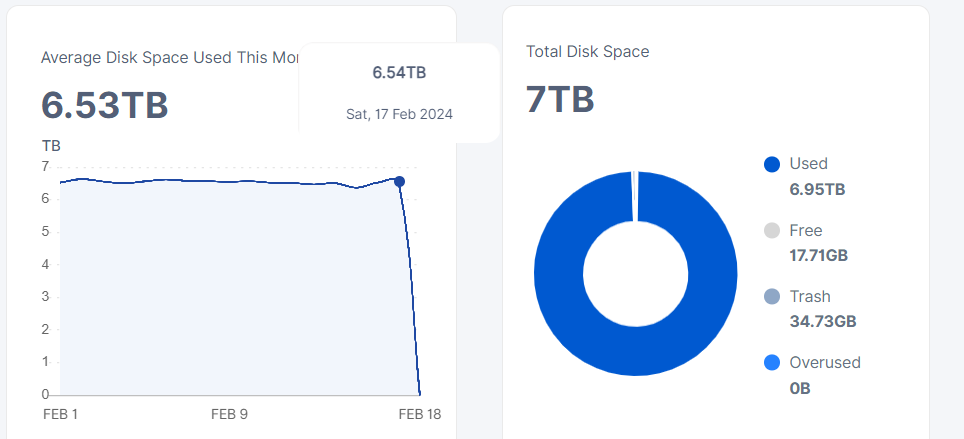
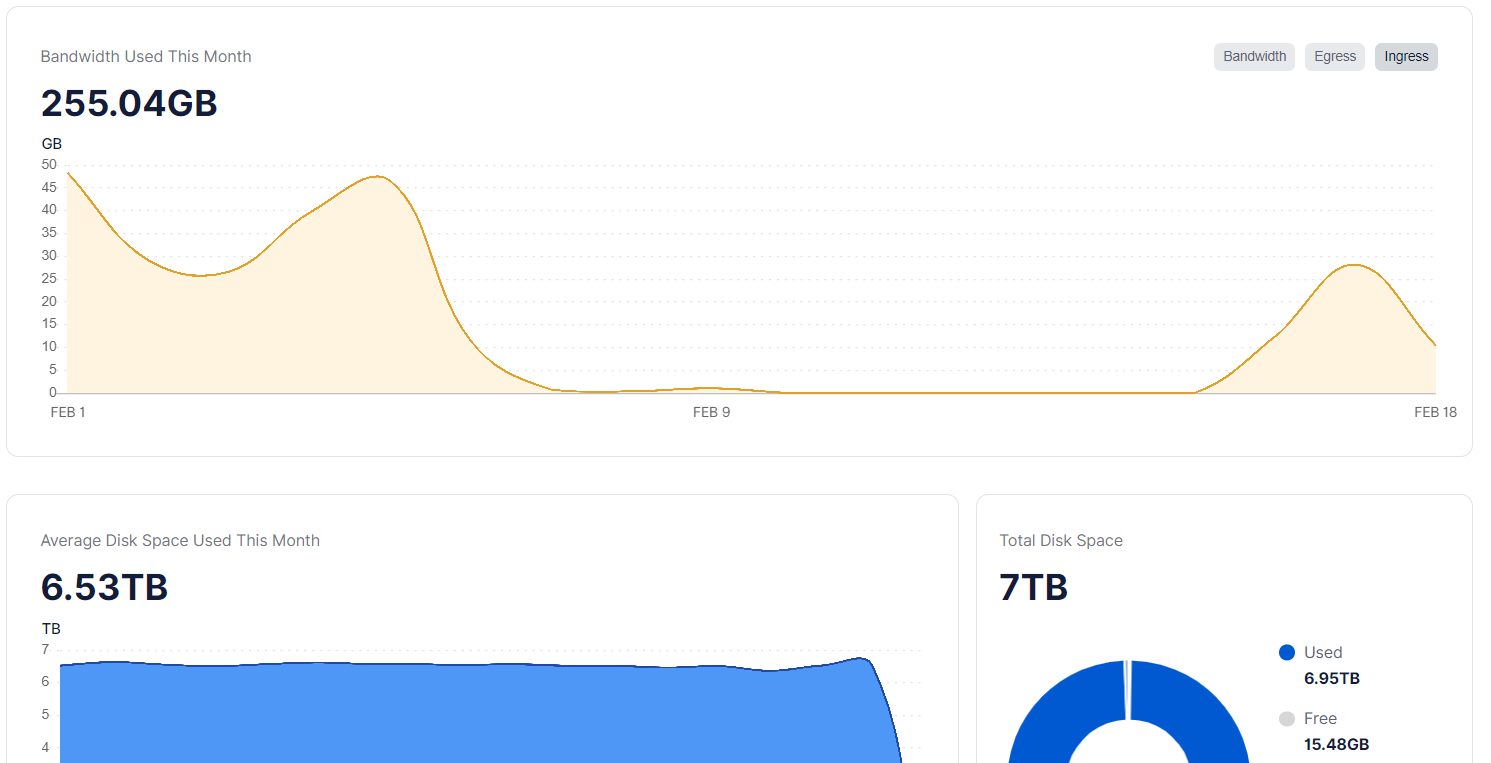
The space of the node plus the trash is larger than the space occupied on the disk.
The size of the trash can has been at the same capacity for a few days.
What could be the problem?

The space of the node plus the trash is larger than the space occupied on the disk.
The size of the trash can has been at the same capacity for a few days.
What could be the problem?
I can’t find any errors in the log.
The trash folder occupies 3.45Gb
Hi @Alexey,
please don’t focus your attention to the unsupported filesystem, I have the same issue also on the node with the local attached storage. Said this
I didn’t disabled nothing, just running the docker command with default parameters (just changing required values to run).
So, should I force the scanning, most likely not and this is not what will fix.
Regarding lazy-filewalker I can see it logging something during the node start-up. Why should I disable it ?
Question is still the same :
Is there a way to recalculate the used space (I have less space in dashboard compared to what is on the disk and it’s not due to filesystem chunk size) ?
I suppose that I have still pieces that can be deleted and maybe I lost some deletion or it failed for some reason.
Below there is my command to run nodes
docker run -d --sysctl net.ipv4.tcp_fastopen=3 --restart unless-stopped --stop-timeout 300
-p 28967:28967/tcp
-p 28967:28967/udp
-p 14002:14002
-e WALLET=“xxx”
-e EMAIL=“xxxx”
-e ADDRESS=“xxx:28967”
-e STORAGE=“10TB”
–log-opt max-size=50m
–log-opt max-file=5
–mount type=bind,source=“/STORJ/identity/storagenode4”,destination=/app/identity
–mount type=bind,source=“/STORJ”,destination=/app/config
–mount type=bind,source=“/STORJ_LOCAL”,destination=/app/dbs
–name storagenode4 storjlabs/storagenode:latest
Any suggestion ?
Thanks to all
You can force the scanning, but with a disabled lazy mode, to allow to finish it before the next restart.
This will allow to run a filewalker with a normal priority, it will be more IOPS-hungry, but must finish earlier before the next interruption.
Yes. The only way is to complete a filewalker for each trusted satellite. All untrusted should be removed with this instruction: How To Forget Untrusted Satellites
You may check the finishing:
docker logs storagenode 2>&1 | grep "gc-filewalker" | grep "finish"
docker logs storagenode 2>&1 | grep "used-space-filewalker" | grep "finish"
they should return records for each satellite (4) for each type
docker logs storagenode 2>&1 | grep "retain" | grep "Prepared|Moved"
should return 4 Prepared records and 4 Moved records, 2 per the satellite
It isn’t. If a piece will not expire, it will be garbage-collected anyway, so why bother?
Well,
I moved to docker-compose and added the two parameters  maybe the docker-compose.yml can be useful to others
version: “3.3”
services:
storagenode:
image: storjlabs/storagenode:latest
container_name: storagenode
volumes:
- type: bind
source: /STORJ/STORJ/identity/storagenode
target: /app/identity
- type: bind
source: /STORJ/STORJ
target: /app/config
- type: bind
source: /var/STORJ_LOCAL
target: /app/dbs
ports:
- 28967:28967/tcp
- 28967:28967/udp
- 14002:14002
restart: unless-stopped
stop_grace_period: 300s
- log-opt max-size=50m
- log-opt max-file=5
sysctls:
net.ipv4.tcp_fastopen: 3
environment:
- WALLET=0x7Cxxxxx
- EMAIL=marco.xxxxx
- ADDRESS=xxxx:28967
- STORAGE=14TB
- pieces.enable-lazy-filewalker=false
- storage2.piece-scan-on-startup=true
watchtower:
image: storjlabs/watchtower
restart: always
container_name: watchtower
command: storagenode watchtower --stop-timeout 300s --interval 21600
volumes:
- /var/run/docker.sock:/var/run/docker.sock
storj_exporter:
image: anclrii/storj-exporter:latest
restart: unless-stopped
container_name: storj-exporter
environment:
- STORJ_HOST_ADDRESS=storagenode
ports:
- “9651:9651”
*** Be aware that I use db on SSD , you have to manuallu edit it in config.yml (storage2.database-dir: “dbs”)
Said this I only have these logs durint startup and/or using your commands to analyze logs
pi@mcanto:~/storj-docker $ docker logs storagenode 2>&1 | grep “gc-filewalker”
pi@mcanto:~/storj-docker $ docker logs storagenode 2>&1 | grep “used-space-filewalker”
2024-02-15T12:58:38Z INFO lazyfilewalker.used-space-filewalker starting subprocess {“process”: “storagenode”, “satelliteID”: “12EayRS2V1kEsWESU9QMRseFhdxYxKicsiFmxrsLZHeLUtdps3S”}
2024-02-15T12:58:38Z INFO lazyfilewalker.used-space-filewalker subprocess started {“process”: “storagenode”, “satelliteID”: “12EayRS2V1kEsWESU9QMRseFhdxYxKicsiFmxrsLZHeLUtdps3S”}
2024-02-15T12:58:38Z INFO lazyfilewalker.used-space-filewalker.subprocess Database started {“process”: “storagenode”, “satelliteID”: “12EayRS2V1kEsWESU9QMRseFhdxYxKicsiFmxrsLZHeLUtdps3S”, “process”: “storagenode”}
2024-02-15T12:58:38Z INFO lazyfilewalker.used-space-filewalker.subprocess used-space-filewalker started {“process”: “storagenode”, “satelliteID”: “12EayRS2V1kEsWESU9QMRseFhdxYxKicsiFmxrsLZHeLUtdps3S”, “process”: “storagenode”}
Full logs startup:
2024-02-15 12:58:35,192 INFO Set uid to user 0 succeeded
2024-02-15 12:58:35,226 INFO RPC interface ‘supervisor’ initialized
2024-02-15 12:58:35,227 INFO supervisord started with pid 1
2024-02-15 12:58:36,231 INFO spawned: ‘processes-exit-eventlistener’ with pid 54
2024-02-15 12:58:36,239 INFO spawned: ‘storagenode’ with pid 55
2024-02-15 12:58:36,245 INFO spawned: ‘storagenode-updater’ with pid 56
2024-02-15T12:58:36Z INFO Configuration loaded {“Process”: “storagenode-updater”, “Location”: “/app/config/config.yaml”}
2024-02-15T12:58:36Z INFO Invalid configuration file key {“Process”: “storagenode-updater”, “Key”: “healthcheck.details”}
2024-02-15T12:58:36Z INFO Invalid configuration file key {“Process”: “storagenode-updater”, “Key”: “storage.allocated-bandwidth”}
2024-02-15T12:58:36Z INFO Invalid configuration file key {“Process”: “storagenode-updater”, “Key”: “healthcheck.enabled”}
2024-02-15T12:58:36Z INFO Invalid configuration file key {“Process”: “storagenode-updater”, “Key”: “storage.allocated-disk-space”}
2024-02-15T12:58:36Z INFO Invalid configuration file key {“Process”: “storagenode-updater”, “Key”: “server.private-address”}
2024-02-15T12:58:36Z INFO Invalid configuration file key {“Process”: “storagenode-updater”, “Key”: “operator.wallet-features”}
2024-02-15T12:58:36Z INFO Invalid configuration file key {“Process”: “storagenode-updater”, “Key”: “server.address”}
2024-02-15T12:58:36Z INFO Invalid configuration file key {“Process”: “storagenode-updater”, “Key”: “operator.wallet”}
2024-02-15T12:58:36Z INFO Invalid configuration file key {“Process”: “storagenode-updater”, “Key”: “console.address”}
2024-02-15T12:58:36Z INFO Invalid configuration file key {“Process”: “storagenode-updater”, “Key”: “operator.email”}
2024-02-15T12:58:36Z INFO Invalid configuration file key {“Process”: “storagenode-updater”, “Key”: “contact.external-address”}
2024-02-15T12:58:36Z INFO Invalid configuration file key {“Process”: “storagenode-updater”, “Key”: “storage2.database-dir”}
2024-02-15T12:58:36Z INFO Invalid configuration file value for key {“Process”: “storagenode-updater”, “Key”: “log.level”}
2024-02-15T12:58:36Z INFO Anonymized tracing enabled {“Process”: “storagenode-updater”}
2024-02-15T12:58:36Z INFO Running on version {“Process”: “storagenode-updater”, “Service”: “storagenode-updater”, “Version”: “v1.96.6”}
2024-02-15T12:58:36Z INFO Downloading versions. {“Process”: “storagenode-updater”, “Server Address”: “https://version.storj.io”}
2024-02-15T12:58:36Z INFO Configuration loaded {“process”: “storagenode”, “Location”: “/app/config/config.yaml”}
2024-02-15T12:58:36Z INFO Anonymized tracing enabled {“process”: “storagenode”}
2024-02-15T12:58:36Z INFO Operator email {“process”: “storagenode”, “Address”: “marco.canto01@gmail.com”}
2024-02-15T12:58:36Z INFO Operator wallet {“process”: “storagenode”, “Address”: “0x7xxxxxx”}
2024-02-15T12:58:36Z INFO server existing kernel support for server-side tcp fast open detected {“process”: “storagenode”}
2024-02-15T12:58:36Z INFO Current binary version {“Process”: “storagenode-updater”, “Service”: “storagenode”, “Version”: “v1.96.6”}
2024-02-15T12:58:36Z INFO Version is up to date {“Process”: “storagenode-updater”, “Service”: “storagenode”}
2024-02-15T12:58:36Z INFO Current binary version {“Process”: “storagenode-updater”, “Service”: “storagenode-updater”, “Version”: “v1.96.6”}
2024-02-15T12:58:36Z INFO Version is up to date {“Process”: “storagenode-updater”, “Service”: “storagenode-updater”}
2024-02-15T12:58:37Z INFO Telemetry enabled {“process”: “storagenode”, “instance ID”: “12mgrK7bsPX5EJwjBqKkf7yR3R5GhDnJ5bgj3qy2Cjjaxxxx”}
2024-02-15T12:58:37Z INFO Event collection enabled {“process”: “storagenode”, “instance ID”: “12mgrK7bsPX5EJwjBqKkf7yR3R5GhDnJ5bgj3qy2xxxx”}
2024-02-15 12:58:37,321 INFO success: processes-exit-eventlistener entered RUNNING state, process has stayed up for > than 1 seconds (startsecs)
2024-02-15 12:58:37,321 INFO success: storagenode entered RUNNING state, process has stayed up for > than 1 seconds (startsecs)
2024-02-15 12:58:37,325 INFO success: storagenode-updater entered RUNNING state, process has stayed up for > than 1 seconds (startsecs)
2024-02-15T12:58:37Z INFO db.migration Database Version {“process”: “storagenode”, “version”: 54}
2024-02-15T12:58:37Z INFO preflight:localtime start checking local system clock with trusted satellites’ system clock. {“process”: “storagenode”}
2024-02-15T12:58:38Z INFO preflight:localtime local system clock is in sync with trusted satellites’ system clock. {“process”: “storagenode”}
2024-02-15T12:58:38Z INFO trust Scheduling next refresh {“process”: “storagenode”, “after”: “3h17m9.280862751s”}
2024-02-15T12:58:38Z INFO Node 12mgrK7bsPX5EJwjBqKkf7yR3R5GhDnJ5bgj3qy2Cjjxxxx started {“process”: “storagenode”}
2024-02-15T12:58:38Z INFO Public server started on [::]:28967 {“process”: “storagenode”}
2024-02-15T12:58:38Z INFO Private server started on 127.0.0.1:7778 {“process”: “storagenode”}
2024-02-15T12:58:38Z INFO bandwidth Performing bandwidth usage rollups {“process”: “storagenode”}
2024-02-15T12:58:38Z INFO pieces:trash emptying trash started {“process”: “storagenode”, “Satellite ID”: “12L9ZFwhzVpuEKMUNUqkaTLGzwY9G24tbiigLiXpmZWKwmcNDDs”}
2024-02-15T12:58:38Z INFO lazyfilewalker.used-space-filewalker starting subprocess {“process”: “storagenode”, “satelliteID”: “12EayRS2V1kEsWESU9QMRseFhdxYxKicsiFmxrsLZHeLUtdps3S”}
2024-02-15T12:58:38Z INFO lazyfilewalker.used-space-filewalker subprocess started {“process”: “storagenode”, “satelliteID”: “12EayRS2V1kEsWESU9QMRseFhdxYxKicsiFmxrsLZHeLUtdps3S”}
2024-02-15T12:58:38Z INFO piecestore download started {“process”: “storagenode”, “Piece ID”: “QGEVPDBCGYJ4PFKCQZSVRRB3C6ODBBO72YZJO2FEIVLHK6MXWC5Q”, “Satellite ID”: “12EayRS2V1kEsWESU9QMRseFhdxYxKicsiFmxrsLZHeLUtdps3S”, “Action”: “GET”, “Offset”: 0, “Size”: 72704, “Remote Address”: “79.127.219.34:40848”}
2024-02-15T12:58:38Z INFO piecestore download started {“process”: “storagenode”, “Piece ID”: “ZKGIIRHHI53W7B3PV7SS3E7RBNEME6V7CRHS7QH2YVTUOEAK2Q7Q”, “Satellite ID”: “12EayRS2V1kEsWESU9QMRseFhdxYxKicsiFmxrsLZHeLUtdps3S”, “Action”: “GET”, “Offset”: 1778944, “Size”: 540160, “Remote Address”: “79.127.220.99:35928”}
…
2024-02-15T12:58:38Z INFO collector deleted expired piece {“process”: “storagenode”, “Satellite ID”: “12EayRS2V1kEsWESU9QMRseFhdxYxKicsiFmxrsLZHeLUtdps3S”, “Piece ID”: “OCOXTQKBAQIV74HS3MWYXWWSUKUJPSU2SLMJQ5UAJ2IN7LLCBOJQ”}
2024-02-15T12:58:38Z INFO lazyfilewalker.used-space-filewalker.subprocess Database started {“process”: “storagenode”, “satelliteID”: “12EayRS2V1kEsWESU9QMRseFhdxYxKicsiFmxrsLZHeLUtdps3S”, “process”: “storagenode”}
2024-02-15T12:58:38Z INFO lazyfilewalker.used-space-filewalker.subprocess used-space-filewalker started {“process”: “storagenode”, “satelliteID”: “12EayRS2V1kEsWESU9QMRseFhdxYxKicsiFmxrsLZHeLUtdps3S”, “process”: “storagenode”}
Thanks to all for the support
Hi @Alexey .
Nothing so far on the logs. Shoudn´t it have some entries by now?
4 days have passed and nothing.
they are not variables, it will not work, you should add these flags either to the command: clause, i.e.
command:
- "--pieces.enable-lazy-filewalker=false"
- "--storage2.piece-scan-on-startup=true"
or as a special STORJ_* variables, i.e.
environment:
...
- STORJ_PIECES_ENABLE_LAZY_FILEWALKER=false
- STORJ_STORAGE2_PIECE_SCAN_ON_STARTUP=true
Depends on many factors. If you disabled a used space filewalker, it will not appear in the logs, GC is happening 1-2 times per week, so I guess you need to wait more, retain should move pieces weekly.
However, if you switched the log level from the default info, you wouldn’t see records at all. If you redirected logs to the file, then you need to search these records in that file instead.
Storj software uses SI measure units unlike Windows, so 6.23TB Windows (actually - TiB, i.e. power of 2) is 6.85TB in SI (power of 10).
So the difference is like 0.23TB. It’s still too much, but will be collected by the Garbage Collector in the next run (next week), since you do not have any errors related to walk as you said.
Hi @Alexey
I changed the docker-compose.yml file and at start filewalker is no more mentioned but I also don’t have nothing saying that a scan is running.
As you suggested I put these two line under the environment part
environment:
…
- STORJ_PIECES_ENABLE_LAZY_FILEWALKER=false
- STORJ_STORAGE2_PIECE_SCAN_ON_STARTUP=true
Additionally can you confirm if other parameters are well configured in the docker file I past yesterday , for instance the ipv4 and logs part ?
Is there a manual where I can find the parameters to be used inside docker file as well the scope (I mean environment , ports, sysctls etc)
Thank you
Perhaps they are ok, I do not know your configuration, so if you have properly configured mountpoints like
they should work.
It actually could be helpful if your system has enough RAM, all metadata is expected to be cached, so the next scan should be faster.
Not sure that parallel execution could help. However, they didn’t run in parallel on my system for some reason:
Results of the most recent garbage collection process of US1 with a 4MB bloom filter:
2024-02-16T05:12:57-08:00	INFO	lazyfilewalker.gc-filewalker	starting subprocess	{"process": "storagenode", "satelliteID": "12EayRS2V1kEsWESU9QMRseFhdxYxKicsiFmxrsLZHeLUtdps3S"}
2024-02-16T05:13:02-08:00	INFO	lazyfilewalker.gc-filewalker	subprocess started	{"process": "storagenode", "satelliteID": "12EayRS2V1kEsWESU9QMRseFhdxYxKicsiFmxrsLZHeLUtdps3S"}
2024-02-16T05:13:03-08:00	INFO	lazyfilewalker.gc-filewalker.subprocess	Database started	{"process": "storagenode", "satelliteID": "12EayRS2V1kEsWESU9QMRseFhdxYxKicsiFmxrsLZHeLUtdps3S", "process": "storagenode"}
2024-02-16T05:13:03-08:00	INFO	lazyfilewalker.gc-filewalker.subprocess	gc-filewalker started	{"process": "storagenode", "satelliteID": "12EayRS2V1kEsWESU9QMRseFhdxYxKicsiFmxrsLZHeLUtdps3S", "process": "storagenode", "createdBefore": "2024-02-07T17:59:59Z", "bloomFilterSize": 4100003}
2024-02-17T12:58:16-08:00	INFO	lazyfilewalker.gc-filewalker.subprocess	gc-filewalker completed	{"process": "storagenode", "satelliteID": "12EayRS2V1kEsWESU9QMRseFhdxYxKicsiFmxrsLZHeLUtdps3S", "process": "storagenode", "piecesCount": 45599015, "piecesSkippedCount": 0}
2024-02-17T12:58:17-08:00	INFO	lazyfilewalker.gc-filewalker	subprocess finished successfully	{"process": "storagenode", "satelliteID": "12EayRS2V1kEsWESU9QMRseFhdxYxKicsiFmxrsLZHeLUtdps3S"}
For reference the results of my most recent used space file walker:
2024-02-09T15:06:03-08:00	INFO	lazyfilewalker.used-space-filewalker	starting subprocess	{"process": "storagenode", "satelliteID": "12EayRS2V1kEsWESU9QMRseFhdxYxKicsiFmxrsLZHeLUtdps3S"}
2024-02-09T15:06:03-08:00	INFO	lazyfilewalker.used-space-filewalker	subprocess started	{"process": "storagenode", "satelliteID": "12EayRS2V1kEsWESU9QMRseFhdxYxKicsiFmxrsLZHeLUtdps3S"}
2024-02-09T15:06:03-08:00	INFO	lazyfilewalker.used-space-filewalker.subprocess	Database started	{"process": "storagenode", "satelliteID": "12EayRS2V1kEsWESU9QMRseFhdxYxKicsiFmxrsLZHeLUtdps3S", "process": "storagenode"}
2024-02-09T15:06:03-08:00	INFO	lazyfilewalker.used-space-filewalker.subprocess	used-space-filewalker started	{"process": "storagenode", "satelliteID": "12EayRS2V1kEsWESU9QMRseFhdxYxKicsiFmxrsLZHeLUtdps3S", "process": "storagenode"}
2024-02-11T04:31:41-08:00	INFO	lazyfilewalker.used-space-filewalker.subprocess	used-space-filewalker completed	{"process": "storagenode", "satelliteID": "12EayRS2V1kEsWESU9QMRseFhdxYxKicsiFmxrsLZHeLUtdps3S", "process": "storagenode", "piecesTotal": 5327049638780, "piecesContentSize": 5304190716796}
2024-02-11T04:31:41-08:00	INFO	lazyfilewalker.used-space-filewalker	subprocess finished successfully	{"process": "storagenode", "satelliteID": "12EayRS2V1kEsWESU9QMRseFhdxYxKicsiFmxrsLZHeLUtdps3S"}
According to the logs and the API I am using over 5TB of space for US1. I’ve also ran du -sh and du -sh --apparent-size and both give values over 5TB for US1. However according to the dashboard I am only being paid for about 3.3TB for US1.
With this recent garbage collection I was hoping to have had this discrepancy fixed with the larger bloom filter size, but I’ve only accumulated around 50GB of garbage.
I am running Storj on Unraid on XFS with an SSD write cache, and a block size of 4096 bytes.
Any insights would be helpful. Thanks!
Seems it requires more rounds and 4MB bloom filter size is not enough to collect all garbage at once.
Interestingly that it moves almost the same amount of pieces independently of the bloom filter size on my node:
2024-02-01T17:34:23Z    INFO    lazyfilewalker.gc-filewalker.subprocess        gc-filewalker started {"process": "storagenode", "satelliteID": "12EayRS2V1kEsWESU9QMRseFhdxYxKicsiFmxrsLZHeLUtdps3S", "process": "storagenode", "createdBefore": "2024-01-24T17:59:59Z", "bloomFilterSize": 2097155}
2024-02-02T09:47:50Z    INFO    lazyfilewalker.gc-filewalker.subprocess gc-filewalker completed {"process": "storagenode", "satelliteID": "12EayRS2V1kEsWESU9QMRseFhdxYxKicsiFmxrsLZHeLUtdps3S", "process": "storagenode", "piecesCount": 13605300,"piecesSkippedCount": 0}
2024-02-08T12:53:09Z    INFO    lazyfilewalker.gc-filewalker.subprocess gc-filewalker started   {"process": "storagenode", "satelliteID": "12EayRS2V1kEsWESU9QMRseFhdxYxKicsiFmxrsLZHeLUtdps3S", "process": "storagenode", "createdBefore": "2024-01-31T17:59:59Z", "bloomFilterSize": 2097155}
2024-02-08T23:10:12Z    INFO    lazyfilewalker.gc-filewalker.subprocess gc-filewalker completed {"process": "storagenode", "satelliteID": "12EayRS2V1kEsWESU9QMRseFhdxYxKicsiFmxrsLZHeLUtdps3S", "process": "storagenode", "piecesCount": 13876555, "piecesSkippedCount": 0}
2024-02-16T17:57:38Z    INFO    lazyfilewalker.gc-filewalker.subprocess gc-filewalker started   {"process": "storagenode", "satelliteID": "12EayRS2V1kEsWESU9QMRseFhdxYxKicsiFmxrsLZHeLUtdps3S", "process": "storagenode", "createdBefore": "2024-02-07T17:59:59Z", "bloomFilterSize": 4100003}
2024-02-17T20:41:03Z    INFO    lazyfilewalker.gc-filewalker.subprocess gc-filewalker completed {"process": "storagenode", "satelliteID": "12EayRS2V1kEsWESU9QMRseFhdxYxKicsiFmxrsLZHeLUtdps3S", "piecesCount": 13229365, "piecesSkippedCount": 0, "process": "storagenode"}
but also a difference is not so huge
So yours took 27h for 7TB, but his took 31h for 5TB.
Do you have something moved to a SSD like db-es, logs, metadata cache?
Or is just the lack of writes/ingress and maybe more RAM?
It’s a Windows Docker node, I didn’t move databases and do not have any special cache devices/software. This system has 32GB of RAM, but it also used for other load (BTW some VMs VHDX stored on this disk), so usually it has not more than 24GB of free RAM.
ingress:
So if you are low on RAM, like a rpi or NAS, with 1-4GB, and your node reboots, starts the used-space-FW, than the bloom filter hits, and starts the GC-FW, you’re scr…
It will run for days/weeks! If there is still ingress, than bye bye relaxation for your drive. It will run 100% for a week untill the next Bloom filter, the next update/reboot, and so on…
Just don’t start new nodes on low RAM systems, with big drives!
SSD write caching on Unraid forces you to use SHFS, their FUSE filesystem that you can treat it similarly to mergerfs.
The benefit is my success rate is high and I can trigger writes to the array overnight, but I think the FUSE filesystem can be a hinderance. It does take an eerily long time for me to do a simple ls inside the blobs folder of a satellite.