Not all, only the used space filewalker. The gc-filewalker is running 1-2 times per week and initiated by satellites, the piece:trash is running every 24h since start, the collector running every hour, and so on.
See
Indeed, @Alexey.
Funny enough it’s happening on my oldest 3 windows nodes.
Log is in info, I even pasted a link over 1GB of log file.
I saw the link, but my tablet is unable to process it… So, I would ask you to search for a few lines which contains “walk” and “started|finished” or “failed|error” with the provided scripts.


Check disk for errors.

Context canceled for dbs indicate slow drive. The entry for that piece will be deleted later. Currently try to chkdsk your drive.
@naxbc After chkdsk (i do not remember if already checked,)
How many folders are in blobs?
Is the temp folder not full of files older 3 days?
If already checked, i apologise for asking.
No problem.
I started full CHKDSK /F and it will take a while as my drive is 16TB.
I’ll post the results when it finishes and let you know about the blobs.
Thank you for the feedback.


Hi Walter1
See here…


Ok. Here we are. The temp is spammed and you have 3 blobs folders to much.
- Easy.
Stop the node, wait 1 min. Then empty temp. - How To Forget Untrusted Satellites - #57 by daki82
This will remove 2 sats. Alter the paths to your setup.
May take days.
Find out the 3. Not needed blobs name. It may be the old stefanbenten. The info is here somewhere.
Dont have time for more…gl
Thanks man, that´s awesome info 
@Alexey where can I find the list of trusted sattelites? Shouldn´t this information be applied to new releases?
All this caused a discrepancy of almost 2TB!!!
It’s a wiki a long time ago?
sorry, I linked wrong
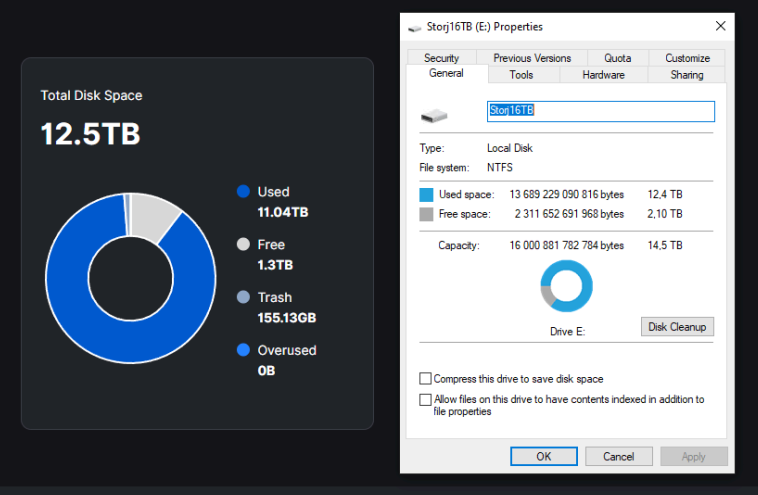
I have one idea to check:
The windows trash bin configuration for the drive. it should say: no trash, delete files directly.
Right click on the recycle bin icon,Properies of the windows trash bin. click on the drive e: