any manual how to move to memtbl?
Set STORJ_HASHSTORE_TABLE_DEFAULT_KIND=memtbl environment variable and wait.
(Assuming you already configured your node to use hashstore)
This defines the format of the metadata for the next compactions, so you need a compaction for both table to see the effect.
You can check the variant with Prometheus endpoint:
curl 127.0.0.1:8364/metrics | grep Kind

hashstore{satellite=“_12EayRS2V1kEsWESU9QMRseFhdxYxKicsiFmxrsLZHeLUtdps3S”,db=“s0”,scope=“storj_io_storj_storagenode”,field=“Table_Kind”} 0

hashstore{satellite=“_12EayRS2V1kEsWESU9QMRseFhdxYxKicsiFmxrsLZHeLUtdps3S”,db=“s1”,scope=“storj_io_storj_storagenode”,field=“Table_Kind”} 0```
0 –> hashtbl, 1 –> memtbl
2 Likes
Many of us have filestatcache enabled. What do you suggest we do?
if i use windows gui, how exactly I set this environment variable?
i put this row to config file?
or it like with migration, i make some file with some extension and put this row incide?
For the idiot SNOs like me who think this is cool but have very little idea of what’s going on under the hood, would it eventually be possible to write a guide on how to move the Hashtable to SSD?
I’m hoping it won’t be too much harder than the current databases-on-an-SSD setup but I’d rather be safe than sorry.
Yours truly
An IT ignoramus 
I was about ask the same thing — if the hash table resides in a separate folder it could be possible to put it onto separate dataset with small block size adjusted to record size, thus pushing everything to SSD — but 64 bytes per object is so little.. it will easily be cached anyway.
My node now has sixty million files in the blobs folder. So it’s not even half a gigabyte. It shall fit to cache on pretty much any device
2 Likes
We predominantly use hashtbl, but have started using memtbl more in cases where the RAM is available. Both are very fast. memtbl is only faster if the RAM is available for it, but if there isn’t enough RAM, then hashtbl is faster.
Ah yes, thank you for the context. It looks like since none of our code used it, it was removed in a refactor without causing anything to trip. It should be straightforward to add back. In fact, the telemetry data your node maintains does actually report satellite usage, e.g.:
$ curl -s yournode.local:5999/mon/stats | grep -E ^satellite_usage
satellite_usage,satellite=12L9ZFwhzVpuEKMUNUqkaTLGzwY9G24tbiigLiXpmZWKwmcNDDs,scope=storj.io/storj/storagenode/nodestats used_bytes=<BYTES HERE>
satellite_usage,satellite=1wFTAgs9DP5RSnCqKV1eLf6N9wtk4EAtmN5DpSxcs8EjT69tGE,scope=storj.io/storj/storagenode/nodestats used_bytes=<BYTES HERE>
...
The hashstore codepaths just ignore it. I don’t think you need to do anything. Hashstore makes the filestatcache unnecessary.
Good question - for right now, STORJ_HASHSTORE_TABLE_DEFAULT_KIND is specifically an environment variable. With this rollout I anticipate a lot more interest in changing configurations than we have had, so we will pursue exposing this configuration in the config file too. You should be able to set system and user environment settings in your Windows System Settings control panel.
Definitely! Perhaps someone on the forum will beat us to it, but there is be a config setting (that can be either environment variable or config file) that specifies where the hashtable metadata (the tables themselves) reside. Either --hashstore.table-path=/path/to/your/ssd/table/folder or STORJ_HASHSTORE_TABLE_PATH=/path or in the config file hashstore.table-path: "/path". There is a similar config option for the logs path (hashstore.logs-path)
2 Likes
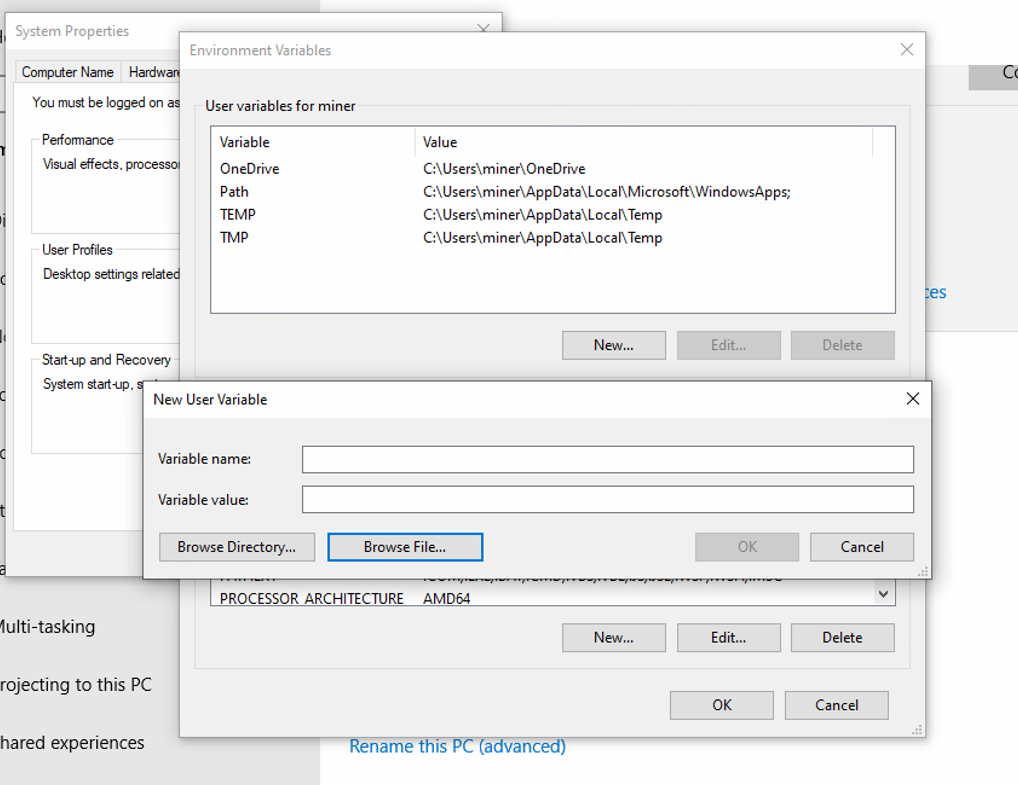
look like in windows we need something more than only parameter, does storagenode looks some name there?
will i need to make separate variable for every node by selecting file or one per server?
The environment variable name is STORJ_HASHSTORE_TABLE_DEFAULT_KIND and the value is memtbl. This applies to any node you run with these settings. It will be easier for you to set it for just one node or another once we have config file support for this setting.
2 Likes
Is there a way to opt out? Or the migration is mandatory?
There are two things I do not like about the new system (or one thing appearing as two things):
Rewriting cold data. Under the current system, if a piece was uploaded a year ago and the customer did not delete it, it stays in its file untouched. The file may be read (the customer downloads his file or there is an audit), but never written. A power failure or system crash will nor result in a loss of this file (unless the file system gets screwed up beyond repair). Under the new system, old data will be periodically rewritten and while I am sure the node software first makes sure that the new file is actually written (using fsync and whatever else) before deleting the old file, I would not want to be the first to find out that if the power fails in just the right moment the piece disappears.
The second part is the migration of current data to the new system. Again, why disturb the old data, but the bigger problem will be the process itself, copying 17TB of data from the old system to the new system will result in a huge IO load on the server with lots of writes. Not looking forward to it. Especialy not during a zfs scrub, because if I cannot choose when it starts, then it will be during a zfs scrub or when I need the server for something else.
I have set the flag and will probably be the last to upgrade.
2 Likes
Perhaps start by reading jtolio’s excellent description 
3 Likes
Stop forcing your customers to migrate — it only heats up the atmosphere and is bad for the climate. Piecestore works perfectly.
well technically the SNO’s are not the customers but more like vendors.
6 Likes
technically you are right. physically it produces heat.
I’d argue CPU-bound deletions on piecestore heat up atmosphere more.
3 Likes
One-time migrations produce so much heat that the CPU-bound deletions are never caught up (28.2 PB must be migrated).
I see curious lack of a forward-looking timeline with items like when do you plan to enable passive hashstore, start active migration, finish active migration, and kill piecestore.
Even a rough orders of magnitude would be helpful here—like, do you plan the active migration to take weeks or months, etc.
3 Likes
I highly doubt this is a valid excuse. I don’t expect conversion to take dramatically more resources than a monthly filesystem scrub, that you are going to be doing anyway. So this one-time event is pretty insignificant in the grand scheme of things.
However, changing from “low cpu usage by deletions” to “virtualy none” allows to increase cpu package idle C state residency, and this dramatically reduces power consumption of the close-to-idle system, which most of home servers are.
2 Likes
what filesystem scrub? i have no checksums or redundancy on my storj-node-data.