How to handle new hashstore with NFS (or SMB) mounted storage

Dear fellow Storjers I wanted to report on some experimentation I’ve done the last few days.

TL;DR: NFS and SMB mounted storage are not supported by Storj! [1] NFS doesn’t work at all with the new hashstore. But if you are network mounting your storage anyway, despite advice, you’ll need to either switch to SMB for everything, or move the hashtable (and only the hashtable) to local storage, while keeping the bulk on NFS.

Intro

Against the advice and documentation for running a storj node, I’ve been running my nodes with the data drives mounted via NFS.

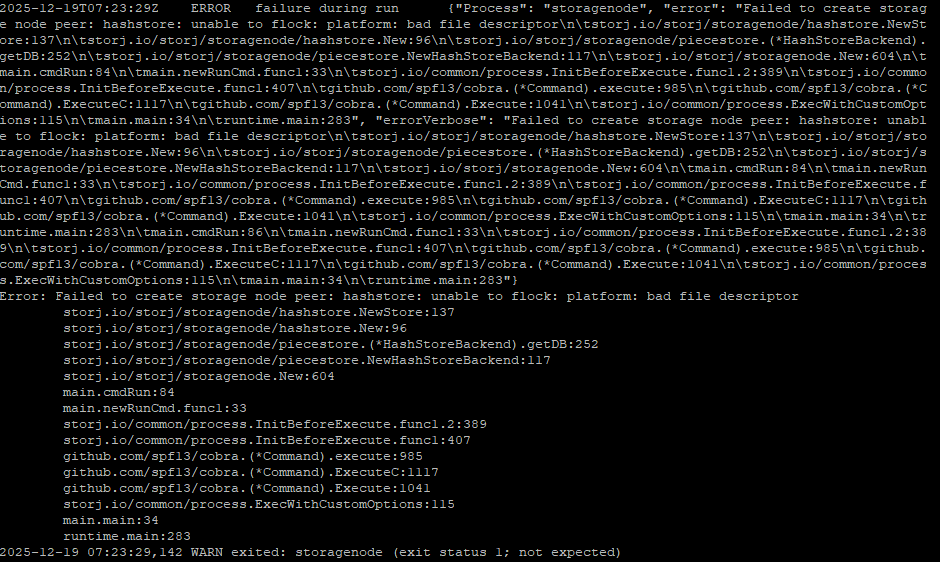
starting with version 1.120.4, storj would fail and throw an error “Failed to create storage node peer: hashstore: unable to flock: hashstore: bad file descriptor”

Important Prerequisite: my databases have, since forever, been mounted on a local SSD. Database don’t work on network storage.

Various Options

0) Doesn’t work at all: experimenting with NFS client lock options

NFS v4 client offers options to mount a NFS share with options like lock or nolock, or local_lock options. No matter which combo I used, I would still get the error. The internet search implied that the Go language just doesn’t allow a flock over NFS, but I’m not a real coder.

Oh, what also doesn’t matter? using “memtbl” or “hashtbl” for your hashstore setup. same error either way.

1) Kind of works but not really: switch to NFS v3

You can switch to mounting the drives with the v3 NFS protocol. Apparently NFSv4 made big changes in file locking, but a side effect is that old v3 can run storj without throwing the “unable to flock” error. HOWEVER, very quickly the storagenode software will start returning errors about “Stale NFS file handle” and it will fail to open various files. Including important things like hash tables. so this doesn’t really work.

2) short term Workaround: Use docker volume mount option to trick the entire hashstore to a different location:

In my docker compose file I tried this line:

  - /<nfsmount>/storj:/app/config       #(the normal data location)
  - /<localdrive>/storj/hashstore:/app/config/storage/hashstore   #(a local drive to fake hashstore)

This effectively tricks storj into using a local drive for the hashstore and only the hashstore, old piecesstore (blobs) stay on the NFS mount. The problem is, when storj migrates our data to hashstore, this would migrate ALL your data to a local drive, which is fine… but you’re no longer using your NFS mount, which is the whole point of me writing this.

3) Longer term workaround: store only the hash table (cache) on a local drive

add these lines to your docker (I use compose so it’s):

volumes:
  - /<localdrive>/hashplace:/app/hashplace


command: --hashstore.table-path=/app/hashplace

This will store the actual hash “table”, which is fairly small, only in the local drive, while the bulk of the data (the logs) are still in their old location. Some other folks have talked of this for performance reasons (hash table on a SSD), but this usage would just be to keep the bulk of files on a NFS store.

A downside here is the storage set up now relies on TWO different drives, and a failure of either one will render the entire Storj node unreadable. So it effectively doubles your chance of failure.

4) “I don’t want to do what I’m told” workaround: switch to a SMB share

I’ve tried mounting my storage drive as a SMB share and… it seems to work okay? Note the important note that my local database have ALWAYS been stored on a network drive instead of a network share. dbs on a network share is probably bad news.

So my docker compose volume setup looks like this:

volumes:
  - /<mysmbnetworkmount>/<storjfolder>:/app/config
  - /home/<me>/.local/share/<storjcontainername>/identity/storagenode:/app/identity
  - /<localdrive>/<storjfolder>:/app/dbs

(which is pretty vanilla setup)

Test Results

I’ve got 3 nodes with option #3 (hash table on local and bulk storage on NFS), in partially migrated state (data on both pieces store and hash store) and they’ve bene running okay for a couple of days.

I’ve got 3 other nodes using SMB for the network storage for everything. Two are tiny and fully migrated to hashstore, on is partially. They also seem okay for the last few days.


  1. Yes I can feel the brooding majest of Alexey’s disapproval as I’m writing this ↩︎

6 Likes

Can you share the version of samba and your smb.conf? Samba support various locking modes, so depending on the service configuration it can either work quite well or be horrible.

This is expected, nfs3 locks are stateless, and managed by the separate daemon. The stale handle probably occurs when hashstore deletes stuff and the tracking process can’t keep up.

I would revert to nfsv4; it is the correct approach. The fact that it is broken is really not NFSv4 issue, but the locking mechanism storj uses. They shall switch to posix compatible fcntl. You may want to hack it together (e.g. tell Claude to do it for you) and rebuild the node and retry.

In the meantime you can try messing with nfsv4 mount options to help nfs deal with things. For example, try something like:

rw,hard,intr,noatime,rsize=1048576,wsize=1048576,vers=4.1,proto=tcp,timeo=600,retrans=2,_netdev,nofail

The most important bits here are hard and intr, but have a look at others, this is what works for me in a different usecase where stability is paramount (albeit I don’t run nodes over nfs)

Are we sure that storj is going to swtich from flock to fcntl? I have one node I haven’t yet migrated to SMB so I could wait and see what happens.

I… I am not going to try to recode my own version of the storagenode software, with or without AI. It’s a learning experience I don’t wish to embark on.

Uh, it looks like the SMB protocol version on the server is 3.11, and smbstatus is reporting a bunch of locked files

Samba version 4.21.7-truenas
PID     Username     Group        Machine                                   Protocol Version  Encryption           Signing
----------------------------------------------------------------------------------------------------------------------------------------
1950759 easyrhino    users        192.168.200.205 (ipv4:192.168.200.205:57245) SMB3_11           -                    partial(AES-128-CMAC)
1960953 easyrhino    users        192.168.3.204 (ipv4:192.168.3.204:57958)  SMB3_11           -                    partial(AES-128-CMAC)
1960951 easyrhino    users        192.168.3.204 (ipv4:192.168.3.204:57938)  SMB3_11           -                    partial(AES-128-CMAC)

and the locks here:

Locked files:
Pid          User(ID)   DenyMode   Access      R/W        Oplock           SharePath   Name   Time
--------------------------------------------------------------------------------------------------
1960952      3000       DENY_NONE  0x12019f    RDWR       LEASE(RWH)       /mnt/HGST8SAS/storj14004   storage/hashstore/121RTSDpyNZVcEU84Ticf2L1ntiuUimbWgfATz21tuvgk3vzoA6/s0/19/log-0000000000000019-00000000   Fri Sep  5 20:10:25 2025
1960953      3000       DENY_NONE  0x12019f    RDWR       NONE             /mnt/HGST8SUN/storj14003   storage/hashstore/12L9ZFwhzVpuEKMUNUqkaTLGzwY9G24tbiigLiXpmZWKwmcNDDs/s1/17/log-0000000000000017-00000000   Fri Sep  5 20:11:39 2025
1960952      3000       DENY_NONE  0x12019f    RDWR       LEASE(RWH)       /mnt/HGST8SAS/storj14004   storage/hashstore/12L9ZFwhzVpuEKMUNUqkaTLGzwY9G24tbiigLiXpmZWKwmcNDDs/s1/15/log-0000000000000015-00000000   Fri Sep  5 20:10:26 2025
1960952      3000       DENY_NONE  0x12019f    RDWR       LEASE(RWH)       /mnt/HGST8SAS/storj14004   storage/hashstore/12L9ZFwhzVpuEKMUNUqkaTLGzwY9G24tbiigLiXpmZWKwmcNDDs/s0/16/log-0000000000000016-00000000   Fri Sep  5 20:10:26 2025
1960952      3000       DENY_NONE  0x12019f    RDWR       LEASE(RWH)       /mnt/HGST8SAS/storj14004   storage/hashstore/121RTSDpyNZVcEU84Ticf2L1ntiuUimbWgfATz21tuvgk3vzoA6/s0/0f/log-000000000000000f-00000000   Fri Sep  5 20:10:25 2025
1960953      3000       DENY_NONE  0x12019f    RDWR       NONE             /mnt/HGST8SUN/storj14003   storage/hashstore/121RTSDpyNZVcEU84Ticf2L1ntiuUimbWgfATz21tuvgk3vzoA6/s0/06/log-0000000000000006-00000000   Fri Sep  5 20:10:25 2025
1960952      3000       DENY_NONE  0x12019f    RDWR       LEASE(RWH)       /mnt/HGST8SAS/storj14004   storage/hashstore/121RTSDpyNZVcEU84Ticf2L1ntiuUimbWgfATz21tuvgk3vzoA6/s1/22/log-0000000000000022-00000000   Fri Sep  5 20:10:26 2025
1960953      3000       DENY_NONE  0x12019f    RDWR       NONE             /mnt/HGST8SUN/storj14003   storage/hashstore/121RTSDpyNZVcEU84Ticf2L1ntiuUimbWgfATz21tuvgk3vzoA6/s1/26/log-0000000000000026-00000000   Fri Sep  5 20:10:41 2025

2 Likes

SMB, actually, may work. Just not sure when it will stop. (I have no doubts, that it can, and likely will stop any time).
If both sides - the server and the client uses Windows SMB/CIFS it likely will work (no promises here, I just share my own experience). If either of them is Linux, then it depends. In most cases it may work, but not guaranteed, they are too far from each other (because of MS and their implementations are not fully compatible).
As a side note, if NFSv4 doesn’t work, it likely will not in the future.

I’ve tested from windows (client) to linux (server), and found some ok’ish performance with these flags:

    aio read size = 1
    aio write size = 1
    use sendfile = yes

I can’t remember if it was the complete set of options I ended up with, as I’m just pulling my info from my notes (it’s a year back or so..).
It seems like I was running samba v 4.15.13

So.. just sharing in case someone can benefit from it.

1 Like

I am currently using:

2) short term Workaround: Use docker volume mount option to trick the entire hashstore to a different location:

  • //storj/hashstore:/app/config/storage/hashstore #(a local drive to fake hashstore)

However, my local drive is filling up (hashstore almost getting to 1TB) and I would like to explore option 3.

My storage setup is that I have docker in a lunix vm running storj. The hashstore is stored in the lunix vm while the rest is stored in a truenas vm mounted via nfs.

3) Longer term workaround: store only the hash table (cache) on a local drive

add these lines to your docker (I use compose so it’s):

volumes:
  - /<localdrive>/hashplace:/app/hashplace

From my understanding of the post, I am planning to move the hashstore folder back to the truenas vm, and then create an empty folder on my linux vm called hashplace and add the above line to my configuration. This will allow only the hashtable to be stored on my linux vm.

I would like to know how much space the hashplace hashtable took, and if my understanding is correct.

I disagree. If you are talented enough to network mount your storage array anyways, you’re also talented enough to create a thin provisioned ISCSI share, and route that over IP. Would fibre channel be better? Sure, but the avarage joe with a single four-disk Synology box does not want to mess with FC.

He should not want to mess with the pitfalls of using either SMB or NFS - all issues of which can easily be solved with ISCSI.

Colouring outside the lines is cool, but I just don’t see the need to do so, when a simple solution exists to a very common problem

3 Likes

as a datapoint, one node where I have a “split” system with data in one place and hashtables in the other place.

storage data is about 3TB, and the hashtables take up 2GB.

I have another node that’s using memtbl. Storage size is 5.8TB, hashtables are about 1GB.

And @Ottetal, i understand what you’re arguing, but I have one node that’s using iscsi, and it’s a pain. The network file mounts are much easier to manage.

You are picking between “data consistency and correct locking semantics” and disaster that appears “easier to manage”.

Storagenode is not designed to work over network filesystem. Period. The appearance of it initially somewhat working is irrelevant.

If you want data consistency you have to use local filesystem. This is non-negotiable.

The underlying block storage is up to you of course – node does not care, it works on a filesystem level. That’s why you can use iSCSI.

2 Likes

I have tried using hashplace on local storage, and moved the hashstore to truenas on SMB.
Screenshot 2025-12-18 232402

It is giving errors about hashstore. Anything I should do differently?

You shouldn’t use nfs or smb, the hashstore backend does not support any network filesystems, they may work until doesn’t. You should use iSCSI, if you cannot run a node on TrueNAS directly (for what reason, by the way?).

Also, I do not see any option, where you provided your /app/hashplace to store anything. The mount /dockerdata/storj/app/config will put all hashstore data to /dockerdata/storj.

Move your hashstore from TrieNAS SMB to TrueNAS iSCSI, and you’ll have solved all problems :slight_smile:

1 Like

Why go through all the back and forth trying to make something work that is not designed to work in the way you are trying to do? Why not just create the storj nodes on Truenas VM and be done with it? There is an docker app available on Truenas specifically for that and multiples can be setup if desired. My node I setup is 100% on all the metrics and I have not had any issues. You can even convert the app into what they call a custom app if you wish to have more control over things or even install from complete scratch.

2 Likes

That “unable to flock” error message is the same one you get if you’re trying to use a NFS mount.

so maybe the drive is still mounted via NFS (like… listed twice in fstab, still needs to be unmounted nfs before mounting SMB, etc).

Also, “hashplace” is not the literal name of any folder in storj. I was using it metaphorically, but if you’re using it literally without the command option it’s not gonna work. Storj looks for /app/config/storage/hashstore for the hash tables by default

If you want to use a more custom location then you also need to include the line command: --hashstore.table-path=/app/hashplace

If you are reverting to a more typical, non-split, layout, you just need to move your hash tables to your storage/hashstore folder and have docker map the entire storage folder to /app/config and then you’re done with it.

2 Likes

You even do not need a VM on TrueNAS, the storagenode app is enough (it’s a docker-compose basically). Docker containers does not use VM on Linux, only on Windows and macOS.

@Alexey Sorry if I wasn’t clear.
I think the OP was running Truenas as a vm and not on bare metal so I referenced that he could with hs current system setup simply use the storj app available from the Truenas catalogue to add one or more storj nodes to his current Truenas setup. No special needs required.

I run Truenas on bare metal and use the app as supplied in the Truenas apps catalogue. It only took a few minutes to setup the app.

Ah, I got it, sorry. The thing is that TrueNAS can run VMs just fine, if it’s installed on a bare metal.
And yes, if TrueNAS is running in a VM, you can install a storagenode app without any problem too. However, the method of how you provide a storage to the VM is important. SMB or NFS will likely not work for storagenode, so you would need either virtual disks, passthrough or iSCSI. In some cases a network filesystem may work (local SMB in Hyper-V or 9P in WSL2 on a Windows host).

1 Like