@Pentium100: When I say “ingress-Speed” I do not mean the internet connection I really mean the speed of the incoming Data. If the speed is low because nobody loads data to you, then a Lost and replaced node takes years to be filled up again. So, I am talking about the right thing…
@Krey: In my sheet I do not set the revenue value to be those given numbers (1,5$/TBm, …). I look at my statisitcs and have set a revenue value that is proportional to the used diskspace. So Egress and data storage is already included in that value. Just fill in your monthly revenue devided by the TB you store.
That’s the problem right now - there is very little customer data, most data is just tests that Storj can stop or start at any moment. My node is nearing capacity and each time it gets too close, I almost order new drives, but then the tests stop, some data may even get deleted and my node stays idle for weeks.
200GB/day ingress is very optimistic. It held at that point for a while, but that was a short while. Just like the 5.6TB egress I had in January (and 364GB in February).
I think discussing the advantages and disadvantages of a RAID configuration of the hard-disks is not the more adequate way for choosing a hard-disk topology. I would recommend to run one node per hard-disk with no RAID. My arguments for such a configuration are presented below.
Most of the RAID configuration have the target to minimize loss of data. Since data security is ensured by the decentralized topology proposed by Storj (many blog articles and the whitewater explain it extensively), storage node operator (SNO) don’t have to care about it anymore. SNO has so to care about the best hardware (or investment) allocation. Minimizing the risk of data losses is replaced by maximizing incomes while reducing risks.
I will take the example of a server with 4 hard-disks and will compare the expected incomes (in the sense of the expected value in probability theory) of RAID5 topology with the topology I recommend.
In an ideal world (i.e. without hard-disk failure), I suppose that each hard-disk is earning a mean income of 12.50 a year. The server will earn 100 (or 100 %) in two years. 100 % of the hardware is available for the Storj network.
Let’s come back to the real world and let’s assume that the mean failure rates of hard-disk is 2 % a year.
The server with RAID5 topology will never fail but will only earn 75.00 $ (or 75 % of the income in an ideal world) in two years since (roughly said) one hard-disk is used for data redundancy and cannot store data. 75 % of the hardware is available for the Storj network.
In the topology I propose, each hard-disk earns a mean value of 0.98 x 12.50 for the first year and 0.98 x 0.98 x 12.50 for the second, resulting of mean earning of about 1.94 x 12.50 = 24.25 (I’m not 100 % sure I have well estimate the Markov chain. I haven’t done it since a while). The total earning for 4 hard-disks is 97.00 $ for two (or 97 % income in an ideal world). 100 % of the hardware is available for the Storj network.
If one hard-disk fails, the loss is restricted to one hard-disk. The main difference is that a second hard-disk can fail. In this case, the losses is bigger than in case of RAID5 but the risk is reduced to a level I think I can afford.
The upon calculated expected incomes are highly depended of the number of hard-disks and the failure rates of hard-disk. In the case of RAID5, incomes can be considered as constant and guaranteed.
RAID5 with large drives is too risky. I use RAID6 (raidz2). If I was using really large drives I may be even tempted to use raidz3 (triple parity). This is because drive failures are not entirely independent. If I buy a bunch of drives from the same batch and use them in an array where they have very similar access patterns, they are more likely to fail at about the same time. Ideally I would want to use different drives, at least drives from different batches. Using different drives would most likely reduce the performance though.
The problem with Storj is that it’s not like mining. If my miner fails, I do not earn money, but I also do not lose anything. After I repair or replace it, I earn the same income as I did just before the failure (well, unless I took too long and the difficulty increased).
With Storj, if a node fails, not only I lose the held amount, but my new node may take up to a year to get back to the earnings of my current node. It will definitely be earning pretty much zero in the first month (vetting) and then later it is going to be empty and will need to be filled up. And the escrow percentage goes back up too.
This is why I do not think that the additional capacity offsets the risk of failure. Also, managing a lot of nodes is less convenient and has more chances for a mistake.
With such introductory notes, I wouldn’t start a single node, it doesn’t pay for either electricity or the Internet. My best 4 nodes earn 2915$ (956$ held) for 14 month when i receive first token. They always live on such raid5 arrays.
this is overload. I would also go this way if the storj did not slow down on long arrays. Perhaps this will change in the future with an increase in the size of the middle piece.
At the same time, I can assure you that for 10 years of active using the ZFS, I have never encountered an array failure due to a failure of the second disk during the raidz resilver.
right after you, how do you extrapolate the loss of a node with such earnings and compare them with the price of the one additional hdd for redundancy.
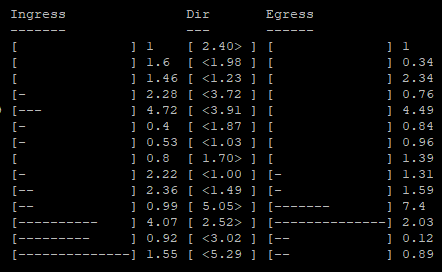
i make a typo. i meant ingress. But about egress i wrote later.
by from my stats i can post relative numbers
Example from second line
1.6 times more ingress compared previous month
1.98 times more ingress compared to egress this month
0.34 times egress less compared previous month
Strings is months, numbers are summary from all my nodes exists this month
This graph is relative equals on many sno with properly worked nodes.
I have encountered a two drive failure in a pool only once - that was a mirror by the way, but I was able to recover all data without having to restore from a backup.
However, with very large drives I may consider doing a 6 drive raidz3 instead of 6 drive raid10. Lower performance, same capacity, higher reliability.
I also sometimes use a 4 drive raidz2 instead of 4 drive raid10 for the same reason.
Please consider relative values between the two topologies. 12.50 $ a year was taken to have same amount of money as calculeted percentages. It was perhaps not a good idea
To bring another raid-vs.-noRaid thought to the discussion: “Growing”.
When you are running on a more-bay-NAS with let’s say 8x4TB and you want to increase disk space for your nodes you are way more easy doing this in a raid-setup. Just swap your 4TB each at a time with a 8TB. You can do this on a running node w/o any problem. Boom, double space for your node to keep growing.
In a non-raid-setup with 8 separat nodes on those 8x4TB disks you will have to kill at least on node completely to swap one 4TB disk with a new 8TB. No you can move those other nodes one at a time to your 8TB disk and then remove the 4TB disk to proceed with the other 8TB disks you bought.
Hmmmm, let me rethink this task. If you have bought your new 8TB disks just buy a SATA-USB3.0 Adapter and do the procedure via an USB-plug for use of external disks. Most (all) NAS will have fast USB-plug by now.
If you use LVM instead of raw partitions (which I recommend) then this isn’t true. As you said in a follow-up, most NAS units support USB-attached storage. You can attach one of the new disks via USB and pvmove the contents of an existing 4TB disk to it, then replace the 4TB disk with an 8TB. You can continue to use pvmove to migrate the volumes off of the old disks one by one.
Note that pvmove can work with mounted volumes and does not disrupt their operation (other than the additional IOPS consumed); it works by creating a temporary mirror between the old and new locations, waiting for the mirror to complete, then atomically: swapping the volume metadata to point at the new location only and breaking the mirror, leaving the old location free.
I like this approach, but it does assume the device you’re working with supports this. NAS systems usually have their own way to manage HDD’s, so this is mostly useful if you’re building your own system. And you need to start out by using LVM to begin with.
 )
)
