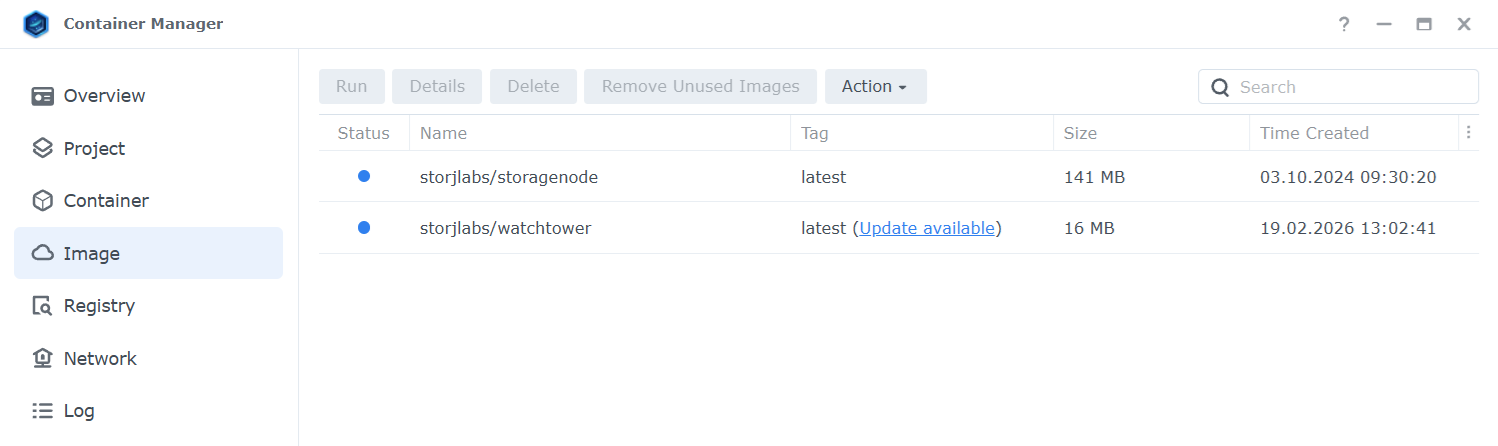
I checked, it seems to works now, thank you!
Is it expected (watchtower logs)?
INFO[0001] Watchtower v0.0.0-unknown
I checked, it seems to works now, thank you!
Is it expected (watchtower logs)?
INFO[0001] Watchtower v0.0.0-unknown
What excately does this watchtower with the running containers when a new image is downloaded?
Does it just restarts the containers? Or it does the stop > remove > run steps?
I’m trying to figure out why can’t I just make a scheduled script to pull the latest storagenode image every day and restart the nodes like once a week. What exactely does this watchtower that we can’t?
Second, why do I need to restart the containers seconds after a new storagenode image is downloaded, if these images don’t update the node anymore, only some base image? Can’t I continue to run the old base image, that updates the nodes with that binary, like for a month or two, without restarting everything?
EDIT: Never mind. I re-read the whole tread; I got my answear. It destroys the container too and than starts it fresh. So just a restart won’t sufice.
Thanks! It’s working well for me now. I’ll mark resolved.
journalctl CONTAINER_ID=425c4d838881 -b -f
Feb 19 12:19:31 <user> 425c4d838881[2798]: time="2026-02-19T20:19:31Z" level=info msg="Watchtower v0.0.0-unknown"
Feb 19 12:19:31 <user> 425c4d838881[2798]: time="2026-02-19T20:19:31Z" level=info msg="Using no notifications"
Feb 19 12:19:31 <user> 425c4d838881[2798]: time="2026-02-19T20:19:31Z" level=info msg="Checking all containers (except explicitly disabled with label)"
Feb 19 12:19:31 <user> 425c4d838881[2798]: time="2026-02-19T20:19:31Z" level=info msg="Scheduling first run: 2026-02-20 04:40:32 +0000 UTC"
Feb 19 12:19:31 <user> 425c4d838881[2798]: time="2026-02-19T20:19:31Z" level=info msg="Note that the first check will be performed in 8 hours, 21 minutes"
Feb 19 20:40:35 <user> 425c4d838881[2798]: time="2026-02-20T04:40:35Z" level=info msg="Session done" Failed=0 Scanned=9 Updated=0 notify=no
No need for a restart. You can schedule these two commands. The docker compose up will only take the container down if the pull have downloaded a new image (or you have changed docker-compose.yaml).
docker compose pull
docker compose up -d
I don’t use compose, just Docker. It seems that this composer is a better way to run nodes. I don’t know if I can use it on my Synology.
You can use compose just fine on docker, but you’ll have to do it from the commandline. Container Manager on Synology still sees all your nodes, you can still power/on/off/restart from Container Manager, but I’d just do everything from commandline. Way easier with docker-compose imo.
I only work from CLI on nodes. Never used the web interface for Docker stuff.
In that case you’re golden, and the switch to a compose file will be seamless.
I use a modified version of this file, which looks like the below, if you don’t feel like opening the link
services:
  storagenode:
    image: storjlabs/storagenode:latest
    restart: unless-stopped
    ports:
        - 28967:28967
    volumes:
        - ./config/identity:/app/identity
        - ./data:/app/config
    environment:
        - WALLET=0x123456789
        - EMAIL=EMAIL
        - ADDRESS=external.url:28967
        - BANDWIDTH=10TB
        - STORAGE=1TB
        - STORJ_LOG_LEVEL=info
I put the docker-compose file in the root directory of each node I have, and control them independently (because that’s what makes sense for my setup) like so.
.
├── Node1/
│   ├── identity/
│   │   └── ((files))
│   ├── data/
│   │   └── ((files))
│   └── docker-compose.yml
└── Node2/
    └── (...)
When controling a node, I cd to the nodes directory and docker compose up or -down
Don’t you have to specify the name of the container when starting or stoping? Like storagenode1, storagenode2, etc?
Where do you put the stop delay of 300s?
I don’t use the restart parameter, but I believe it’s called stop_grace_period: '300', which you can put just under restart: unless-stopped.
You don’t have to specify a name for the storagenode, as long as there is a single docker-compose.yml file in the directory you’re currently standing in.
    stop_grace_period: 300s
    volumes:
        - ./config/identity:/app/identity
        - ./data:/app/config
I would recommend to use a long format for volumes, because this one is equivalent of -v, instead of --mount.
Also, you can add all nodes to the one docker-compose.yaml file and to down/up only one of them you can specify its name in the docker compose down or up commands.
It’s needed if you also have a watchtower in your docker-compose.yaml to provide them to watchtower (because docker compose will give them a random name like my-nodes_storagenode1_1 instead of just storagenode1 as specified in your services: section).
See:
Docker compose:
It’s docker-compose.yaml or docker-compose.yml? The linked guide sais yml. I know about yaml like in config.yaml. Which one is it?
Watchtower:
The new version is not working either on Synology, only on Ubuntu.
So, I checked my nodes and for whatever reason, I don’t have the watchtower container running. I can’t remember if I removed it or it just disappeared.
docker stop -t 300 watchtower
Error response from daemon: No such container: watchtower

docker rm watchtower
Error response from daemon: No such container: watchtower
I pulled and started the new version.
docker pull storjlabs/watchtower

Status: Image is up to date for storjlabs/watchtower:latest
docker.io/storjlabs/watchtower:latest

docker run -d --restart=always \
	--name watchtower \
	-v /var/run/docker.sock:/var/run/docker.sock storjlabs/watchtower \
	--notifications-level info \
	--stop-timeout 300s
In Ubuntu is working again, but on Synology, it keeps restarting after 60s with this error in log:
time="xxx" level=error msg="Error response from daemon: client version 1.44 is too new. Maximum supported API version is 1.43"
time="xxx" level=info msg="Waiting for the notification goroutine to finish" notify=no
Solution for Synology?
DSM 7.3.2-86009 Update 1
Container Manager 24.0.2-1606
Man, Synology is so many versions behind:
Synology DSM:
Docker Engine v24.0.2
Docker Compose v2.20.1

Docker offical:
Docker Engine v29.2.1
Docker Compose v5.0.2
I got it working with API ver.1.43. Synology can’t use API ver.1.44.
docker run -d --restart=always \
--name watchtower \
-e DOCKER_API_VERSION=1.43 \
-v /var/run/docker.sock:/var/run/docker.sock storjlabs/watchtower \
--notifications-level info \
--stop-timeout 300s
Logs:
docker logs watchtower 2>&1
time="xxx" level=info msg="Watchtower v0.0.0-unknown"
time="xxx" level=info msg="Using no notifications"
time="xxx" level=info msg="Checking all containers (except explicitly disabled with label)"
time="xxx" level=info msg="Scheduling first run: xxx +0000 UTC"
time="xxx" level=info msg="Note that the first check will be performed in xx hours, xx minutes, xx seconds"
Docker Hub images:
storjlabs/watchtower:latest - 19.02.2026
storjlabs/watchtower:2.0.3

storjlabs/storagenode:latest - 03.10.2024
storjlabs/storagenode:9109fd2-amd64
Both should work, so you may use either.
You may wait when the watchtower would check itself and see, will it recreate a container?