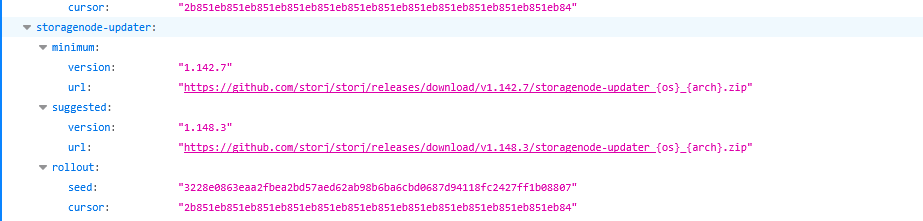
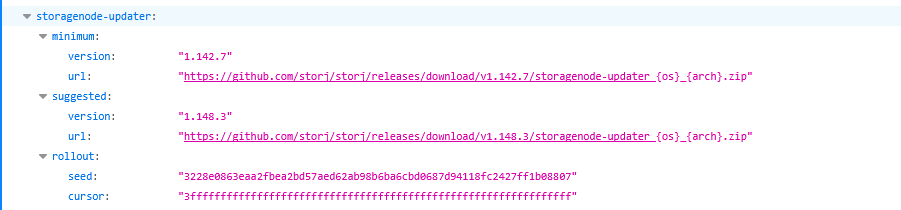
The nodes are being updated gradually, which is expected. Since the cursor is only incremental, I don’t see any problems with this. The current expected percentage is reached, then there will be a short pause, and then the update will continue.
Therefore, your observations regarding instability may be related to the update mechanism implemented in the base image: GitHub - storj/storagenode-docker: Auto-updated Storagenode container for Storj network · GitHub
First, the minimum version will be downloaded if /app/config/bin is missing/inaccessible and run. Then, it will check for updates and download the suggested version if allowed, and run it.
Copilot
The update logic lives in the container’s docker/entrypoint script and runs every time the container starts. It maintains two locations for each binary:
Persistent store: BINARY_STORE_DIR (default /app/config/bin) — meant to survive container recreation when backed by a volume.
Runtime location: BINARY_DIR (/app/bin) — where supervisor runs the binaries from.
1) Initial download if missing
On startup it iterates over storagenode-updater then storagenode:
If /app/config/bin/<binary> does not exist, it downloads a ZIP from the “version server” and extracts the binary into BINARY_STORE_DIR.
This happens here:
get_default_url(process, version) asks ${VERSION_SERVER_URL}/processes/<process>/<version>/url?os=linux&arch=${GOARCH} for the download URL.
get_binary(binary, url) downloads /tmp/<binary>.zip, unzip -p extracts the binary into ${BINARY_STORE_DIR}/<binary>.
2) “Should update” loop (minimum → suggested)
Whether the binary was just downloaded or already present, it then calls should_update <binary>:
First it copy_binary from the persistent store into /app/bin/<binary> and makes it executable.
Then it loops over two “channels”: minimum then suggested.
If that command exits successfully (meaning “yes, update”):
It fetches the download URL for that channel (minimum or suggested).
Downloads + replaces the stored binary in /app/config/bin/<binary>.
Copies it again into /app/bin/<binary>.
If it doesn’t indicate an update is needed, it breaks out of the loop and stops checking further channels.
Effectively:
It ensures you’re at least on the minimum required version.
If that passes, it may then advance to the suggested version.
3) Running uses the updated binaries
After the update step finishes, the container configures supervisord to run from /app/bin:
storagenode-updater run --binary-location /app/bin/storagenode ...
storagenode run ...
So the startup-time updater determines what versions end up running for that container session.
Notes / implications
The process assumes VERSION_SERVER_URL is set (otherwise get_default_url will fail because it unconditionally uses it when downloading/checking).
storagenode-updater is updated first, then it is used to decide whether to update itself and storagenode.
Persisting /app/config/bin (the default BINARY_STORE_DIR) is what makes updates “stick” across container recreation; otherwise you’ll redownload on each new container.
So, if you notice that the system switches between the minimum and suggested values, then there were problems in your configuration, and deleting the bin subfolder solved them.
I think that nothing is wrong with it, I can see the current cursor as 47ae147ae147ae147ae147ae147ae147ae147ae147ae147ae147ae147ae147ad, on your screenshot it was: 2b851eb851eb851eb851eb851eb851eb851eb851eb851eb851eb851eb851eb84
then
So, it’s increased, not decreased.
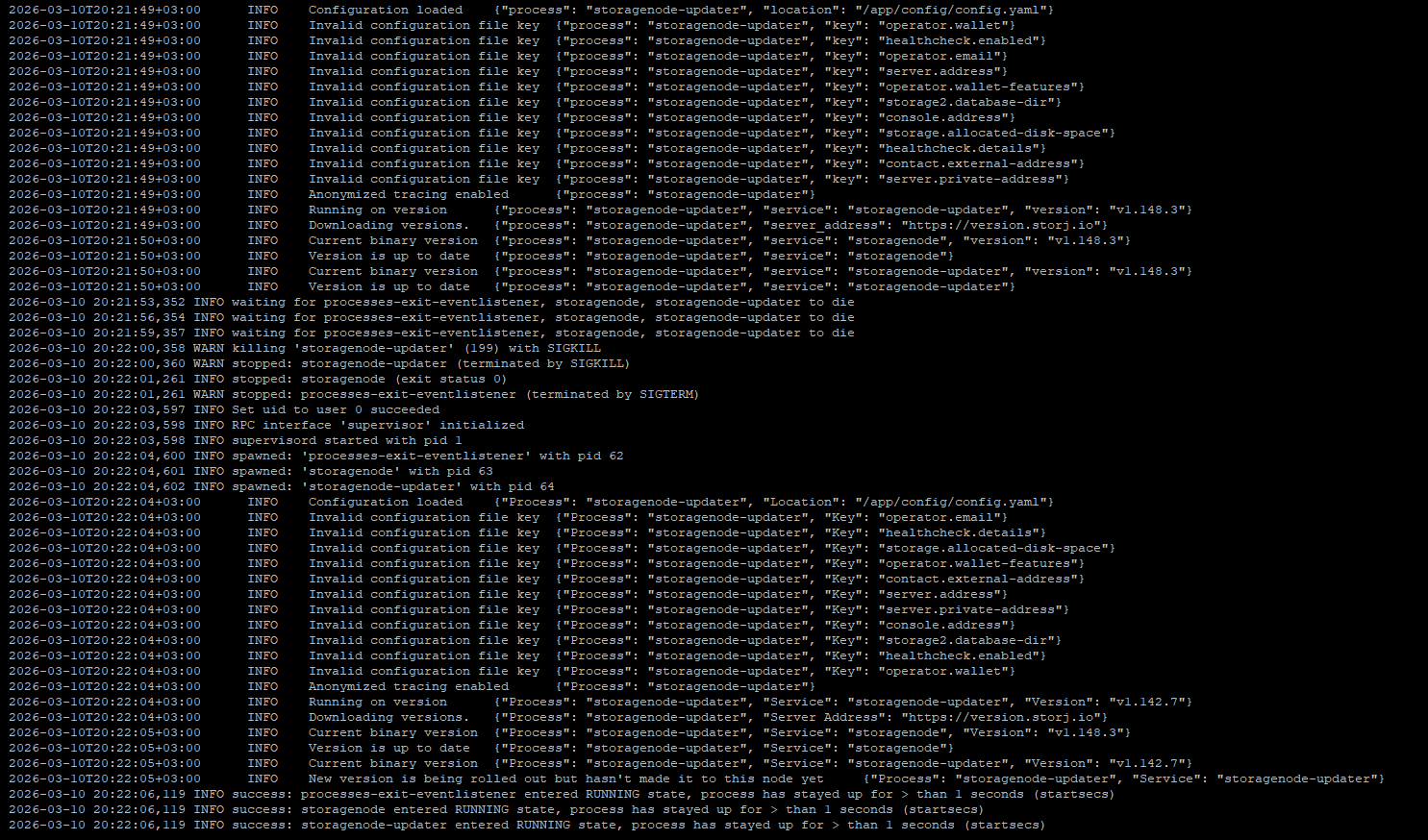
But maybe your configuration has had an issue (likely a permissions issue, or an incorrect mapping from the host), so the binaries were not persisted between restarts. In that case it would firstly start with a previous version, then it will trying to update itself and restart. If it was not persistent, it will start again with a previous version.
I would like to ask you to post logs not as screenshots next time, it’s hard to read and AI cannot normally copy from it.
From what I can see, storagenode and storagenode-updater have been updated to the suggested version, but then something is killed both services (perhaps there was a timeout for waiting to start either storagenode or storagenode-updater) and for some reason storagenode-updater was not updated in the /app/config/bin subfolder and started with the previous version which was there.
However, it also stated that it’s up to date while it was on the old version, like the cursor has been changed to another subset of nodes. But in that case the downgrade will not happen (it will not try to download an older version if it’s already on a new one). Nevertheless if the older version was persisted in /app/config/bin, it will start with it and will not upgrade, because now your node is not in the populated subset for the update.
I do not see any problem with a switching cursor though too, even if it jumps between a previous wave to a new one, but not gradually - it updates random subset of nodes, and downgrade shouldn’t happen, if /app/config/bin is persisting changes between restarts.
Много воды ты написал, но это не важно. Была проблема с version.storj.io и она видимо решена. Возможно скрин я неудачный приложил выше, но курсор вверх-вниз-вверх скакал, и из-за этого я поймал примерно 30 рестартов нод.
Такое поведение version.storj.io возможно, когда 2 и более сервера обслуживающих сервис version получая запросы по очереди отдают разные значения.
Я понимаю ваше предположение. Однако узлы не должны понижать версию несмотря на курсор, если они уже обновились.
На вашем скриншоте видно, что storagenode и storagenode-updater сначала обновились до рекомендуемой, а потом были отстрелены. storagenode не откатился и остался на рекомендуемой, а вот storagenode-updater оказался на минимальной. Сам он откатываться не должен, но при рестарте бинарники сначала копируются из /app/config/bin в /app/bin и запускаются, потом проверяется, нет ли обновлений.
И если есть, то скачивается и запускается, потом уже передаётся управление под супирвизор.
Так что остался только вопрос - почему в /app/config/bin оказалась старая версия storagenode-updater, особенно с учётом того, что всё прекратилось, когда вы удалили эту папку перед запуском контейнера.