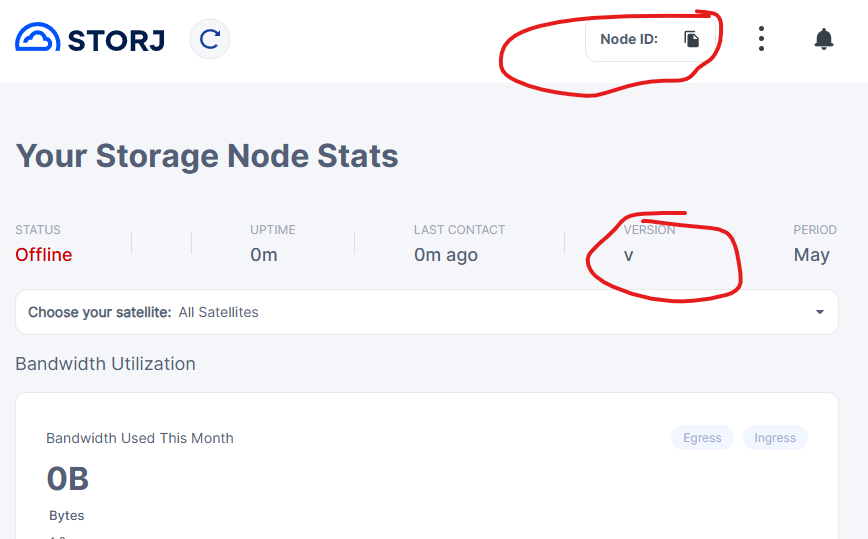
To rule out ddns try to use your external IP directly as your external node address temporarily. Shut down node, set the configuration, wait five minutes, and start it again.
If this magically fixes your issue - switch to a normal ddns provider. We don’t know if fortunet/fortiguard does not have issues but judging by their abhorrent software quality I would not put it past them. It may be resolving from a number of locations but failing from others. This has been known to happen with a number of providers, both large and small. Cloudflare and noip are known to work fine.
Another possibility would be flaky external address detection. Again, it’s something that happens, but you won’t know unless you check the log. This is why I asked for a log form your ddns updater. Look at it and confirm the address is stable.
All things about traffic/DNS/SNAT not affect version and Node ID . Where is it ? While dashboard doesn’t working all another thing in this case doesn’t matter ))
Yes, this does look like something gets stuck and node fails to fully initialize. Maybe databases are screwed up. Try following the documentation to rebuild the databases. If that was an issue — and assuming windows host, very likely it is indeed — it may progress forward enough to log next issue.
I would also run chkdsk on the disk to fix any other possible filesystem corruption, I doubt the damage is limited just to databases.
This is indication of the fact that the node, which you trying to connect, is stopped or restarting. The dashboard would look like this on the cached data, but without a connected node. You can do Ctrl-F5 and it will likely show you a page to check your connecting address.
So, please listen @arrogantrabbit he suggesting right things - please fix the restarting problem first. You may search for FATAL and/or Unrecoverable errors, i.e. in PowerShell:
This happened to me due to the storagenode-updater starts first and by default is using the same config as the storagenode binding to the same ports (including the web UI, so I was in fact accessing an empty UI of the updater instead). As a quick check try stopping the storagenode-updater service, then restart storagenode and then start the storqagenode-updater.
The storagenode-updater service doesn’t listen any port, so the reason is different.
Copilot Summary
I’ll search the storj repository to find information about storagenode-updater and whether it listens to any ports.Let me get more specific information about the storagenode-updater’s main entry point and its configuration:No, storagenode-updater does not listen to any ports while running.
Based on the code analysis, storagenode-updater is a command-line utility designed to automatically check for and apply software updates. It operates purely as a background polling service without any network listening capabilities:
Key characteristics:
No HTTP/Network Server: Unlike the storagenode itself, which has console addresses and public RPC ports, storagenode-updater has no server configuration.
Polling-Based Operation: It runs on a configurable interval (default minimum 1 minute) and:
Checks a version control server for available updates
Compares current binary versions against recommended versions
Downloads and applies updates if needed
Restarts the storagenode service after updating
Outbound Only Communication: The updater only makes outbound HTTP requests to runCfg.Version.ServerAddress to fetch version information—it doesn’t listen for incoming connections.
Configuration Options: The available settings (from the code) include:
--binary-location: Path to storagenode binary
--check-interval: How often to check for updates
--service-name: Service to manage
--restart-method: How to restart services (kill or service command)
No port/address listening configuration exists
So storagenode-updater is a lightweight, background daemon with no open ports—it operates entirely through scheduled polling and service management operations.
Thank you for the correction. My apologies, I did not verify what was actually causing the storagenode failure to bind to the listening port on startup. I only saw that it is not listening, and when I checked the logs of the storagenode-updater I saw this:
2026-04-14T14:42:40+02:00	INFO	Configuration loaded	{"location": "C:\\Program Files\\Storj\\Storage Node\\config.yaml"}
2026-04-14T14:42:40+02:00	INFO	Invalid configuration file key	{"key": "storage.allocated-disk-space"}
2026-04-14T14:42:40+02:00	INFO	Invalid configuration file key	{"key": "operator.wallet"}
2026-04-14T14:42:40+02:00	INFO	Invalid configuration file key	{"key": "operator.email"}
2026-04-14T14:42:40+02:00	INFO	Invalid configuration file key	{"key": "healthcheck.details"}
2026-04-14T14:42:40+02:00	INFO	Invalid configuration file key	{"key": "contact.external-address"}
2026-04-14T14:42:40+02:00	INFO	Invalid configuration file key	{"key": "server.address"}
2026-04-14T14:42:40+02:00	INFO	Invalid configuration file key	{"key": "healthcheck.enabled"}
2026-04-14T14:42:40+02:00	INFO	Invalid configuration file key	{"key": "server.private-address"}
2026-04-14T14:42:40+02:00	INFO	Invalid configuration file key	{"key": "storage.path"}
2026-04-14T14:42:40+02:00	INFO	Invalid configuration file key	{"key": "operator.wallet-features"}
so it was apparently reading the storagenode’s config which made me guess that it was occupying ports configured there too. storagenode-updater service startup cmd:
I did not make any manual modifications to this since I’ve installed it, so it is purely the official installer’s thing. Does not seem to cause any issues though, so I just delayed the updater start time and put it off for later.
Yes, they share the same config, however, storagenode-updater ignores all not supported options from there, including any configured port.
So, the storagenode-updater service cannot influence the storagenode service except updates.
$ storagenode setup --help | grep preflight

      --preflight.database-check                                 whether or not preflight check for database is
enabled. (default true)
      --preflight.local-time-check                               whether or not preflight check for local system clock
is enabled on the satellite side. When disabling this feature, your storagenode may not setup correctly. (default true)