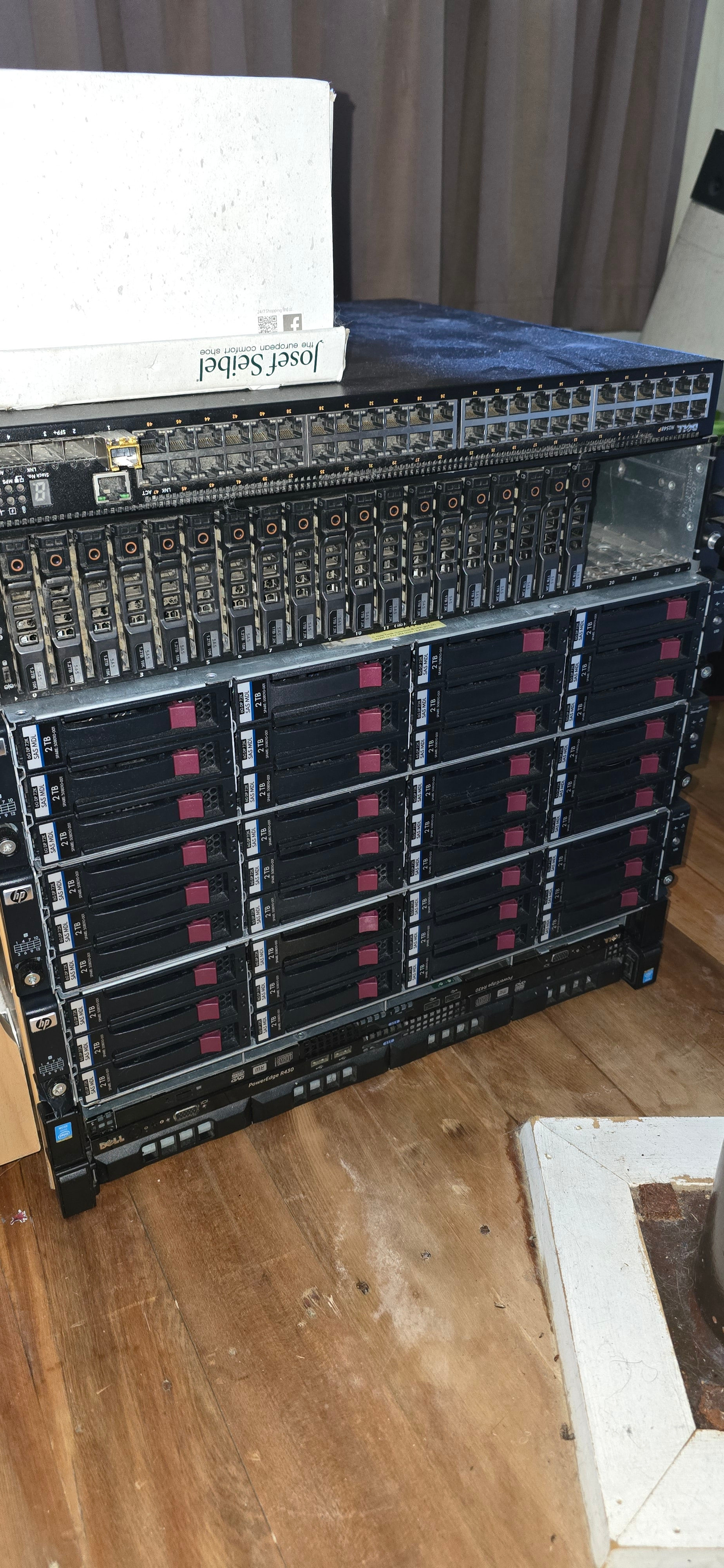
I’m sure this has all been asked plenty of times but was just wondering on a best use case for my hardware.
I’ve done some reading and it seems it’s better to have one node per disk instead of 1 node per large volume?
I currrently have a synology DS1821+ on 900/500mbit that is always on wiith around 30tb spare.
I also have an R430 running Truenas. This has 3x12 bay and 1x24 bay disk shelf in IT mode. 2 are connected with 3 vdevs. 2 drive redundancy each vdev. 8x10 8x10 8x2 approx 110tb. The 3rd shelf has 12x2tb drives unallocated. The 4th has 20x1tb unalllocated. The whole system is empty with no critical data and can be connfigured or formatted as required
This system is currently turned off until the synology is full then I will probably fire it up and turn it on shelf by shelf to conserve power until I need it.
My main question how shall I set up nodes, and can I keep the shelves off but add storage as required without having to reset or reconfigure. It seems silly to have the whole lot running with around 150tb raid volume but using 2tb. Will i remove the zfs and use each disk individually? Is this a commercial setup? I’m not trying to get rich, just trying to offset the power usage to have the main server running.
I understand it’s my call. But the synology is a volume, not a drive. Why would I run my server and shelf with 1 drive? Your reply makes no sense at all and appears you want to push people away from using storj instead of have them contribute. if >100tb is a poor attempt thats fine. I’m only a homelabber and not a datacenter.
Please read up on the Storj network then. Storj needs a large number of small storage units, not a single large one. Unless you sign up to the Select network (which you likely can’t), it’s rather unlikely the Storj network would choose to store more than 20 TB of data on your hardware in the foreseeable future.
You can create a separate volume or a folder on your existing volume and share what you feel good about.
However, @Toyoo is right, it’s better to run the node on the hardware which will be online anyway, with Storj or without, only in this case it will be profitable: you can use your earnings to cover part of your bills for running this Synology.
Yeah, appreciate the advice. I’ll probably flag it. Sounds more like the kind of thing you do for warm fuzzies or bragging rights instead of any being any actual use or financial gain.
Scenario one: You run your server. You pay for electricity.
Scenario two: You run your server. You spend 30 min setting up node. Storj pays part of your electricity.
Yea, zero financial gain. Not a no-brainer at all. Needs lengthy discussion and business plan. And yet another forum thread.
Totally believable in light of your later comments. Of course you are.
What’s actual use you are speaking of? Actual customers use Storj services. Actual idle online capacity is being utilized instead of going to waste. Less waste, more profit, literally everyone benefits. It’s a no downside, no tradeoff project. And yet, you just barely showed up and are already unhappy. I don’t know what else to say.
If your DS1821+ has 30TB of spare space, set up a single Storj node there and watch it grow. Keep it simple: you’ll probably gain around 3TB/year for the first couple years.
It’s not worth powering your R430 for Storj… unless you have an extra /24 IP address per drive (or pool). And even then my rule-of-thumb is that the first 2TB of used-space in every Storj node only pays for itself (so it will never make sense to have nodes with only 1-2TB of space each).
I’m unsure why you think I am trying to get rich. I am trying to offset the power to run the disk shelf. I have been told that it’s unlikely I’ll ever go over 20tb of usage. My main question was whether I can ‘dynamically’ add/remove drives, or storage allocation - which was unanswered and adds to the complexity.
To me it seems like a pain in the rear end to have to earmark or allocate 20tb and then reconfigure if I want the space back, or want to fire up another server/node whatever. The synology uses hardly any power. I couldn’t care less about offsetting that. I would much rather have the ability to break it, tinker and reboot it if needed as its a toy
The actual use being that I have also been told a large array or several drives is pointless. imagine having over 100tb of space and they only want to use 1 or 2tb. To me this sounds more like the 5 year old with a lemonade stand out the front of the house. Everyone feels good about it but in reality it’s hardly worth the few dollars it makes and the house drinks lemonade for the next 24 hours.
I’m not unhappy at all, as per the comments I am being realistic that there is no point running any part of the large array and I would rather the ability to reboot the Synology instead of a few dollars. I don’t know the difference between running it on drives or volumes but that seems counter productive to have entire drives running for the sake of it, thats not passive at all thats someone doing it ONLY for the income, I can gaurentee power savings by switching drives off. Also, the Synology needs to reboot after every update so it’s probably not adaquate anyway
Side note - I am unsure what you mean about the ip addresses, a wan ip to appear as an independant node? I only have one wan ip but can do whatever I want with the internal ones.
The IP-address portion is important to understand.
Right now there are over 33000 other nodes on the network, and Storj is trying to spread incoming data over them. One of the ways it tries to make sure outages in particular areas don’t do too much damage, is that it considers IPs in the same subnet (/24) to be grouped together… and shares data between them.
That means if you had 10 Storj nodes all behind one IP… you wouldn’t get 10x the incoming data and grow 10x as fast… because they’d all get around 1/10th the data each. So your real limit to growth isn’t your drives: it’s that you have one WAN IP (and it may be shared with a neighbor: you can check your IP here).
When people discuss “a 20TB limit”: that’s more the max you tend to see from old nodes behind single IPs. A more reasonable node size may be around 10TB after around 3 years. You can still grow larger with more nodes, and fill your R430 (some people have monster setups being paid for hundreds of TB of space) … BUT you would need more different-/24 IPs to fill all your space.
So, since it sounds like you have a single IP to use… it makes most sense to run a single Storj node (at least until that first node fills). And if your DS1821+ has 30TB of free space you may as well run it there.
TL;DR; The number of IPs you can use determines how much $$$ you can make from Storj: raw HDD space is rarely the constraint.
It’s good news if you have no neighbors now: that means your first node won’t be sharing - so it can grow faster!
Storj can’t tell if your different IPs all come from your same ISP (some will simply sell you more), or different ISPs, or from software like VPNs. It only cares that the IPs are on different /24 subnets. That’s kinda left as an exercise for the reader
I probably wont bother with extra IP addresses, that sounds like money spent to me, but will have a google around. to see if there is an easy way. Also talk to my isp on Monday.
Ah, sorry, focused too much on the X-Y problem. Storj code does not care. Separate node instance per drive is the official recommendation. This can mean just as well a separate file system per drive. There is nothing that needs to be shared between them in terms of disk space, configuration—except maybe for the wallet address (-:
Though, again, if you already have 30 TB of disk space available, you will likely not need to “expand” anytime soon.
Yes, you can. However, reducing the allocated space will not free up space immediately—it’s up to the clients to decide when to delete their data. Changing the configuration is quite simple - increase or decrease the value of the STORAGE environment variable in the docker run command: How do I change values like wallet address or storage capacity? - Storj Docs
Some people use a different approach - they allocate all the space and then manage the disk quotas.
and note in the inverse you don’t have to block out 10tb or 20tb at the beginning. you can allocated a TB or two and let it grow. the node growth will stop at a limit you set. you can then increase the limit if you want.