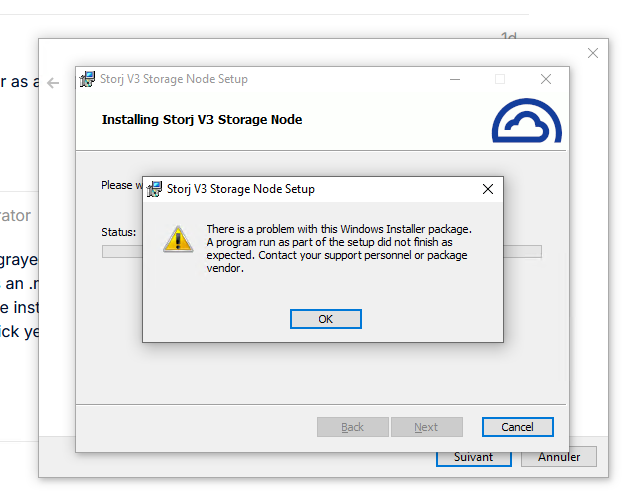
This is unsupported. Unless your drive z is iSCSI.
To triage MSI installer issue — post logs. Likely storagenode does not like something. Probably the fact that your Z disk is mounted to a user and you are trying to reach it from admin or system account.
You don’t have to run MSI at all. You can register storagenode.exe directly with sc. MSI is one of thr worst designed products I have ever seen. I would not waste time triaging it.
Yes, seems have an issue with the connexion with my Z: drive
Here is the log
2026-05-18T16:49:47+02:00 INFO Anonymized tracing enabled {“process”: “storagenode”}
2026-05-18T16:49:47+02:00 FATAL Unrecoverable error {“process”: “storagenode”, “error”: “mkdir Z:\Storj: Le chemin d’accès spécifié est introuvable.; mkdir Z:\Storj: Le chemin d’accès spécifié est introuvable.; mkdir Z:\Storj: Le chemin d’accès spécifié est introuvable.”, “errorVerbose”: “group:\n— mkdir Z:\Storj: Le chemin d’accès spécifié est introuvable.\n— mkdir Z:\Storj: Le chemin d’accès spécifié est introuvable.\n— mkdir Z:\Storj: Le chemin d’accès spécifié est introuvable.”}
Right. As I said above, use iSCSI or run node on the NAS.
While you can make the mount accessible to the node, either by mounting the disk for the system user or running storagenode as normal user, storagenode itself does not support storage over SMB, you will lose data. Especially if there is Synology on the other end, their samba is broken full stop for decades. Don’t use it for anything half-important, let alone locking-heavy node software.
You can try NFS, but this is also unsupported and if any issues arise you will be on your own. And they will, because locking semantics is still different.
Only sane choice here is executing node on the NAS itself.
You don’t have to use docker. You can run it directly.
DSM6 uses upstart and DSM7 — systemd.
Docker may be easier to setup initially but this will add extra layers and exposure for additional failures. Docker on synology is an antient half patched abomination, you will see all sorts of weird issues. For example, memory accounting has been broken for years, and it’s almost impossible to stabilize quic. But you can try.
I asked my robot friend to generate a prompt for your robot friend to guide you through the install. Copy paste it to your agent
I want to run a Storj storagenode directly on Synology DSM, without Docker.

First determine whether my NAS runs DSM6 or DSM7.

If DSM6, generate an upstart service configuration.

If DSM7, generate a systemd service unit.

Use the native storagenode executable, not Docker.

Requirements:

* create a dedicated unprivileged user for storagenode
* create separate directories for identity, config, logs, and storage
* use my existing identity files
* use a local path on the Synology volume
* do not use SMB
* do not use a mapped drive
* configure storagenode run with explicit --config-dir and --identity-dir
* configure the service to start automatically after boot
* configure restart on failure
* show exact commands
* show how to inspect logs
* show how to stop, start, restart, and check service status
* assume I can SSH into the Synology as admin/root
* before producing commands, verify every path and binary name with me
* do not generate plausible placeholder paths
* generate copy-pasteable commands only after collecting the required values
* if I do not provide direct access to the NAS, guide me step by step: give one command or one small group of related commands, wait for my output, then continue based on that output

Ask me for the following values before generating commands:

* DSM version
* Synology CPU architecture
* path where I want storagenode data stored
* path where my identity files are currently located
* external address / DDNS name
* external port
* storage allocation
* wallet address
* email address
I don’t have the agent, the difference between agent performance is 99% prompting and 1% agent itself. You can use any. This output was produced by raw ChatGPT (with my system prompt that stops it from being annoying helpful bullshiter and forces to attempt to falsify all claims it makes, present only surviving ones, and provide sources) and request to create a prompt for another agent to guide you though installing storagenode on synology natively as I walked from my car to work
I completely reject this premise. GUI is built on top of command line tools. It introduces another layer of potential failures, issues, unexpected behaviors, and limitations.
Being uncomfortable with CLI is not a valid excuse, ever. You can damage the system via GUi just as easily, and often, without knowing.
It’s a curios experiment — to see if you can bend the system to your will using limiting and coarse GUI, but it’s not a viable way forward. Especially so with a synology, where any step into any direction but along the most straightforward configuration leads to guaranteed failure.
“But it worked for me!” Does not matter. You are probably still on that one tested path.
“But synology says changing system via CLI is unsupported!” I could not care less what they think. Let alone what they want me to think.
CLI is not scary or difficult. It’s much simpler and easier , only takes getting used to. The same way you got used to GUI. GUI has, albeit often broken, help. CLI has excellent built in help, always. Every single tool comes with extensive documentation or at least command line parameters usage with examples.
Figure out how to do things that way. It will save you massive amount of time. You will accumulate scripts, helpers, and automation naturally over time, something that is impossible with GUi, and won’t depend on a will of underpaid interns developing horrible synology GUI apps on what you can and cannot do with the system.
This applies to TrueNAS users as well. All configuration is doable via mdcli/mdclt — providing path to automation and reuse. Even though TrieNAS web UI is already ten times better than Synology’s bloated garbage, command line tooling is unbeatable.
So reject that learned helplessness and interact with your systems in a full, unrestricted by artificial nonsens, way.
Don’t be afraid to break things. You will break them anyway. You will restore from backup if you do. You still need and have a backup, don’t you? So fear of breaking the system is irrelevant as well.
TrueNAS != GUI. Gui is just a cherry on top, a gimmick. TrueNAS supports configuration via API (preferred route) and CLI.
You want to use TrueNAS for all the other harnessing and validation they spent time providing, so you don’t have to do it yourself. You could, but you would end up with very similar functionality likely and lower reliability.
For me, the biggest ones are:
zrepl integration with scheduling. Use it every day. That’s my whole backup system.
Samba patching and configuration, including custom modules like tmprotect. (Synology can’t even configure samba correctly. What a pathetic garbage company).
straightforward migration path (configuration via DB). I can go from zero to full configured system with one config file.
some rudimentary harnessing around zfs mounts, iocage, and data collection.
Again, you could do all yourself, but they have already done that. So why not enjoy the fruits of someone else’s competent labor.
And you can still tweak and adapt that. It’s still FreeBSD base system, and Python middleware. All in source form.
Once FreeBSD 13.3 becomes too annoying to use, in probably 5 years, I’m going to migrate to vanilla FreeBSD and use AI tools to port pieces of TrueNAS Core (probably just tmprotect) to the new samba and won’t look back.
Separately, iXSystems migration to Linux was business correct, but engineering backwards and I’m not going to be migrating to scale.