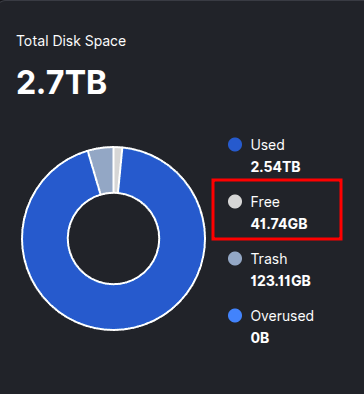
After reading several discussions about storage allocation, I still can’t understand how to set proper storage allocation for my node.
Here is my problem: The remaining space in the Dashboard doesn’t match the remaining space in my system. I’m concerned that Satellites keeps sending data to the node when the disk will be completely full. If so, is there a risk of being penalized in any way?
Your node is pretty much full, you didn’t do anything wrong
Are you talking about the UI saying you have 43.33GB free, and your df saying 7.4G available? I can’t point to anything specific: but on a multi-TB disk a difference of 30’ish GB is a rounding error.
If it was me, I’d set “STORAGE: 2.6TB” just to give the filesystem some free space to deal with fragmentation - but otherwise just let it run and enjoy the sweet sweet payouts from a full disk!
Exactly. Sorry it wasn’t clear in my original post (I edited the original post to make it clearer).
I’m just concerned that Satellites keeps sending data to the node when the disk will be completely full. If so, is there a risk of being penalized in any way?
Satellites don’t send you anything: they only suggest that your node is available or not (to paying customers who want to upload). If your node is full, customers don’t upload to you… so the satellite doesn’t think you have any new files: so it doesn’t check for any new files (like for an audit). Other than that… the Satellite is just happy for you to remain online.
I think the main downside is… that you probably could be paid more if you had more space to share. First world problems
Nothing. The node offers some estimates of disk space used, but this estimate is biased depending on many external factors. For example, it is not possible for the node to discover the file system overhead for storing files without getting overly permissive access to your system, so it cannot take it into account.
If you need the node to leave some space for non-storage node use, adjust the allocation in the relative direction, that’s pretty much the only way.