Disconnect briefly every day

Disconnect briefly every day after moved to Hashstore on version 1.35.5

I have a problem with one of my Storj nodes. They have been moved to Hashstore, but I don’t know if that’s where the problem lies.

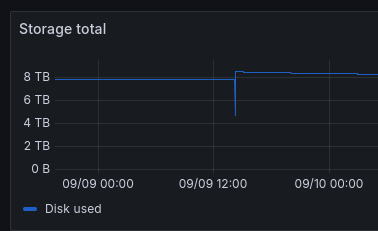
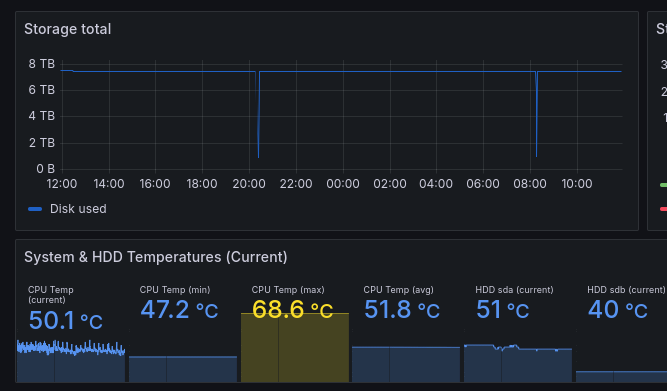
The problem is that every day, sometimes after 8 p.m. and sometimes after 8 a.m., they disconnect briefly. It doesn’t last very long, but it keeps happening, which is lowering my online score.
Here is the information on the node.

HDD: TOSHIBA Enterprise Capacity MG10AFA, 22TB (20% full)
Raspberry Pi 4 (with Debian ARM)
1 GB UP/DOWN connection

As I thought at first, Promteuse can’t keep up, but in reality, the Storj dashboard has the same information (I think it is not a ISP problem because the Promteuse look on the local network)

The problem is that I have gone from 100% to 98.88% since migrating to version 1.35.5 and migrating to Hashstore in a week or two (I don’t remember)
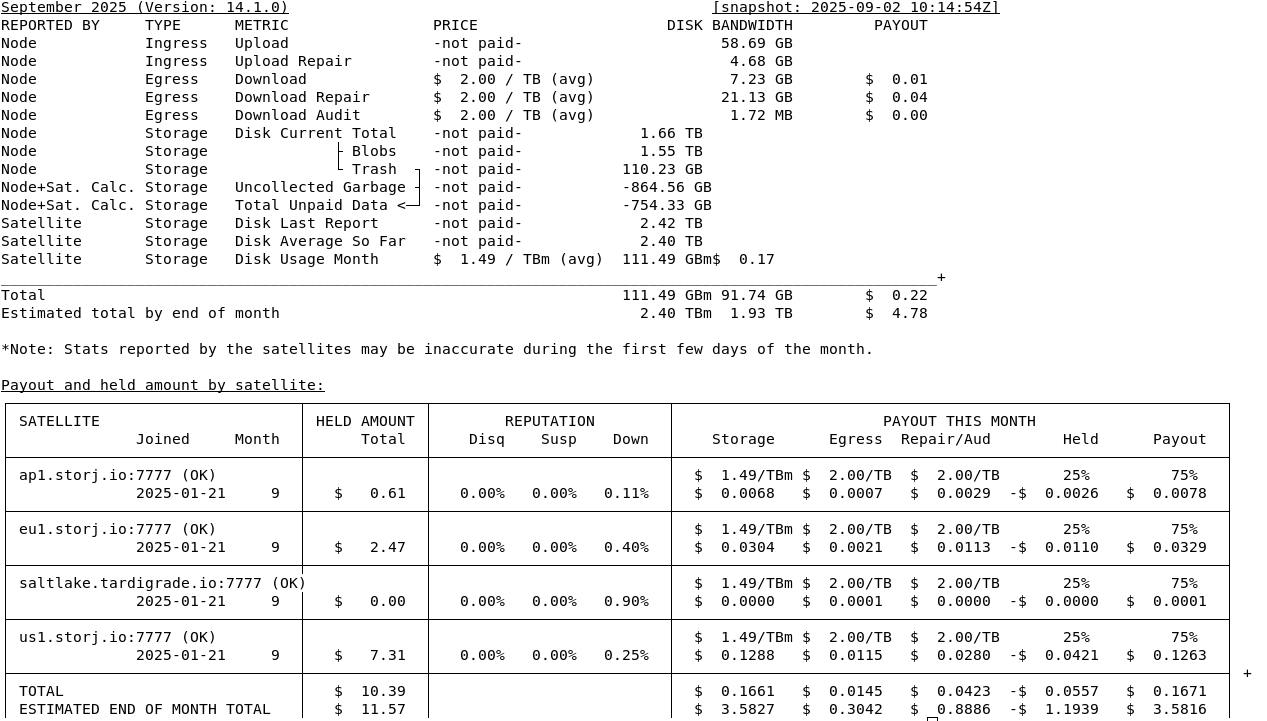
There are no problems in the logs, the migration to Hashstore is complete, but the temperature of my HDD has increased by 5°-7° to since I switched to Hashstore, the cabinets that contain the servers is the same temperature as before.

What worries me is that the score keeps going down, which isn’t great for the Storj network (I think if my node disconnected). Are there any explanations or ideas? Why do these disconnections always happen at the same times?
For your information, the server (raspberry pi) remains stable and also the docker image.

Perhaps you have noticed something similar, or it could be explained by the new version 1.35.5 or the switch to Hashstore.

Please let me know what you think. I would lean towards an HDD problem as the temperature has increased, but to be honest, I don’t really know.

PS: Disconnections are between 2 and 10 minutes. Could this disqualify my node over time, or is this time insignificant (if you think about it, a 20-minute disconnection every day adds up to 10 hours, which is enormous)?


Compaction of hashstore happens more randomly, don’t think it’s related.

If you really think it’s related to a process in storagenode, you can compare the localhost:debugport/mon/ps output during the problem and after the problem.

You may see long running processes there.

But I am not sure. Even if you have a network connectivity issue, you shouldn’t have low value time to time for storage total.

Monitoring is suspicious.

Also: you can check iowait / io pressure on the node. If something makes your node slow, there should be high IO utilization.

1 Like

Temperature is kinda the same for me, even a bit lower.

36 now for one drive:

grafik

Even 33 on a cooler:

grafik

But they are also on passive hashstore as of now. Will migrate to active soon.

You can run:

iostat -xz 1

and save the logs in like:

iostat -xz 1 > iostat.logs

@elek Compaction of hashstore happens more randomly, don’t think it’s related.

That’s very useful to know, Thank you, that gives me one thing I can cross out.

@Walter1 Okay, that’s good to know. It seemed a bit hot to me. I would have liked to keep them below 45°C, but that’s not possible (maybe in winter) by me. Are you using identical HDDs, i.e. the same model or manufacturer? For me, the average doesn’t vary much; even before, it was between 45 (min) and 48 (max).

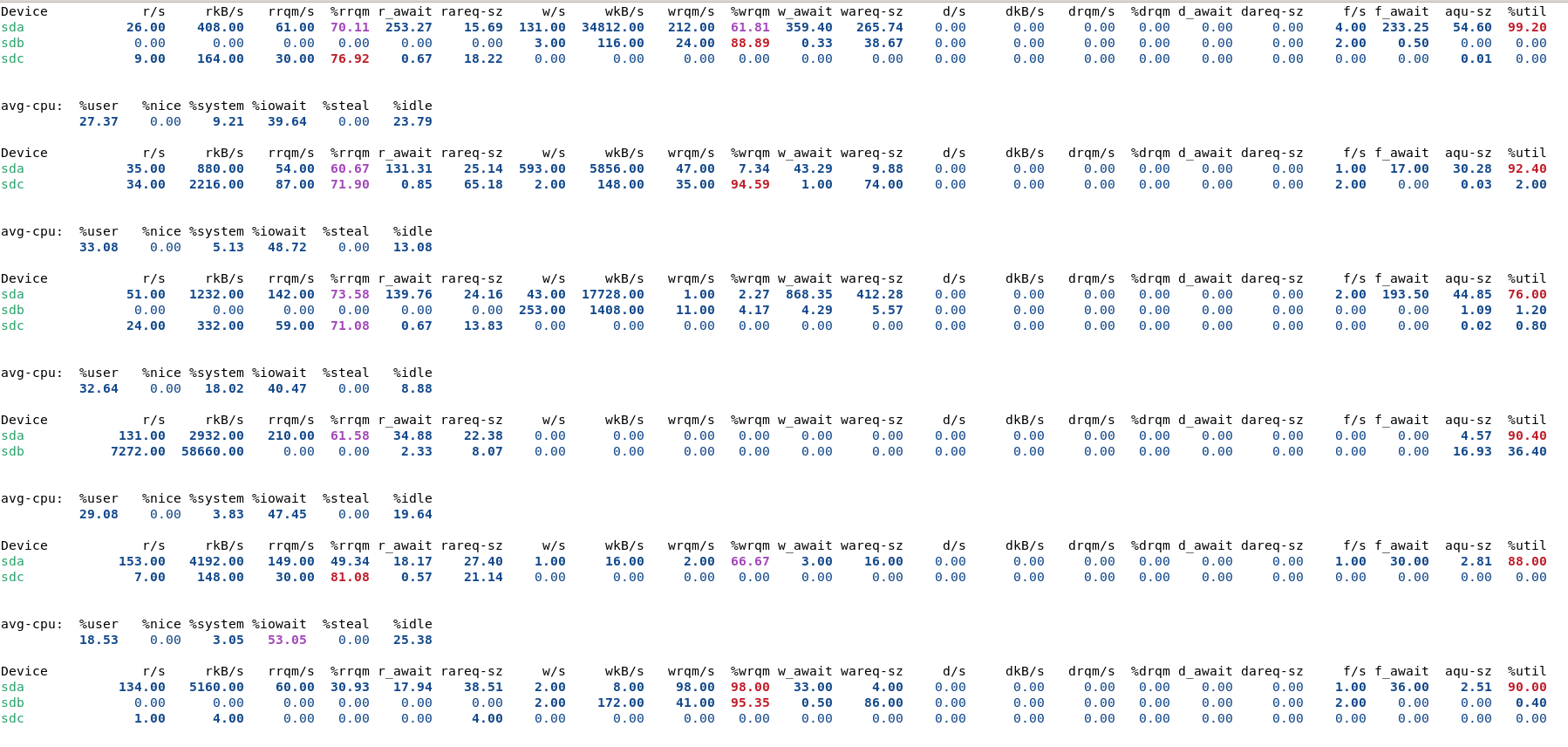
I will need to check this out in more detail, but the write speed on this HDD seems extremely slow and the usage % is more then 80%. I’m not sure I understand everything correctly; perhaps the system creates a mini buffer before writing to the disk.

Do you think I should change the cables and try another USB => SATA connector? (it is connected via USB 3.00)

But that doesn’t explain why the outage occurs at around the same time every day.

I have a hypothesis, but it’s just an idea: the building has recently been powered by solar energy, with regional energy purchased at night and self-generated energy during the day (normally). Could a micro-cut be disconnecting my HDD?

Because these times correspond to sunrise and sunset :sun: :sunrise_over_mountains: :sunset:

Yeah I have alot MG10 20 TB. You have one MG10F 22 TB, they should be hotter like the new MG11 24 TB, which gets also hot.

Ideally they should stay < 40 °C, that’s what all HDD-Manufateurers state. But that temp is kinda hard to reach without active cooling, as their idle temp is almost at 40 °C. So you need some fans there.

I wouldn’t use USB-Drives or Bays at all. Directly SATA or SAS.

you need just cases with good ventilation.
cases with good vent i have 33-38 degree Celsius.
with not good 38 to 42 degree Celsius
Also toshiba MG serias and HGST

From the datasheet of your drive, acceptable enclosure temperature is 5 °C to 60 °C. There is no reason to keep them at 40.

FFIW I aim at 55C, and run fans just enough to prevent temps from going higher. I don’t see any increase in failure rate. You won’t see either on such a small number of disks. Savings on power and noise however will be immediate and tangible.

3 Likes

I don’t know, but I imagine that they have a longer lifetime if I can keep them at 40°C. But I’m very curious to know if you have any information on this, because maybe what I imagine is wrong. Is it possible that as long as the HDD is between 5°C and 60°C, its lifetime is the same? If there are any specialists out there, I’d appreciate an explanation of why this would or wouldn’t affect the life of ours HDD (something scientific or tests that have been done).

So same time for today crash…
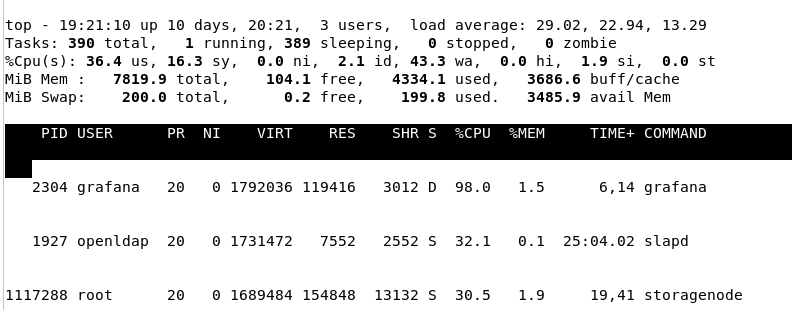
I was able to recover some logs, which I’ve attached. If you have any ideas about the problem, I’d be very grateful. From what I understand, it’s the graphana, slapd and storagenode processes that are crashing the system. The system seems to be overloaded in terms of CPU usage, then the storj node is restarted.

If I don’t run useful command the inform me about, I’m not a specialist :face_with_diagonal_mouth:

Link for log file:

log (TOP)

isotat

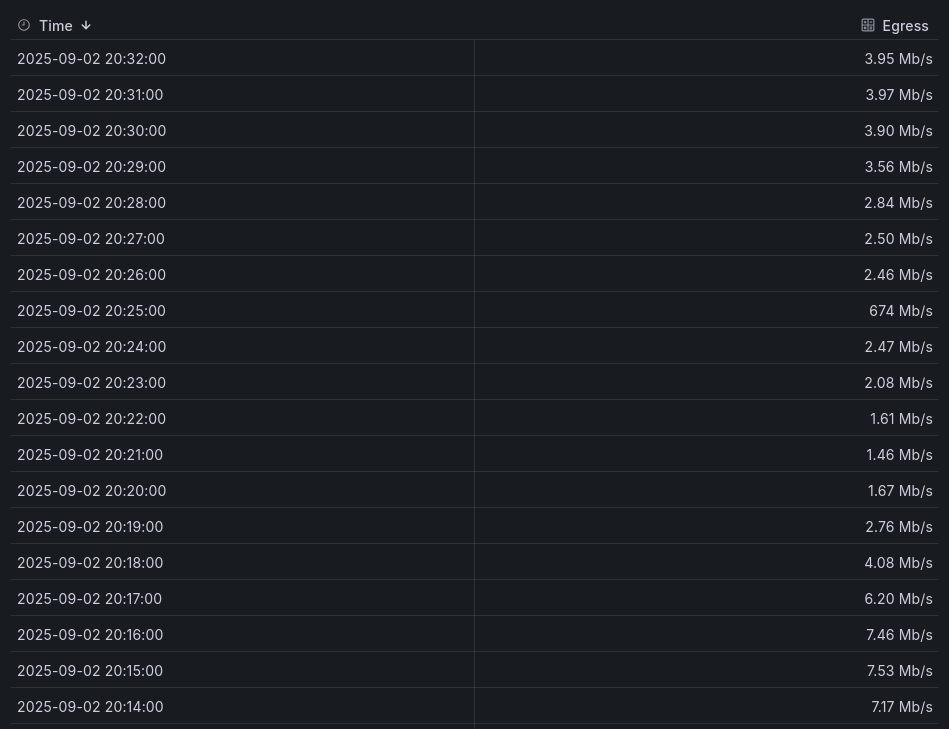
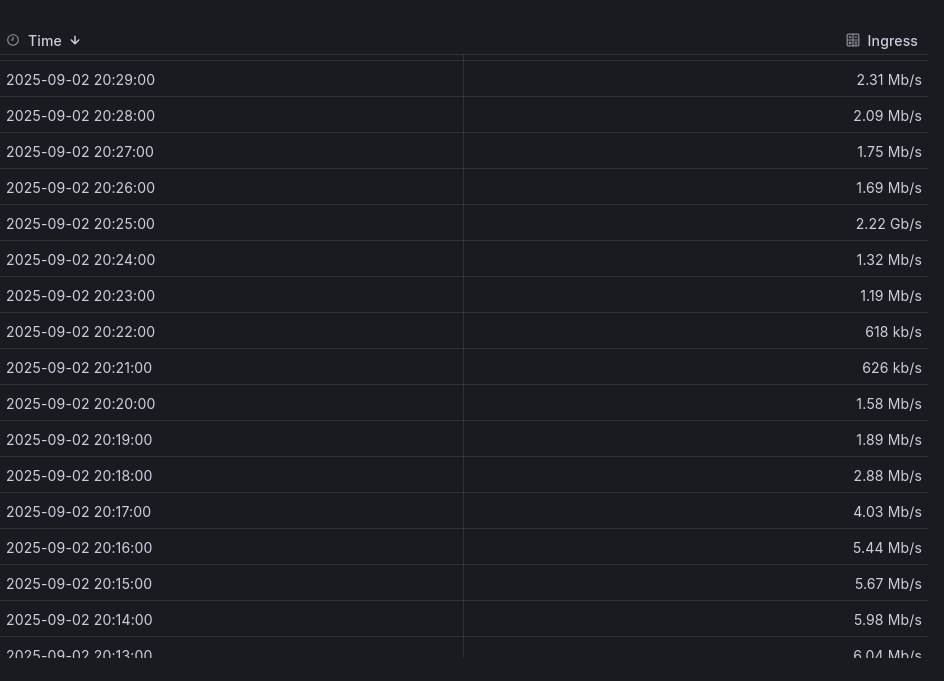
It is maybe also interesting to see the Ingrees and Egress for the specific node

Toshiba_OpenE_Blogpost_July2022_final.pdf

here is information about temp and lifetime. you are correct bellow 40 is optimal

also as far as i remember some vendors if your smart will go over 55, you lose warranty.


Current Drive Temperature:     26 C
Drive Trip Temperature:        85 C

i believe if you hit the TRIP or Critical Temp they void warranty - But if drive hits that temp, tends to melt enclosures and warranty is likely least of your issues.

Do you see any events in syslog correlating with downtime?

I think you are running out of RAM, struggling when under load. Prometheus,.Grafana, Navidrop etc and only 8G.

But: What happens just after 8 (am and pm),. Any cronjobs start around then? Any of your apps have something running at that time.

Of course. Most electronics will last longer when it runs colder (SSDs are one of the curious exceptions). But thats not the point: because any modern electronics becomes obsolete much sooner than it has a chance to fail, regardless of how it is used.

The datasheet is a source of information. It states, that when disks are run between 5°C and 60°C, the manufacturer guarantees they will work for over 5 years.

No, lifetime would be likely very different. But if you are going to replace the disk after 8 years anyway, it does not matter if you shortened its lifespan from 20 to 10 years. Actual numbers may differ; but my point is – if mfg says 60°C is OK – then it’s OK.

It has to do with something that restarts once in 12 hours; maybe your assumption about those solar pannels is correct.
In my case, I see the same online score, because my router is set to restart each day at the same hour, so once in 24h.
Check the entire line of systems if one restarts at those hours, by a scheduled task or forced by those pannels…

1 Like

Also, you can check node’s logs - did you have a restart of the node?
Do not exclude also DDNS provider, it could be unreliable: Search results for 'duckdns order:latest' - Storj Community Forum (official)

I drew different conclusion from that “document”: at stated 0.438 % AFR, even quadrupling it makes no perceptible difference when you don’t have thousands of disks running.

This makes no sense. You can’t lose warranty by operating disks within range specified in datasheet. That’s the whole point of datasheet.

On the other hand, value of warranty is so small, I would not worry about it at all. Again, at the same AFR stated above, about half percent, and cost of disk $200, the warranty is worth $1. I would not lift a finger for $1. This is why buying new disks makes no sense — you overpay hundreds of dollars and get a warranty worth $1. And early failures to deal with — its net negative.

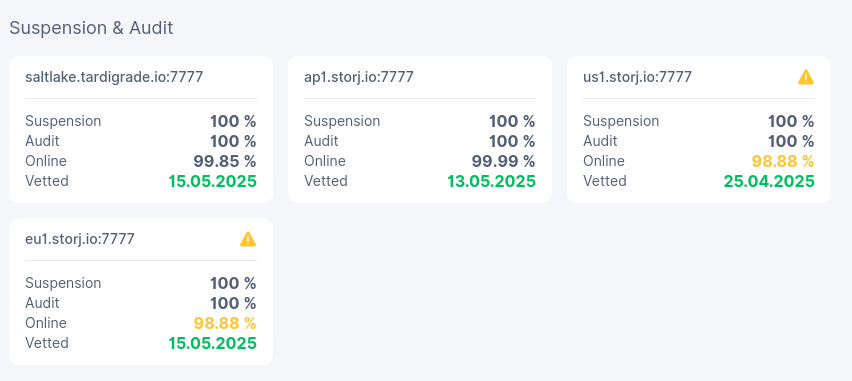
What is the DHCP lease time for IPs in your router’s settings?
I encountered a problem with this some years ago. I set it to 12 hours and I got disconected/ reconected on a system, with a shared sql db, and all clients lost conectivity at that db, along with program crash. I don’t remember if they had static LAN IPs.
Anyway, use wired connection for the storagenode, static LAN IP, 24h DHCP lease time in router, no DDOS prevention in router (it should be next to Firewall checkmark in the WAN settings).

2 Likes

I got the same from that paper… if you keep them at 50C, maybe 6-7 drives will fail in a year instead of 4-5 drives. No biggie.
I don’t understand how the compensation mentioned makes sense;
he sais if you keep the drive at 50C for 24h, you should keep it also at 30C for 24h, and you get the average of 40C, which is ideal and dosen’t affect the drive.
If the higher temp realy affects the drive, then this can’t be true.
You could keep it for 1 year at 65C and then, to compensate, you keep it a few years at 35C. Is it the same as keeping it all the time at 40C? :thinking:

I’m finally getting back to you (I didn’t have time before because I was revising for exams). It’s just in case you’re curious, because the problem has been solved. :slight_smile:

To put it simply, I don’t know exactly what worked because I made several changes:

  1. The system time was not up to date => updated the time
  2. System update (Debian, + Yunohost) + uninstalled Navidom (because I wasn’t using it)
  3. Modification of the basic rules of faill2ban, because I noticed that I had up to 45 connection attempts per 15 minutes in ssh but also elsewhere. The amazing thing is that they decreased dramatically with the new rules.
  4. Reset all password (also the Yunohost account)
  5. There was also the problem of updating the Storj version, which failed because of the wrong address with the (vv), which was resolved at the same time.

In the meantime, electricians came to fix problems with the electrical network.

I think it was them and not me who solved the problem, but the good news is that the mini server is once again ultra-responsive.

The node has been migrated to v1.136.4 and I’m not having any problems, as you can see from the graph, and the storage GB are increasing really well on this node. Oh, and the HDD temperature has dropped back down to an average of 47°C. :grinning_face:
Winter is coming… :snowman: :sweat_smile:

Otherwise, I would like to thank you all for your suggestions and messages. It’s true that in 10 years’ time, HDDs will be obsolete, but it’s still good for the environment if one of my HDDs can last two more years, as this reduces waste.

As for DDNS, I use my domain name provider’s DDNS. I have other services that use it (the same DDNS to the router) and they work well. I’m very happy with it and haven’t had any problems in over four years. The router is a Fritzbox (also very happy with it). I do the updates manually (because I don’t want it to reboot, which it used to do).
I’ll leave you to admire this beautiful graph. :star_struck:

3 Likes