I can adopt all your nodes, and you’ll do better than just a graceful-exit payout.
If not then thanks for supporting the community for so long. Come check on us every few months: maybe we can win you back!
I can adopt all your nodes, and you’ll do better than just a graceful-exit payout.
If not then thanks for supporting the community for so long. Come check on us every few months: maybe we can win you back!
dedicated was put in place, to prevent huge hdd scanning from memory…
Roxor is right, forget about Storj and its broken updates, move on to something else
i am wait that 750tb of data are redistributed to all. I have over 100TB free to charge. Thanks @ntil
I understand, that you have had a reason. Did you try?
Damien created a fix which is included in v1.155.8. version.storj.io is updated to use that one.
Please let me know if you see any further problems (with stack trace please).
Also: I would highly recommend to remove dedicated configuration. I will remove this option very soon.
Originally we created it to make the space usage calculation faster. But we don’t need it any more with hashstore. I am planning to remove that implementation. We already switched back with select nodes.
Morning @elek most nodes have updated gracefully.
Except 1 ,
I will let you know why that one hasn’t
There are issues with the allocated storage again.
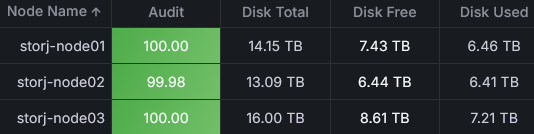
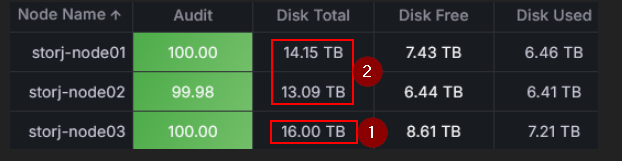
All 3 nodes have been allocated 16 TB. Node 3 is still on version 1.152.6, while the others are on 1.155.8.
The nodes all have hashstore and the dedicated disk feature disabled.
Node 1 API excerpt:
"used":6460371401088,
"available":7659277931008,
"overused":0,
"allocated":14152692255616,
"trash":263145944384,
"reclaimable":919742298996
Node 3 API excerpt:
"used":7213832905910,
"available":8026426994688,
"overused":0,
"allocated":16000000000000,
"trash":176818588288,
"reclaimable":1022261750656
Whew, I have 25 nodes at a remote location, that all in all restarted just around 200 times this morning until now. I’ve never seen so massive restarts until now, but it all seems to be working
With the latest space reporting, can you no longer see numbers in relation to the node size you specified? Like if your Docker config had “- STORAGE=8TB” in it do you never see numbers that add up to 8TB anymore?
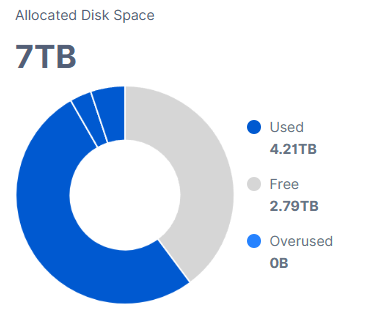
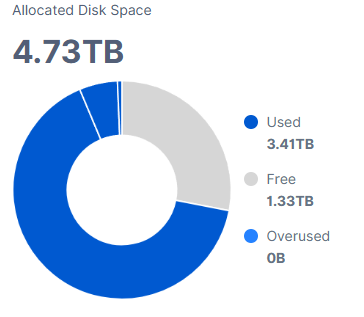
It looks like it’s calculating actually-used by the node (for “Used”), and actual-filesystem-free-space (for “Free”)… and summing them to get the main “Allocated Disk Space” number in the GUI chart. If you actually are using Storj for the leftover space another app is using… then your Allocated Disk Space is going to dance around depending on what that other app is doing.
I guess that’s not bad, just a change. I had reports that depended on the old behavior to tell me “what size HDD is that node on”… now I have no idea.
I saw similar strangeness around 3am EST. I think sometimes Storj pushes a new version… and tells the update logic to use it… before GitHub CDNs distribute the update globally. So some nodes get in a reboot loop until their-part-of-the-world can ‘see’ the new zip.
No, their excerpts saying a different picture:
14.15TB is allocated (STORAGE=14.15TB), 263.15GB is trash, 919.74GB is reclaimable, 6.46TB is used. So, 14.15TB - 263.15GB - 6.46TB = 7.43TB is free, which of 919.74GB is reclaimable (so, actually still occupied, but can be reclaimed).
But he said: “…All 3 nodes have been allocated 16 TB…”. None are STORAGE=14.15TB.
It looks like his old/node-3 example is correct though:
The same deal, 16TB allocated, 7.21TB used, 176.82GB is trash, 1.02TB reclaimable;
16TB - 7.21TB - 176.82GB = 8.61TB free, which 1.02TB are reclaimable.
How many the actual free space on the disk?
I know, that the node can adjust the allocated to the actual available. For example, (Allocated - (Used + Trash + Reclaimable)) > (Free on the disk), then it will use a minimum between the (Allocated) and (Used + Trash + Reclaimable + free on the disk).
Ah, OK…
…that must be a 1.155 change. For the last few years what you had set as allocated in your STORAGE= parameter… was what the GUI used for the “Allocated Disk Space” number.
Perhaps, it again popup on the GUI level. Do you have a string in the log, that it will use not the allocated, but the actual available? (I don’t remember the exact string, sorry)
It’s just as Roxor said: all 3 nodes have been allocated 16 TB, so STORAGE=16TB
I still have Chia plots on the HDDs, so the OS reports less free space than the node would expect, but that’s not the point. The issue is the allocated value—that’s the one that’s wrong.
╭───────────────────────────────────────────────────────────────────────────────────────────────────────────────╮
│ 13 local devices                                                                                              │
├────────────────────────────┬────────┬────────┬────────┬───────────────────────────────┬──────┬────────────────┤
│ MOUNTED ON                 │   SIZE │   USED │  AVAIL │              USE%             │ TYPE │ FILESYSTEM     │
├────────────────────────────┼────────┼────────┼────────┼───────────────────────────────┼──────┼────────────────┤
│ /                          │ 467.3G │ 167.1G │ 276.5G │ [#######.............]  35.7% │ ext4 │ /dev/nvme0n1p2 │
│ /boot/efi                  │   1.0G │   6.1M │   1.0G │ [....................]   0.6% │ vfat │ /dev/nvme0n1p1 │
│ /mnt/chia/blockchain       │ 468.4G │ 215.8G │ 228.7G │ [#########...........]  46.1% │ ext4 │ /dev/sda1      │
│ /mnt/storj/node001_2021.10 │  16.3T │   8.5T │   7.0T │ [##########..........]  52.1% │ ext4 │ /dev/sdb1      │
│ /mnt/storj/node002_2022.04 │  16.3T │   9.4T │   6.1T │ [###########.........]  57.8% │ ext4 │ /dev/sdc1      │
│ /mnt/storj/node003_2023.12 │  16.3T │   8.2T │   7.3T │ [##########..........]  50.2% │ ext4 │ /dev/sdd1