Updated Proxmox from version 6 to version 9
Storj stopped working
Error when starting
2025-08-21 19:20:02,877 INFO Set uid to user 0 succeeded
Error: Cannot open an HTTP server: socket.error reported errno.EACCES (13)
For help, use /usr/bin/supervisord -h
2025-08-21 19:20:49,099 INFO Set uid to user 0 succeeded
Error: Cannot open an HTTP server: socket.error reported errno.EACCES (13)
For help, use /usr/bin/supervisord -h
2025-08-21 19:21:35,093 INFO Set uid to user 0 succeeded
Error: Cannot open an HTTP server: socket.error reported errno.EACCES (13)
For help, use /usr/bin/supervisord -h
2025-08-21 19:22:21,211 INFO Set uid to user 0 succeeded
Error: Cannot open an HTTP server: socket.error reported errno.EACCES (13)
For help, use /usr/bin/supervisord -h
2025-08-21 19:23:07,315 INFO Set uid to user 0 succeeded
Error: Cannot open an HTTP server: socket.error reported errno.EACCES (13)
For help, use /usr/bin/supervisord -h
2025-08-21 19:23:53,322 INFO Set uid to user 0 succeeded
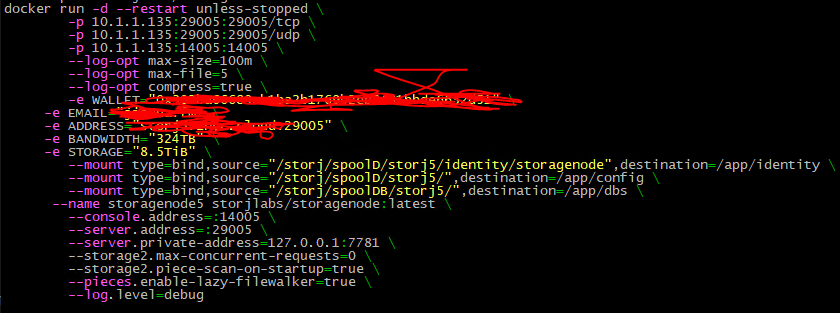
Perhaps your docker network configured to the host mode, not the bridge mode (I think so, because you also changed the private address), in that case the listening address for supervisord is already occupied, you need to change it, see
So, you need to switch to a private port by specifying SUPERVISOR_SERVER=private_port:
I read your code block, but I still don’t understand in what format to pass private and public ports
I tried different things, always the same error
    case ${SUPERVISOR_SERVER} in
  	unix) # default
  	;;
  	public_port)
  	  # replace unix_http_server section to inet_http_server
  		sed -i "s#^\[unix_http_server\]\$#\[inet_http_server\]#" /etc/supervisor/supervisord.conf
  		# replace unix socket file with tcp public port
      sed -i "s#^file=/etc/supervisor/supervisor.sock\$#port=*:9001#" /etc/supervisor/supervisord.conf
      # set server url to http server address
      sed -i "s#^serverurl=unix:///etc/supervisor/supervisor.sock\$#serverurl=http://127.0.0.1:9001#" /etc/supervisor/supervisord.conf
  	;;
  	private_port)
  	  # replace unix_http_server section to inet_http_server
  		sed -i "s#^\[unix_http_server\]\$#\[inet_http_server\]#" /etc/supervisor/supervisord.conf
  		# replace unix socket file with tcp private port .i.e. listens on only localhost
      sed -i "s#^file=/etc/supervisor/supervisor.sock\$#port=127.0.0.1:9001#" /etc/supervisor/supervisord.conf
       # set server url to http server address
      sed -i "s#^serverurl=unix:///etc/supervisor/supervisor.sock\$#serverurl=http://127.0.0.1:9001#" /etc/supervisor/supervisord.conf
  	;;
  	*)
  		echo "Invalid value '${SUPERVISOR_SERVER}' for SUPERVISOR_SERVER. Expected 'unix', 'public_port' or 'private_port'"
  		exit 1
  	;;
  esac
You cannot provide a port there, only change the mode:
unix - the default, it should use a socket
public_port will bind it to 0.0.0.0:9001
private_port will bind it to 127.0.0.1:9001
If you use a host network, then likely the public_port mode will not work, because it’s directly exposed to the host, and there could be only one with such number. But the private_port mode should work for multiple containers (the localhost (127.0.0.1) is still isolated as far as I understand).
The other way would be only to build your own image based on an official one and replace the port with a variable to be able to provide it for every container. And use this custom image instead of the official.