I do not think so. It should be in the time when you see a timeout. Perhaps some short overusage which not lasts long?
However, you may try to increase a timeout and see - did it help or not. Just not forget to save the config and restart the node.
Maybe it’s enough to saturate your disk? The “connection closed by the remote host” is a consequence of the long tail cancelation, so they are pretty normal, even if they indicates that your node lose the race.
hardware all ok, but i don’t mind. there are fiber gb lines with ssd cached raids behind there:
so ofc, some snos get not the data. but ingress is still 2tb last month, ithink storj would degrease the log prio to info. later. please. make the logs go small on loglevel error.
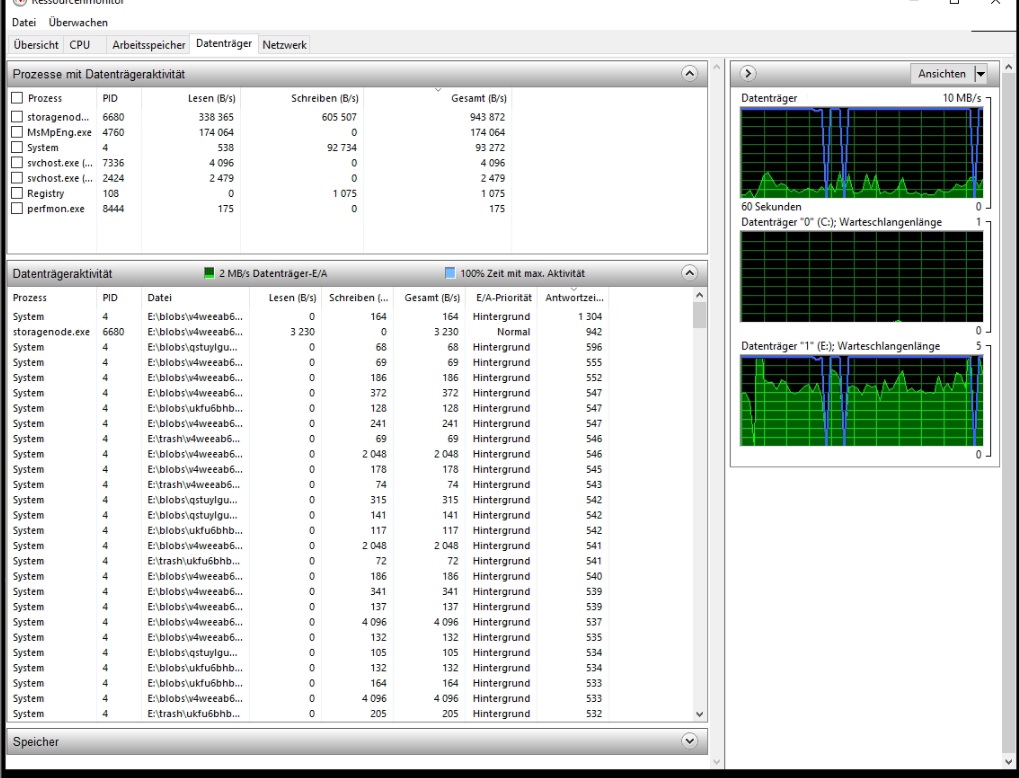
my guess too, same with my wd 12gb . still lots of drive bandwith free
Have updated node to 1.76.1 version, still problems there, now I see some diferent errors.
2023-04-01T11:26:53.086+0300 FATAL Unrecoverable error {“error”: “piecestore monitor: timed out after 1m0s while verifying writability of storage directory”, “errorVerbose”: “piecestore monitor: timed out after 1m0s while verifying writability of storage directory\n\tstorj.io/storj/storagenode/monitor.(*Service).Run.func2.1:150\n\tstorj.io/common/sync2.(*Cycle).Run:160\n\tstorj.io/storj/storagenode/monitor.(*Service).Run.func2:146\n\tgolang.org/x/sync/errgroup.(*Group).Go.func1:75”}
And 2023-04-01T11:26:52.391+0300 ERROR piecestore error sending hash and order limit {"error": "context canceled"}
Where can increate the write timeout?
By pure luck I was watching when something strange happened.
There was a moment when Task manager showed 0 write speed for a minute or two. At the same time File Explorer was showing that HDD is present but it didn’t let me access it. Node didn’t crash as I set “storage2.monitor.verify-dir-writable-timeout” to 2 minutes. I didn’t find anything in event viewer.
At the moment I have no ideas what it was and how to fix it(
@Alexey, безопасно выставлять этот параметр = 4 минутам?
storage2.monitor.verify-dir-writable-timeout: 4m00s
или какое значение будет оптимальным?
или лучше оставить 1 минуту и пусть лучше служба перезапустится, чем получить другие проблемы из-за большего интервала?
Объясните пожалуйста
ПС. ничего не помогает. Даже с установленными 4 минутами получаю ошибку
FATAL Unrecoverable error {“error”: “piecestore monitor: timed out after 4m0s while verifying writability of storage directory”
@andy777
Do you have Disk Optimisation ON for the storagenode disk? It should be OFF, no defrag nedeed for Storj disk. It’s a NTFS partition, in Windows, right? SATA or USB connection?
In the config.yam file, you need to use a plain text editor like Notepad++. After the change you need to explicitly save the config and restart the storagenode service either from the Services applet or from the elevated PowerShell:
Restart-Service storagenode
This is clearly shows that your system has hardware issues.
Is it an internal drive or external? If it’s an external drive, make sure that it has an external power supply, you may also re-plug the USB cable, but stop the storagenode service first and make a safe eject from the Windows system tray (notification applet on the taskbar) or from the File Explorer.
Please also add a data location to the exclusion list of your antivirus, the data is encrypted and your node has only 1/80 of each encrypted segment, so scanning it with the antivirus just waste of resources.
Seems you have some hardware issues too, since the disk cannot respond even after 4 minutes.
If it’s an external drive, you must use an external power supply for it to make it stable. The USB controller may overheat also and your disk become a temporary disconnected, so it should have an active cooling or at least you may open a disk case (do not disassemble the disk itself).
Please also add a data location to the exception list of your antivirus.
Of course, you may try to increase the timeout even more, but it could lead to more canceled uploads in case of Write timeouts and fail audits in case of Read timeout.
на русском
Похоже у вашей системы есть проблемы с доступом к диску по неизвестной пока причине, раз даже 4 минут не хватило, чтобы получить отклик от диска.
Если это внешний диск, он обязательно должен иметь внешнее питание для стабильной работы. USB контроллер может перегреваться и диск тогда будет временно недоступен, так что в корпусе для диска необходимо иметь активное охлаждение. Или хотя бы открыть коробку (сам диск вскрывать не надо).
Пожалуйста добавьте расположение данных узла в список исключения вашего антивируса - нет смысла сканировать кусочки зашифрованных сегментов, это просто трата ресурсов.
Конечно вы можете увеличить таймаут ещё больше, но тогда узел будет получать меньше загрузок в случае таймаута на запись и проваливать аудиты в случае таймаута на чтение.
No disk optimization. It’s Internal HDD. And no changes to the system were made before the issue appeared itself.
That’s the point. It is internal HDD and no changes were made to the system prior.
The issue was there before, but was hidden (we did not have a timeout on readability and writeability checks - they just hangs forever and could not help against the disqualification in case of partial hardware freezes), so now it’s visible.
And now we need to figure out, how to fix it.
From many responses here I did assume that these temporary freezes happens from time to time, or suspiciously close to the garbage collector interval
--collector.interval duration how frequently expired pieces are collected (default 1h0m0s)
For those who have timeouts every hour, it could be result of running of the garbage collector (it may load the disk to 100% when scan pieces).
For those who have timeouts after several hours it could be related to high upload/download rate on that time which makes disk to response slower than usual.
In these two cases the increasing a timeout could help a little bit.
But if even increasing a timeout did not help, then you have a deal with a hardware issue, not the load issue (but it could be triggered by the high load).
In this case I would suggest to try to use a different connector for the disk, maybe the current one is unstable, or just unplug and plug again to remove oxides and dust to make contact more stable (the node must be stopped, in case of internal disks the whole box should be powered off). Perhaps your box is not cooled enough, this could be a case too.
It’s strange that only windows nodes have this issue. Maybe because the big majority of nodes are on windows?
I wouldn’t be surprised if this was because hardware issues on Windows are less visible (it’s broken again? probably some Windows update shenanigans again, let’s just restart it), and only actually trying to set up a reliable service puts them into spotlight.
Though, it would certainly be interesting to learn what’s the share of Windows/Linux/Synology/QNAP/etc. nodes in the network, their storage, and average reliability metrics.
You can see it on this page: https://api.github.com/repos/storj/storj/releases
if i open this it is only code readable like an txt…making no sense for me