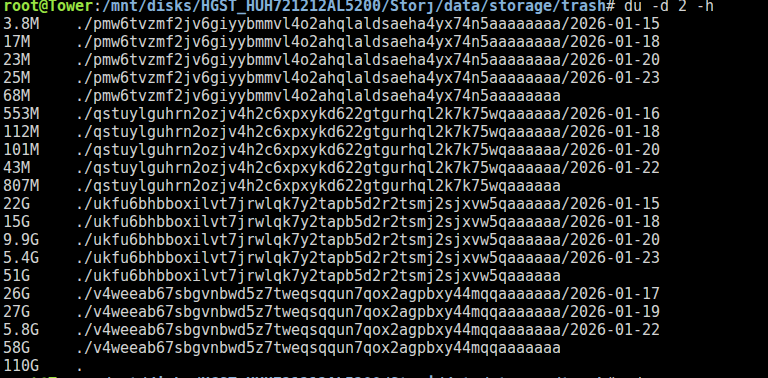
I have an issue where my node is down due to running out of space. Is there anything I can do to free up space?
The log is showing this:
hashstore.(*Store).writeHintFile.func2:1301\n\tstorj.io/storj/storagenode/hashstore.(*Store).writeHintFile:1318\n\tstorj.io/storj/storagenode/hashstore.(*Store).Close:482\n\tstorj.io/storj/storagenode/hashstore.NewStore.func2:119\n\tstorj.io/storj/storagenode/hashstore.NewStore:137\n\tstorj.io/storj/storagenode/hashstore.New:96\n\tstorj.io/storj/storagenode/piecestore.(*HashStoreBackend).getDB:252\n\tstorj.io/storj/storagenode/piecestore.NewHashStoreBackend:117\n\tstorj.io/storj/storagenode.New:604\n\tmain.cmdRun:84\n\tmain.newRunCmd.func1:33\n\tstorj.io/common/process.InitBeforeExecute.func1.2:389\n\tstorj.io/common/process.InitBeforeExecute.func1:407\n\tgithub.com/spf13/cobra.(*Command).execute:985\n\tgithub.com/spf13/cobra.(*Command).ExecuteC:1117\n\tgithub.com/spf13/cobra.(*Command).Execute:1041\n\tstorj.io/common/process.ExecWithCustomOptions:115\n\tmain.main:34\n\truntime.main:283"}
2026-01-22T08:10:21Z ERROR failure during run {“Process”: “storagenode”, “error”: “Failed to create storage node peer: hashstore: unable to flock: platform: open config/storage/hashstore/121RTSDpyNZVcEU84Ticf2L1ntiuUimbWgfATz21tuvgk3vzoA6/s0/meta/flock-test-1699297311.tmp: no space left on device\n\tstorj.io/storj/storagenode/hashstore.NewStore:137\n\tstorj.io/storj/storagenode/hashstore.New:96\n\tstorj.io/storj/storagenode/piecestore.(*HashStoreBackend).getDB:252\n\tstorj.io/storj/storagenode/piecestore.NewHashStoreBackend:117\n\tstorj.io/storj/storagenode.New:604\n\tmain.cmdRun:84\n\tmain.newRunCmd.func1:33\n\tstorj.io/common/process.InitBeforeExecute.func1.2:389\n\tstorj.io/common/process.InitBeforeExecute.func1:407\n\tgithub.com/spf13/cobra.(*Command).execute:985\n\tgithub.com/spf13/cobra.(*Command).ExecuteC:1117\n\tgithub.com/spf13/cobra.(*Command).Execute:1041\n\tstorj.io/common/process.ExecWithCustomOptions:115\n\tmain.main:34\n\truntime.main:283”, “errorVerbose”: “Failed to create storage node peer: hashstore: unable to flock: platform: open config/storage/hashstore/121RTSDpyNZVcEU84Ticf2L1ntiuUimbWgfATz21tuvgk3vzoA6/s0/meta/flock-test-1699297311.tmp: no space left on device\n\tstorj.io/storj/storagenode/hashstore.NewStore:137\n\tstorj.io/storj/storagenode/hashstore.New:96\n\tstorj.io/storj/storagenode/piecestore.(*HashStoreBackend).getDB:252\n\tstorj.io/storj/storagenode/piecestore.NewHashStoreBackend:117\n\tstorj.io/storj/storagenode.New:604\n\tmain.cmdRun:84\n\tmain.newRunCmd.func1:33\n\tstorj.io/common/process.InitBeforeExecute.func1.2:389\n\tstorj.io/common/process.InitBeforeExecute.func1:407\n\tgithub.com/spf13/cobra.(*Command).execute:985\n\tgithub.com/spf13/cobra.(*Command).ExecuteC:1117\n\tgithub.com/spf13/cobra.(*Command).Execute:1041\n\tstorj.io/common/process.ExecWithCustomOptions:115\n\tmain.main:34\n\truntime.main:283\n\tmain.cmdRun:86\n\tmain.newRunCmd.func1:33\n\tstorj.io/common/process.InitBeforeExecute.func1.2:389\n\tstorj.io/common/process.InitBeforeExecute.func1:407\n\tgithub.com/spf13/cobra.(*Command).execute:985\n\tgithub.com/spf13/cobra.(*Command).ExecuteC:1117\n\tgithub.com/spf13/cobra.(*Command).Execute:1041\n\tstorj.io/common/process.ExecWithCustomOptions:115\n\tmain.main:34\n\truntime.main:283”}
Error: Failed to create storage node peer: hashstore: unable to flock: platform: open config/storage/hashstore/121RTSDpyNZVcEU84Ticf2L1ntiuUimbWgfATz21tuvgk3vzoA6/s0/meta/flock-test-1699297311.tmp: no space left on device