How do the node delete unnecessary files after switching to a hashstore now? Are “retain” files no longer needed? Where is the “trash” located now?
If you would enable an active and the passive migrations, all not corrupted pieces (except piecestore trash) will be moved to hashstore logs and hashtables.
If you would have something left after migration - it likely corrupted or zero-sized files, so you can remove them manually. Others suggests also remove all subfolders in the blobs folder to reduce amount of used IOPS on scanning empty directories for remained pieces.
The piecestore’s trash will be removed as usual, after 7 days. The “new” trash will be inside hashstore logs files and will expire after 7 days as well and then removed during compaction, if it would clear a configured threshold for the garbage in the hashstore log files. The TTL data is placed to the similar hashstore logs, so such hashstore logs will be simple just removed after expiration.
After switching to “hashstore,” I noticed an interesting feature: after the node (Windows) boots, it starts actively reading “hashstore” files. However, the node isn’t yet running—the “storegenode” service is still starting, the dashboard isn’t open, and there’s no data traffic on the node. It’s currently “checking” the “hashstore” files. This takes 5-10 minutes before the node starts. The file verification time depends on the node size, which is logical.
After all, if the node size increases over time, the “hashstore” file verification time also increases. This time is calculated as the node being offline. And this happens every time the node starts.
Is this normal? Or should report it to the developers?
Feels ok to me. Node is offline until hashstore opened.
Also my nodes restarting only for version upgrade so a few minutes don’t really matter.
I’d agree with you if I didn’t live in Ukraine, 40 km from “zero line”. Frequent power and communication outages cause nodes to switch to both backup power and backup communication channels (which are currently operational). Fortunately, I’ve already automated all of this, but it still causes frequent node restarts. So for me, it’s not just a matter of “set it and forget it.”
The reason for being offline doesn’t matter. I don’t really need power backup because grid is super stable but some of my nodes using a fast but not very reliable vpn. Those nodes have poor online scores of 90..95% but there is no significant difference to the 100% nodes.
yep I have a larger node (6TB?) that uses memtable and it takes SEVERAL minutes for the node to open the hashtables and get up and running.
This does seem normal, surprised me too. Comes from a mini-filewalker that needs to read all log files’ sizes, and given they are spread over 512 subdirectories, this becomes a somewhat non-trivial I/O. It’s not as slow for me though, the worst case I’m observing is 20-30 seconds for a single satellite, so manageable.
I don’t think this will be worth Storj’s effort, but maybe the new hint files could keep this information too for faster startup?
They are designed for this too,
After the migration has started and is fully completed, which parameters will still be in effect?
If the --storage. parameters no longer work, how can I now specify the amount of disk space the node can occupy?
–storage2.monitor.minimum-disk-space
–storage.allocated-disk-space
–storage2.monitor.minimum-bandwidth
–storage.allocated-bandwidth
hey! need help of community mind:)
i have several windows nodes with the same symptoms:
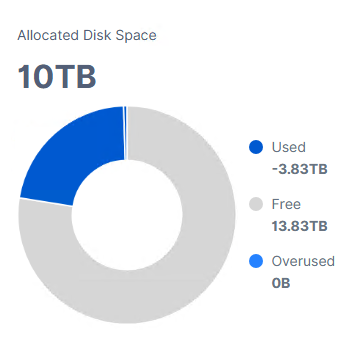
hashstore folder is showing
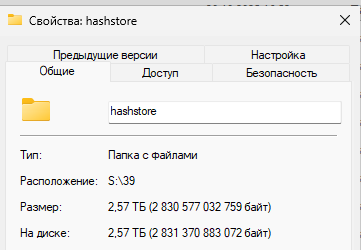
my question:
1)is it possible for windows gui node to check if hashstore process is complete
2) was is successful
3) how should it be compacted (grown) compares to blobs
4) is it possible to launch it manually and checking process while is migrating
Hello guys,
I started passive migration for one of my five nodes, 2 TB, just to test the difference between hashstore and piecestore, since I don’t have much data saved on it.
However, even though all values have been set to “true” in the /meta/*.migrate files, the migration still does not activate.I cannot see any logs related to the hashstore even after a couple of days. The piecestore is still in use, with the only difference being that Multinode now shows the “Used” value as 0 TB, while it should be roughly around 2.8 TB.
I see that there is already a discussion on this matter: Single node and multinode dashboards shows different values after migration to hashstore, but I don’t understand whether a suitable solution has already been found and we just need to wait for an update, or whether we need to intervene manually to resolve the bug ourselves.
Logs from the nodes:
user@server:~ $ sudo docker logs node-1 --tail 500 | grep "enqueued for migration" 2025-12-01T19:10:05Z INFO piecemigrate:chore all enqueued for migration; will sleep before next pooling {"Process": "storagenode", "active": {"12EayRS2V1kEsWESU9QMRseFhdxYxKicsiFmxrsLZHeLUtdps3S": false, "12L9ZFwhzVpuEKMUNUqkaTLGzwY9G24tbiigLiXpmZWKwmcNDDs": false, "1wFTAgs9DP5RSnCqKV1eLf6N9wtk4EAtmN5DpSxcs8EjT69tGE": false, "121RTSDpyNZVcEU84Ticf2L1ntiuUimbWgfATz21tuvgk3vzoA6": false}, "interval": "10m0s"}
user@server:~ $ sudo docker logs node-5 --tail 500 | grep "enqueued for migration" 2025-12-01T19:10:02Z INFO piecemigrate:chore all enqueued for migration; will sleep before next pooling {"Process": "storagenode", "active": {"121RTSDpyNZVcEU84Ticf2L1ntiuUimbWgfATz21tuvgk3vzoA6": false, "12EayRS2V1kEsWESU9QMRseFhdxYxKicsiFmxrsLZHeLUtdps3S": false, "12L9ZFwhzVpuEKMUNUqkaTLGzwY9G24tbiigLiXpmZWKwmcNDDs": false, "1wFTAgs9DP5RSnCqKV1eLf6N9wtk4EAtmN5DpSxcs8EjT69tGE": false}, "interval": "10m0s"}
user@server:~ $ sudo docker logs node-4 --tail 1500 | grep "enqueued for migration" 2025-12-01T19:10:01Z INFO piecemigrate:chore all enqueued for migration; will sleep before next pooling {"Process": "storagenode", "active": {"1wFTAgs9DP5RSnCqKV1eLf6N9wtk4EAtmN5DpSxcs8EjT69tGE": false, "121RTSDpyNZVcEU84Ticf2L1ntiuUimbWgfATz21tuvgk3vzoA6": false, "12EayRS2V1kEsWESU9QMRseFhdxYxKicsiFmxrsLZHeLUtdps3S": false, "12L9ZFwhzVpuEKMUNUqkaTLGzwY9G24tbiigLiXpmZWKwmcNDDs": false}, "interval": "10m0s"}
user@server:~ $ sudo docker logs node-2 --tail 1500 | grep "enqueued for migration" 2025-12-01T19:03:50Z INFO piecemigrate:chore all enqueued for migration; will sleep before next pooling {"Process": "storagenode", "active": {"12EayRS2V1kEsWESU9QMRseFhdxYxKicsiFmxrsLZHeLUtdps3S": false, "12L9ZFwhzVpuEKMUNUqkaTLGzwY9G24tbiigLiXpmZWKwmcNDDs": false, "1wFTAgs9DP5RSnCqKV1eLf6N9wtk4EAtmN5DpSxcs8EjT69tGE": false, "121RTSDpyNZVcEU84Ticf2L1ntiuUimbWgfATz21tuvgk3vzoA6": false}, "interval": "10m0s"}
user@server:~ $ sudo docker logs node-3 --tail 1500 | grep "enqueued for migration" 2025-12-01T19:14:20Z INFO piecemigrate:chore all enqueued for migration; will sleep before next pooling {"Process": "storagenode", "active": {"1wFTAgs9DP5RSnCqKV1eLf6N9wtk4EAtmN5DpSxcs8EjT69tGE": false, "121RTSDpyNZVcEU84Ticf2L1ntiuUimbWgfATz21tuvgk3vzoA6": false, "12EayRS2V1kEsWESU9QMRseFhdxYxKicsiFmxrsLZHeLUtdps3S": false, "12L9ZFwhzVpuEKMUNUqkaTLGzwY9G24tbiigLiXpmZWKwmcNDDs": false}, "interval": "10m0s"}
*.migrate file Configuration example:
user@server:~ $ sudo nano /mnt/node-4/storage/hashstore/meta/121RTSDpyNZVcEU84Ticf2L1ntiuUimbWgfATz21tuvgk3vzoA6.migrate
GNU nano 7.2 /mnt/node-4/storage/hashstore/meta/121RTSDpyNZVcEU84Ticf2L1ntiuUimbWgfATz21tuvgk3vzoA6.migrate {"PassiveMigrate":true,"WriteToNew":true,"ReadNewFirst":true,"TTLToNew":true}
I’ve also saw that hashstore rollout has been paused due to an issue on Windows, however I thought it had been fixed few releases ago.
Any suggestions?
Thanks!


In order to start active migration of existing data there must be a *.migrate_chore file for each satellite with only content ‘true’.
I didn’t say I wanted to trigger active migration, only passive migration. 
piecemigrate:chore is the active migration part. With passive migration only new data should go to hashstore folder. Is this folder still empty?
Yes, unfortunately is not getting populated.
user@server:~ $ ls /mnt/node4/storage/hashstore
121RTSDpyNZVcEU84Ticf2L1ntiuUimbWgfATz21tuvgk3vzoA6  12EayRS2V1kEsWESU9QMRseFhdxYxKicsiFmxrsLZHeLUtdps3S  12L9ZFwhzVpuEKMUNUqkaTLGzwY9G24tbiigLiXpmZWKwmcNDDs  meta
user@server:~ $ ls /mnt/node4/storage/hashstore/121RTSDpyNZVcEU84Ticf2L1ntiuUimbWgfATz21tuvgk3vzoA6
s0  s1
user@server:~ $ ls /mnt/node4/storage/hashstore/121RTSDpyNZVcEU84Ticf2L1ntiuUimbWgfATz21tuvgk3vzoA6/s0
01  03  05  07  09  0b  0d  0f  11  13  15  17  19  1b  1d  1f  21  23  25  27  29  2b  2d  2f  31  33  35  37  39  3b  3d  3f  41  43  45  47  49  4b  4d
02  04  06  08  0a  0c  0e  10  12  14  16  18  1a  1c  1e  20  22  24  26  28  2a  2c  2e  30  32  34  36  38  3a  3c  3e  40  42  44  46  48  4a  4c  meta
user@server:~ $ ls /mnt/node4/storage/hashstore/121RTSDpyNZVcEU84Ticf2L1ntiuUimbWgfATz21tuvgk3vzoA6/s0/01
Each of these folders is empty, nothing inside any of them, and it’s the same for each one of the server.
By the way, I wanted to try passive migration before switching to active migration just to ensure that nothing would crash in the meantime. I’m cautious by nature 
Just to make sure you didn’t skip any steps, I’m sure you know them, but just to be sure…
Did you stop node > rm node > activate migration > start node?
Most of the times obvious things are the less considered 
user@server:~ $ sudo docker logs node-4 | grep "hashstore"
2025-12-01T23:05:28Z    INFO    hashstore       hashstore opened successfully   {"Process": "storagenode", "satellite": "121RTSDpyNZVcEU84Ticf2L1ntiuUimbWgfATz21tuvgk3vzoA6", "open_time": "180.698508ms"}
2025-12-01T23:05:28Z    INFO    hashstore       hashstore opened successfully   {"Process": "storagenode", "satellite": "12EayRS2V1kEsWESU9QMRseFhdxYxKicsiFmxrsLZHeLUtdps3S", "open_time": "103.778463ms"}
2025-12-01T23:05:29Z    INFO    hashstore       hashstore opened successfully   {"Process": "storagenode", "satellite": "12L9ZFwhzVpuEKMUNUqkaTLGzwY9G24tbiigLiXpmZWKwmcNDDs", "open_time": "345.02464ms"}
I don’t know why but I was convinced that simply by stopping the node and rebooting it would trigger the migration. Thanks for the reminder 
I will keep it like this for a couple of days just to see how it goes and then switch to active migration to test the feature further. Then eventually I will migrate also the rest of nodes.
Hello @max232,
Welcome back!
These ones still in the effect, unless you use a Dedicated disk functionality
These ones doesn’t work many years:
Seems you need to delete a prefix database and restart the node to recalculate used space.
no, nothing implemented in the GUI to show the process.
It’s happens automatically, so usually you shouldn’t do anything.
yes, you need enable both the passive and the active migrations.
You may also read the first post where the Community collected different tips.