One of my nodes has had ~400GB “used reclaimable” space for quite a long time (I’m guessing weeks). How can I reclaim this space?
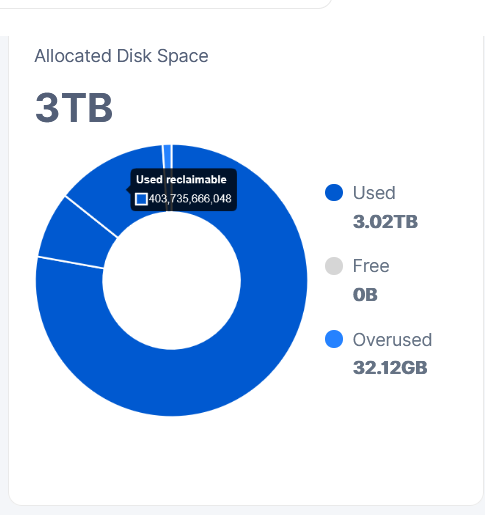
Might be related: I’ve migrated this node to use hashstore.
One of my nodes has had ~400GB “used reclaimable” space for quite a long time (I’m guessing weeks). How can I reclaim this space?
Might be related: I’ve migrated this node to use hashstore.
If I remember correctly… after a bloom filter the freshly-deleted data gets flagged as “Used Trash”… but it’s protected for 7 day (and won’t be removed from disk). After those 7 days hashstore can begin to reclaim (“Used Reclaimable”) it and actually get rid of it - that runs around every 12 hours.
Reclaiming has lots of tunables: but it’s based on probabilites: the more reclaimable data that’s in each of the 1GB data logs… the greater chance it will be rewritten smaller (with that reclaimable data removed).
So the short answer is “just wait”. Twice a day the node will decide to give back a bit of the space.
But hashstore will have more of that stale space hanging around. In piecestore trash was for-sure deleted after 7 days. Hashstore waits 7 days then gradually reclaims from the worst data log files… occasionally… if it feels like it… and the stars align… and the wind is blowing from the right direction… over time 

(and if I have any of that wrong, I’m sure someone will correct me  )
)
But also each incoming bloomfilter will add new pieces to reclaimable seven days later. So a certain percentage of reclaimable will always be there. The key tunable to make it smaller is STORJ_HASHSTORE_COMPACTION_ALIVE_FRACTION. Default setting of 0.25 is very lazy and results in big reclaimable space. I am using 0.6 .
This space is used to make the node faster, why would you want to reclaim it?
To have space for actual data.
The network wants fast nodes though.
BTW: The node needs some headroom to do compactions. How much free disk space is left?
884G - I’m guessing that should be plenty?
Lol no. Keep 10-15% free depending on the filesystem. Give filesystem node is on more breathing space.
Also 400GB is sixty cents a month.
in your config.yaml you can make your
hashstore.compaction.alive-fraction
bigger. like 0.6 instead of 0.25
I think you have a problem in some broken files, so it cant reclaime space, as process drops every time. Storj haven’t fixed this problem yet. if you have this problem you will find it in logs. with word compaction
Hi,
I don’t have “hashstore.compaction.alive-fraction” in my config.yaml. I am using a normal Windows node.
storagenode run --help | grep hashstore
      --hashstore.compaction.alive-fraction float                if the log file is not this alive, compact it (default 0.25)
      --hashstore.compaction.max-log-size uint                   max size of a log file (default 1073741824)
      --hashstore.compaction.ordered-rewrite                     controls if we collect records and sort them and rewrite them before the hashtbl (default true)
      --hashstore.compaction.probability-power float             power to raise the rewrite probability to. >1 means must be closer to the alive fraction to be compacted, <1 means the opposite (default 2)
      --hashstore.compaction.rewrite-multiple float              multiple of the hashtbl to rewrite in a single compaction (default 10)
      --hashstore.hashtbl.mlock                                  if set, call mlock on any mmap/mremap'd data (default true)
      --hashstore.hashtbl.mmap                                   if set, uses mmap to do reads
      --hashstore.logs-path string                               path to store log files in (by default, it's relative to the storage directory)' (default "hashstore")
      --hashstore.memtbl.mlock                                   if set, call mlock on any mmap/mremap'd data (default true)
      --hashstore.memtbl.mmap                                    if set, uses mmap to do reads
      --hashstore.store.open-file-cache int                      number of open file handles to cache for reads (default 10)
      --hashstore.store.prealloc-alignment uint                  alignment to use for preallocating log files. 0 means no special alignment (default 67108864)
      --hashstore.store.sync-writes                              if set, writes to the log file and table are fsync'd to disk
      --hashstore.table-default-kind TableKind                   default table kind to use (hashtbl or memtbl) during NEW compations (default HashTbl)
      --hashstore.table-path string                              path to store tables in. Can be same as LogsPath, as subdirectories are used (by default, it's relative to the storage directory) (default "hashstore")
Hello @zeroheat,
Welcome back!
You can add a missing option to the config.yaml file, just make sure you don’t have it already, otherwise the node will not start. Save the config and restart the node.
Are you using that as a Docker environment variable or as an entry in config.yaml? I’m having the same issue as OP but my Used Reclaimable is over 900GB.
It’s an env variable. Accordingly your question I can assume that you run Windows version, then you need to use this option:
      --hashstore.compaction.alive-fraction float                if the log file is not this alive, compact it
(default 0.25)
In the config.yaml it will be
hashstore.compaction.alive-fraction: 0.25
or as
environment variable. But for Windows you need to place it to the system variables list, because the storagenode service is running under the SYSTEM user.
Actually no, I use the version on the TrueNAS app store, which runs on Docker.
I am running my TrueNAS nodes as custom app using this to adjust reclaimable space:
environment:
        - STORJ_HASHSTORE_COMPACTION_ALIVE_FRACTION=0.6
I would not recommend going much higher than 0.6 because gained free space is not worth the higher IO activity.
In this case, making changes to the configuration file will be more difficult for you, so using an environment variable is the correct way to configure it.
Out of curiosity, how high can the number be set?