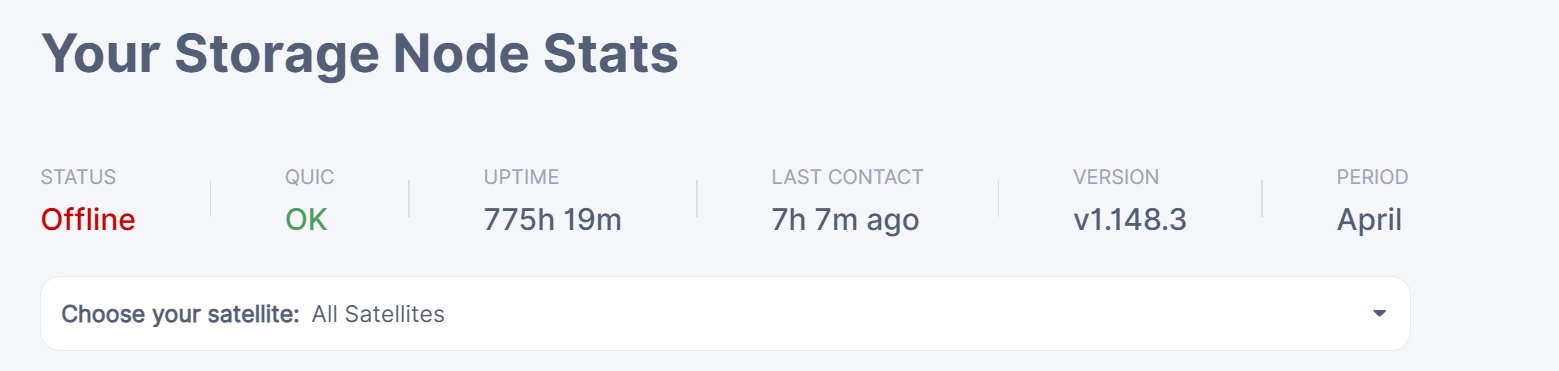
The fact that your port is working as seen by the external port checker points squarely at DDNS issues being the cause of your node bing offline.
You cannot claim that DDNS is working because the evidence directly contradicts the statement: the fact that it resolved correctly your address once from some specific IPs does not prove that it “is working”. The fact it does not resolve from any one address proves that it does not.
Check your node log, you will find the reason why it is offline there. Restart the node, and look for satellite pings at start.
Does not rule out DDNS. DDNS is comprised of multiple servers in one or more clusters, that need to replicate and keep data in sync, and sometimes they do not. The fact that your DDNS resolved correct from your location means nothing.
Known bad DDNS providers are duck dns, Asus DNS, whatever the heck Synology offers, and many more.
I’ll ask again: Which DDNS provider are you using? And what updater, and what ip detection endpoint? Show logs from your updater as well.
Not useful. I’ll ask again: show first pings from satellite and handshake following node restart
Yes, my PC had the wrong timezone because it has two operationg systems. But after correcting it and hard refreshing the dashboard, the node still appeared offline.
You are using “dedyn.io”, whatever the heck is this. Assume it’s broken. Switch to a DDNS service that has some reputation. NoIP seems to work fine according to reports, cloudflare is fine too.
It’ also important to use correct endpoint for ip detection – the cloudflare endpoint everyone seems to be using has been broken for a while. Use somethign else, ike ifconfig.me, or whatever default your updater supports.
Check the logs of that script, and confirm that last day worth of updates were correct.
I don’t remember on the top of my head – but it’s very first few messages storage node prints upon boot.
perfectly working node would have uploads and downloads from at least three satellites. This one has downloads only from two. This points strongly to DDNS issues.
try your external ip:port in brouser, it shold show you simple web page. if no then you ip is wrong or port forward problem. if ok then do the same with ddns link:port, shold show the same if not then problem in ddns.
Please search for “ping satellite failed” error in your logs, there will be a reason.
You can also check your http://DDNS:port on the smartphone using the mobile internet (not WiFi), it should show the node’s status page.
Since they require nameservers pointing to them, its not possible for me to use them. My domain was created on dedyn.io and only they can provide DDNS service. I cannot change nameservers for my domain on their platform.
Use noip for nodes. See if this alone is enough to fix the issue. I would not trust little local provider to operate correctly globally. If you google carefully you’ll find reports of their service reporting stale IPs in the past. Just don’t waste time with them, use established platform. (I would move all domains to cloudflare eventually, the only stable provider in my experience. Even google domains sucked – no wonder they sold the business to squarespace). it’s hard to do right and maintain correctly. Many have tried, most have failed.
Need more lines, until and including node registering with satellites.
Remaining open questions:
did you check .lastPinged value and compare it with current time on that host? If node is “working fine” and actually receiving and sending data to all satellites (you might want to filter longer log and grep unique satellites), then the possible culprit is, as alpha rabbit pointed out, mismatched time zone: if the difference is more than 2 hours, the lastPinged will not pass the threshold test from any satellite.
did you check log of your DNS update, to rule out ip detection shenanigans, resulting in wrong IP being provisioned intermittently?
Problem solved. Nothing wrong with node, checked all 4 satellites, all reported last contact of 0 min ago. “Status” went back “Online” again. The cause was simply mismatched timezone on my personal computer (Not the host running the node). Thank you all for your help.