Andrii
December 3, 2025, 2:50pm
1
New release candidate v1.143 is already deployed on QA Satellite
356ff80 satellite/metabase/changestream: avoid fmt.Sprintf in SQL885e52c web/satellite: update css2a499ec satellite/metabase/changestream: increase max timeout for test cleanup93c200c satellite/metabase/changestream: log errors in processorffe45bd satellite/payments: add logging when ProcessRecord failsfe89fd4 satellite/satellitedb: create new bucket_migrations tableeb86b4a satellite/admin-ui: fix user/project state update bugbc7fcc5 satellite/console/consoleweb: add compute gateway URL to CSP218f5d1 satellite/valdi: make the valdi client optional for modular console7d2c971 satellite/mailservice: wrap template parsing errorc5df8af satellite/metabase: fix negative version handling in Delete|Get ObjectExactVersioncacf8fa satellite: added bucket migrations DB logic102ca97 web/satellite: improve remove card flowfc9e942 satellite/metabase: use precommit query in delete6994c2e satellite/metabase: rename isRetentionProtected → Retention.isProtected05161dd satellite/metabase/changestream: SchedulePartitions sets scheduled_at81e32bd web/satellite: add webui to modular storagenode container0b0d5e5 satellite/metabase: avoid reading segment count from previous object version5cb3f91 satellite/satellitedb: Fix metrics reporting7c92021 satellite/console: add config for partner UI mods4711e71 satellite/metabase: simplify test object verificationb676c86 satellite/metabase: simplify test object verification part 21d9b6e7 web/satellite: get partner UI config from backend1b85db8 satellite/console: add white label config981622e satellite/{console,tenancy}: create tenant context system for request-level tenant identification5717d95 satellite/payments/stripe: reduce number of queries to spanner63897d4 satellite/metabase: reuse object (if possible) when committing unversioned objects5bae544 satellite/metabase: simplify test object verification part 38f03e82 satellite/metabase: add EncodeSpanner/DecodeSpanner for Version94c347e satellite/reputation: check node age in addition to number of audits to determine vetted status2d06d4a satellite/Dockerfile: adds the bad-passwords file directly to the image3d47568 satellite/nodeselection: unvetted selector should use threshold as a max336b8ea satellite/admin: allow abbreviated user deletion797d6e0 satellite/admin-ui: allow abbreviated user deletionb137784 satellite/db: add tenant_id column to users table309e444 satellite/{console,db}: add tenantID aware db methods136c71f satellite/metabase: use Apply instead of BatchWrite in deleteObjectLastCommittedPlainbeaec41 satellite/metainfo: reduce test data size1de3ae1 satellite/metainfo: fix multipart upload detection in batchf9621fd web/satellite: make UI config backward compatible
f8e4d8f web/storagenode: migrated simple components to use script setup syntaxd33cb90 web/storagenode: migrate notifications, content and error components to use SFC syntaxf061d96 web/storagenode: migrated and reworked charts to use SFC syntaxc2ecb27 web/storagenode: migrate another set of components to use SFC syntaxce86a8d web/storagenode: migrated payout components to use SFC syntaxef5f694 web/storagenode: remove Vue filters8b27012 web/storagenode: replace Vuex with Piniab085811 web/storagenode: upgrade Vue version along with other deps6e27be9 storagenode/{console,web}: replace vue cli service (webpack) with vite7849fe5 cmd/storagenode: fix node version for docker image8c49a04 web/storagenode,all: fix node Dockerfile, use official nodejs image and bump to 24.11.14e52fd0 storagenode: Fix UsedSpace calculation of Storagenode web console8eddf1d storagenode/hashstore: windows fixes
35ba1fb testsuite/playwright-ui: regenerate lock file
b920533 cmd/uplink: move backward compatibility tests from storj/uplink
d55d648 multinode: add telemetry9916a84 multinode: display full used space
22a8e9b shared/modular/cli: errgroup must cancel the context3b7dfe9 shared/modular/cli: use zeebo/errs for error handling6b59cfd claude/skills: add test-with-spanner skilledceb83 all: fix ctx handlingd00fe29 Claude.md: teach it how to run unit tests with Spanner emulator502cede build: script and Claude files to do automatic review on Gerritfba7259 Jenkinsfile.{verify|public}: improve build timef2c0856 scripts: tag-release.sh doesn’t create dedicated commits
Roxor
December 3, 2025, 3:04pm
2
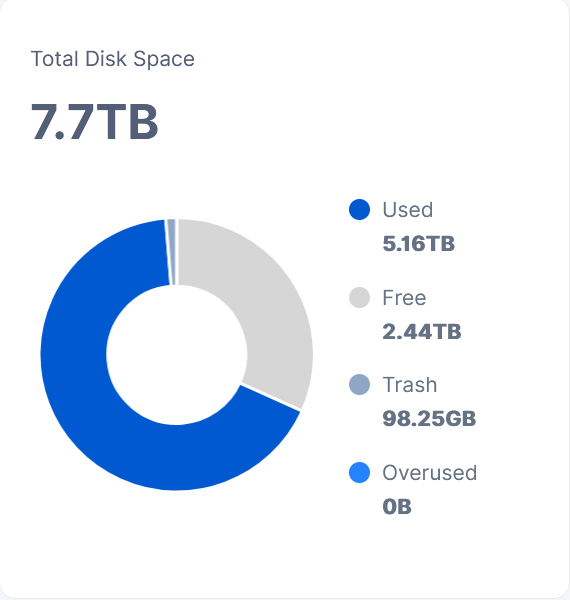
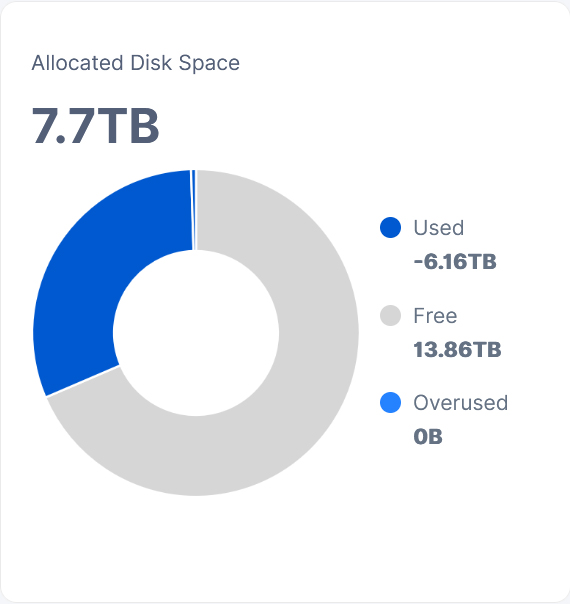
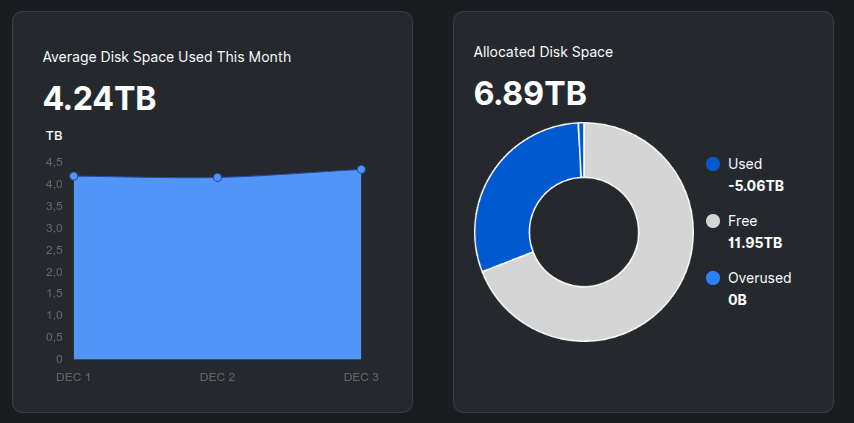
Ah… the end of an Era. It used to be fun to figure out what series-of-calculations the UI must be making… to get numbers so wrong
Grafana and storj multinode dashboard shows the same. Node is on hashstore.
Toyoo
December 3, 2025, 9:01pm
5
Andrii:
d00fe29 Claude.md: teach it how to run unit tests with Spanner emulator
An old joke in the AI community:
Do not anthropomorphize AI. They don’t like it.
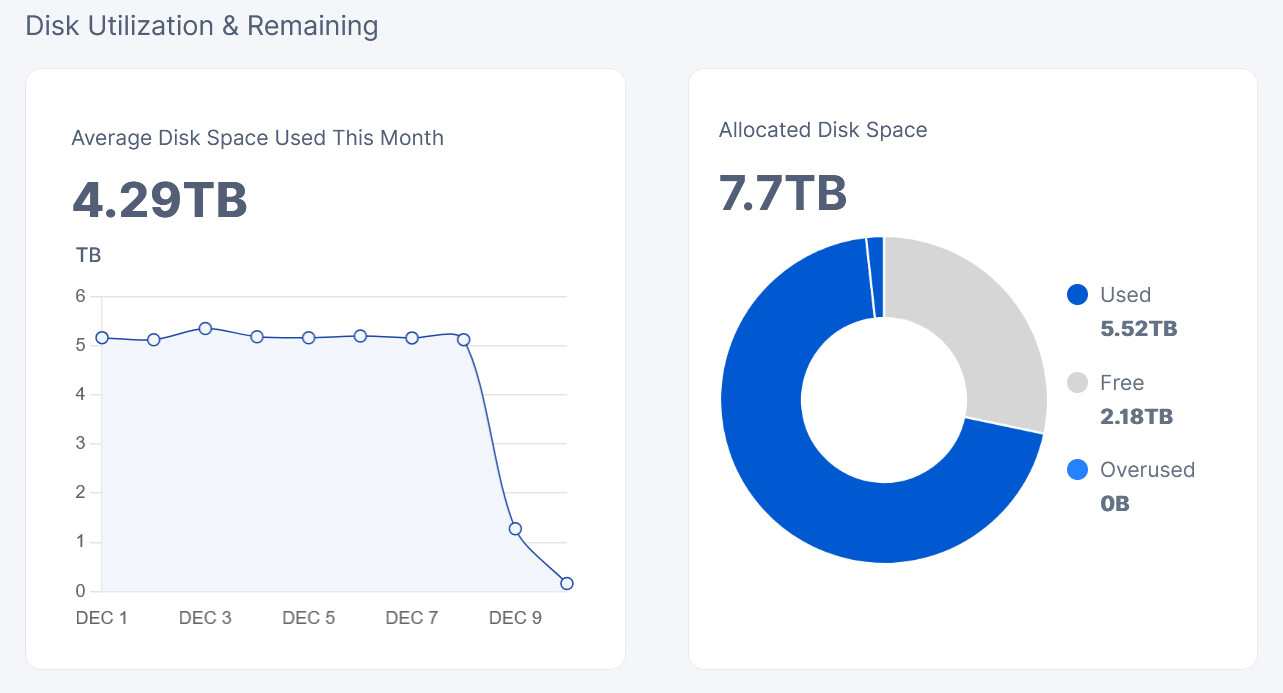
Allocated disk space display still broken in v1.143.3. Delete all databases did not help.
Good morning, after updating the node to the new version v1.143.2, the space used by Storj is broken. I’ve deleted the databases to reset it, but it’s still the same. Also, since it became broken, it’s not receiving any data.
Vadim
December 10, 2025, 8:42am
8
So downgrade it back, because you is not supposed to update it, until it is written in version.storj.io
elek
December 10, 2025, 9:46am
9
It’s not receiving data, because you have too much, not because the UI is broken.
Based on what I see in the code.
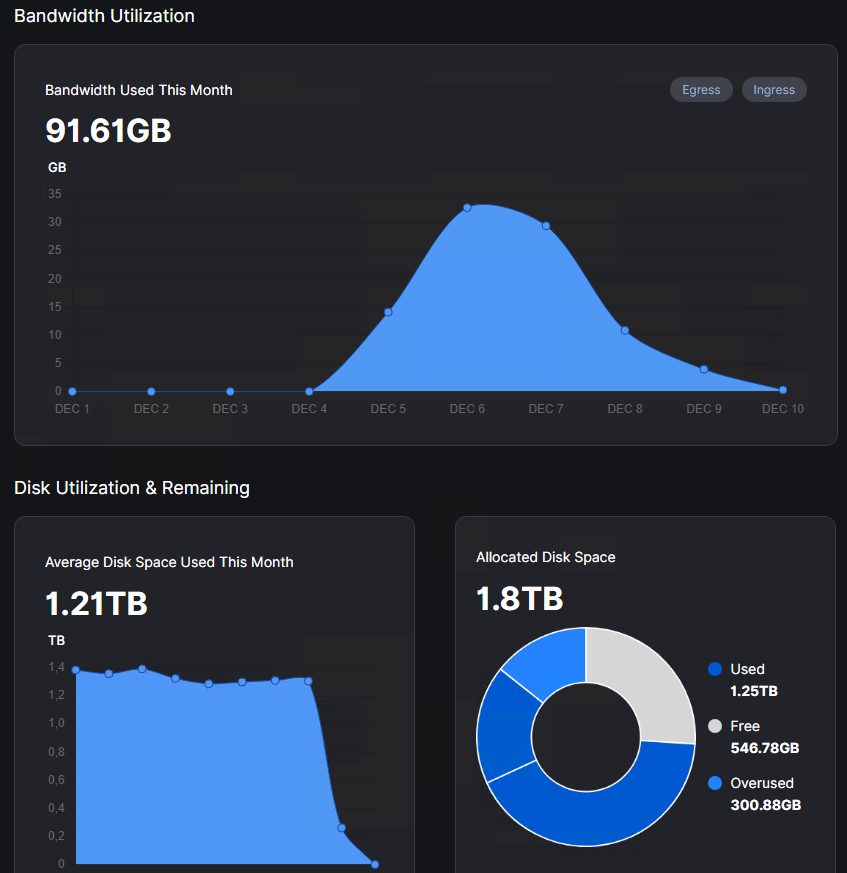
Used/Free display is not reliable (working on this), overused must be true.
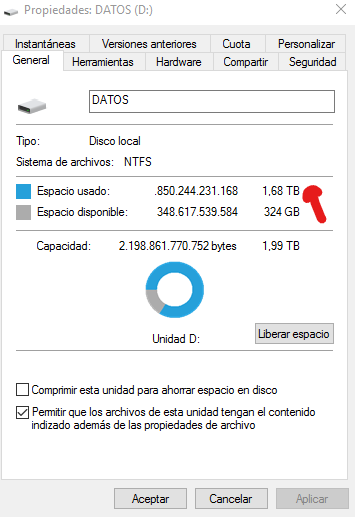
According to Windows disk space, it says 1.68 TB is in use. Therefore, the node should have approximately 100 GB of space left to receive data, which is why it’s strange that it indicates it’s already full.
100 GB isn’t critical, but it’s confusing because I also can’t see the garbage collection to check what’s happening.
elek
December 10, 2025, 5:20pm
11
v1.143.4 is just released. Please test that one. There is a small fix related to the UI (I am still testing it, but you can also do).
For non-ui related problems, best to share the content of this URL:
http://localhost:14001/api/sno/ (this is an endpoint on the storagenode console)
The most important part is nodeId (what I can use to check what is the free space according to the satellite), and diskSpace (used on the UI to display free space).
The third important information is whether you use dedicated or shared (default) disk space calculation. (If you don’t understand this question, you use shared). The dedicated disk space calculator uses some reserved pool which couldn’t be used.
1.43.4 windows, hashstore, no dedicated disk.
Vadim
December 10, 2025, 5:44pm
13
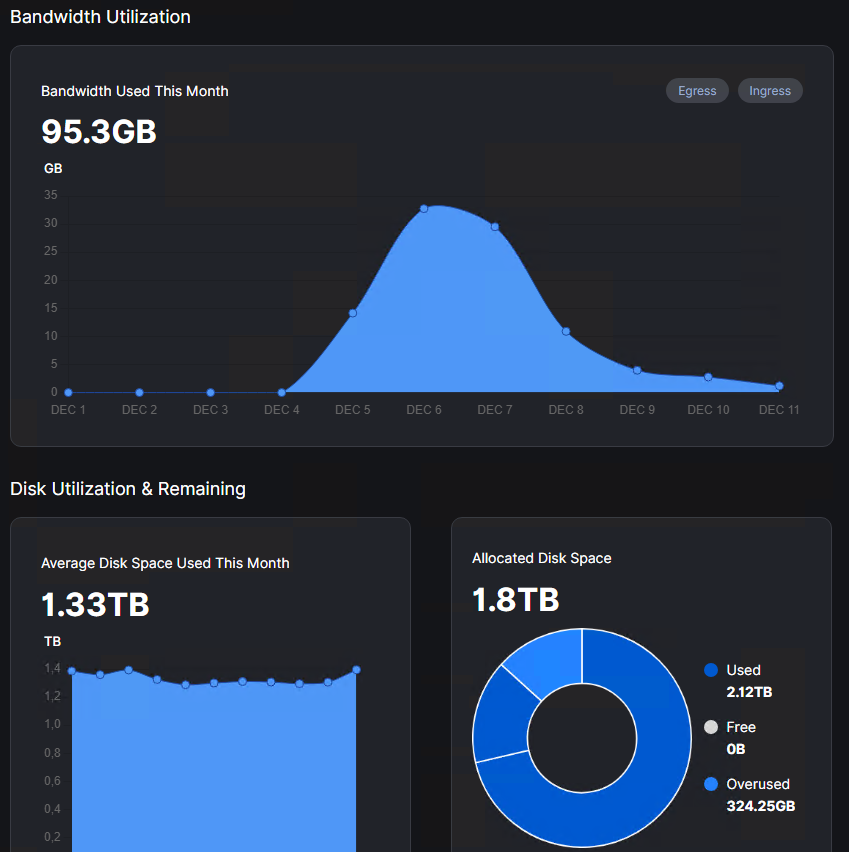
it also looks that sattelite not report used space, I have something like this picture.
Vadim
December 10, 2025, 5:47pm
14
why there is no trash any more? also dead bytes can be also qualified as trash.
elek
December 10, 2025, 8:40pm
15
There are too many categories (trash, reserved, reclaimable, etc.). Doesn’t fit easily on the right side. Instead I tried to add categories only to doughnut (move mouse over the two blue parts. There should be tool tips).
Trash represents the trash which couldn’t be deleted, yet.
“dead bytes” are called “reclaimable”, and counted as a separated category, as they can be deleted immediately.
I don’t have nodes on 1.143 yet.
What I would like to see and have in the API without any quirks is:
Space occupied and paid
Space occupied and unpaid
(Space up for deletion if not 2.)
Allocated Space
Free space
And of course the numbers should align with the CLI dashboard which was more accurate displaying the free space and the OS.
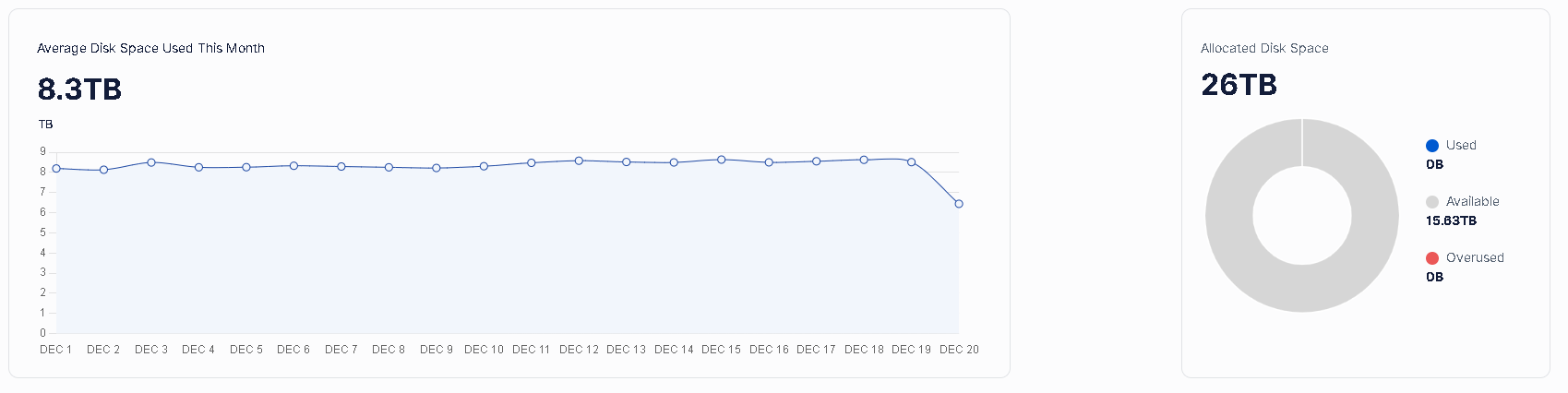
I tested version v1.143.4, and now it appears like this on my dashboard:
I’ll send you the data I obtained from http://localhost:14002/api/sno/ privately so you can review it.
Regards
Just an idea. If you would use a stacked bar chart, the graph area would be narrower and there would be enough space on the right side for the data labels.
Roberto
December 20, 2025, 1:18pm
19
multinode dashboard
Vadim
December 28, 2025, 11:58am
20
I tried this version, now it looks like it show all data as used, but we dont understand how much is useful data there, is it possible to categories useful, trash, available. Overused is not really useful, I will see it if there is difference between allocated used + trash, dead data cold be also just a trash, because it what it really is.