Hello,
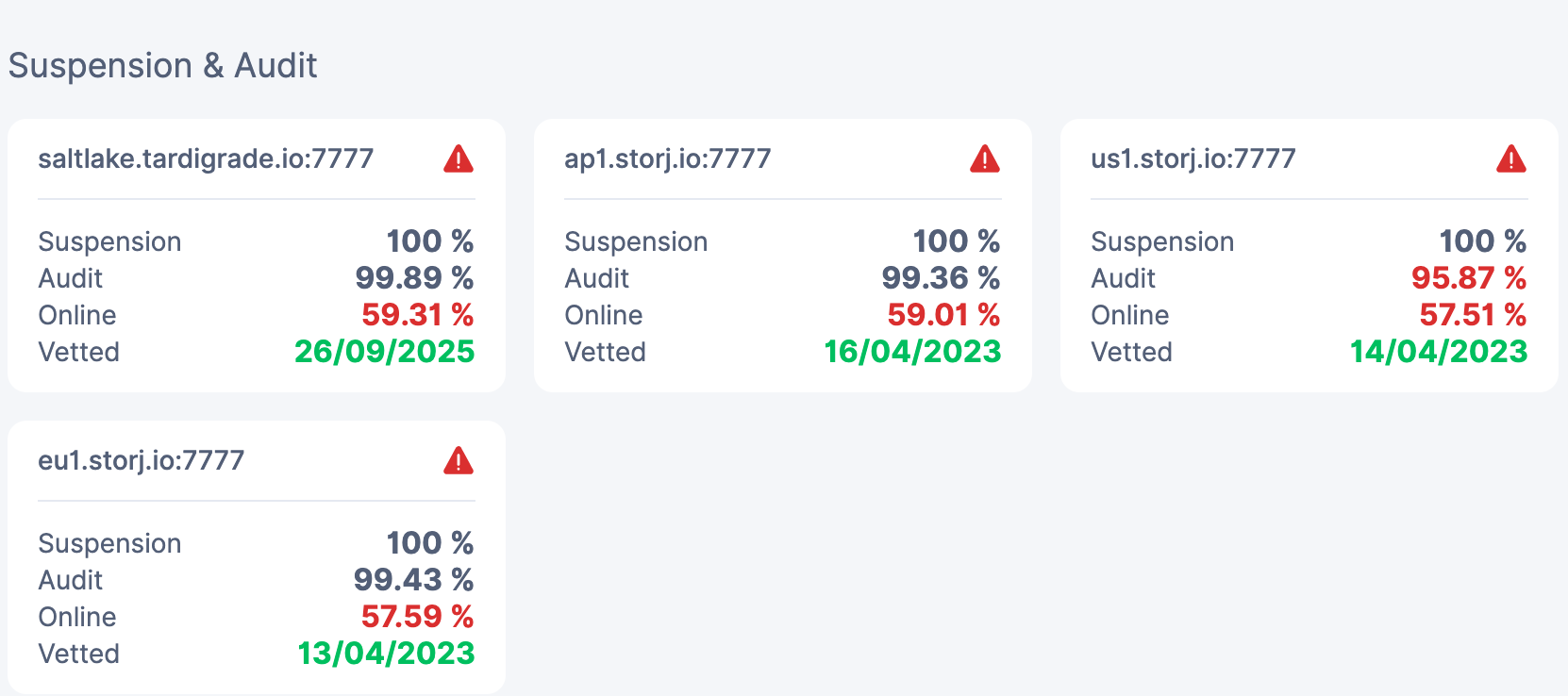
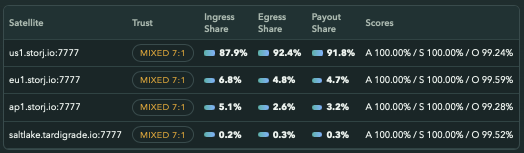
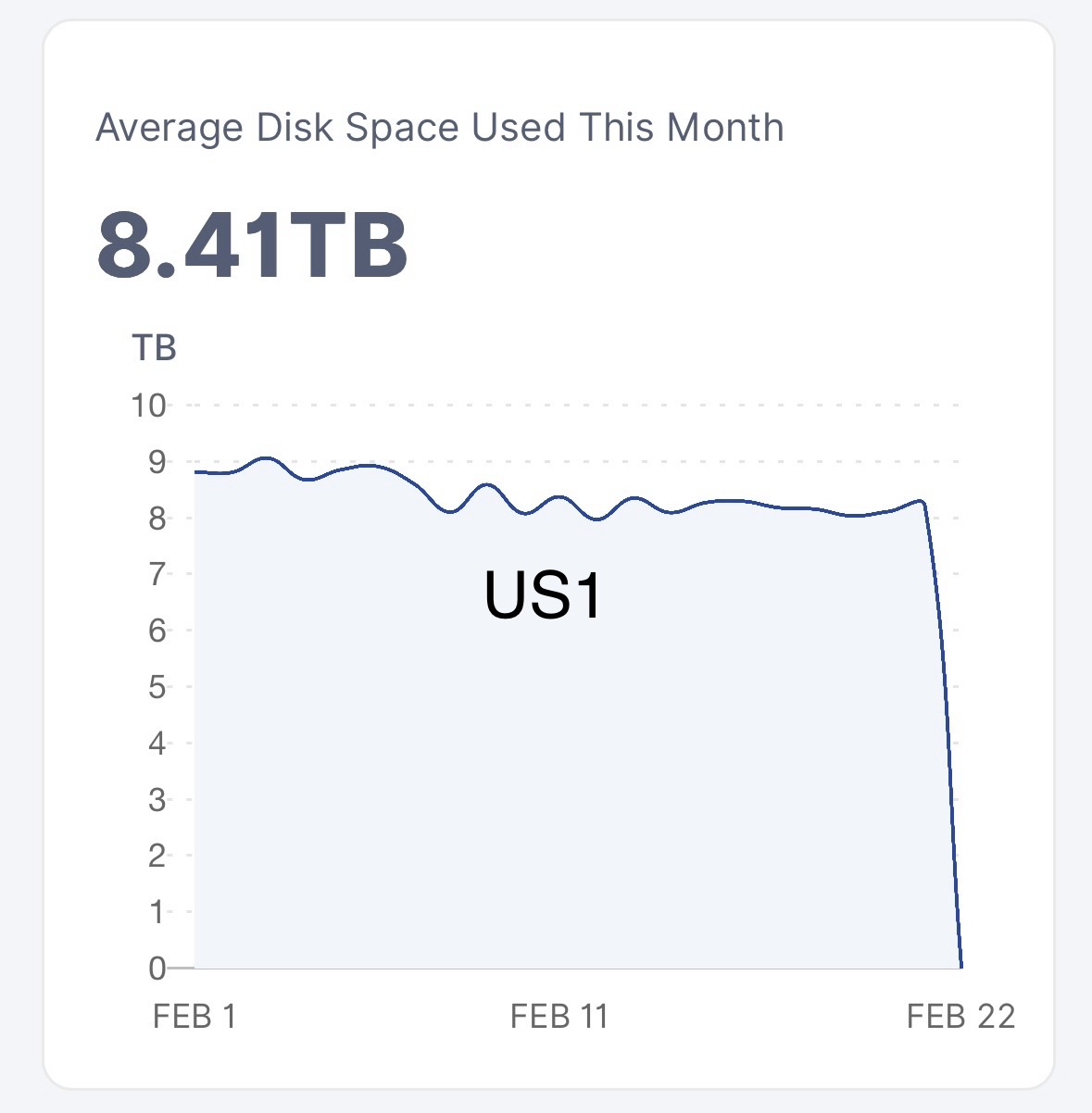
Due to my own mistake some files on my node got corrupted. I therefore got disqualified on 1 satellite (US1 audit 95.87%, which happens to be around 70% of data/earnings unfortunately; about 6TB out of 8-9TB).
Is there a possibility to wipe that data of this satellite and reset it so that the other 3 can continue to work?
Or is the only option to start with a new identity on a different drive and a graceful exit from the other satellites on the existing drive?
I did see a similar request in 2020 in the forums, but hopefully things have changed
The disqualification is irreversible and permanent. You can go ahead and delete the entire US1 folder if you want, it won’t play any difference. Don’t touch the other satellite folders if you don’t have any dataloss there, and they’ll continue to be unaffected.
The US1 folder is named ukfu6bhbboxilvt7jrwlqk7y2tapb5d2r2tsmj2sjxvw5qaaaaa. See information about the others here
I’d suggest starting a new node, and running two nodes on the same subnet. That way, the new node will be getting traffic from US1 again. The three other satellites will have a roughly 50/50% split between data.
Course of action, if I was you:
Today: Create new node and put it to use
10 months from now: New node is fully vetted and held back period is over. At this time, cap the size of old node to what it’s currently at that time; all data will go to the new node; old node will stay the same size for ever - new node continues to grow
Put the DQed satellite on the blacklist, in the config, and start a new node with new identity, and in it’s config, blacklist the other satellites.
This way you have one node that runs for 3 sats and 1 node for the forth sat. They won’t share any traffic.
The black listing on the new node should be done after the setup step and before the normal run command, by editing the newly created config.
The second course of action whould be the Ottetal way: set the allocated space to 10GB (you must edit 2 params - 1 in the config - minimum allowed, and 1 in the run command - allocated). Delete the US1 sat and blacklist it in the config.
Start the second node with new identity on all sats. The first one will loose data naturaly, from client deleting data in time. When it’s almost gone, Graceful exit from the remaining sats.
If you don’t find the config params, let us know.
Edit: thinking about it, the second way it’s better. Running 2 nodes on the same drive will create problems with space management, and they influence eachother reducing performance. So you must ditch the first one entirely.
Yesterday I setup a second node (in TrueNAS Scale as another Instance). Currently they are on the same drive in a different dataset/folder of course.
They use the same local IP but with different ports and port forwarding.
The new node is doing fine so far. With currently a 100mb/line (no fiber yet, will be 1Gb ina few months), the drive can handle 2 nodes I think?
The New US1 sat is today at 8GB out of 13GB total. That will take 2-3 years again ;-(
I read that deleting US1 happens automatically after 7 days and it is better not to mess around with the structure manually? US1 was DQ at 95.87%, too bad.
The other sats are slowly recovering (I was down for 12 days trying to recover the node), so almost at 60% again at online with 100% suspension and 99+% audits, these should be fine.
Why should i blacklist US1 on my failed node? Will it hurt to not touch it?
To get rid of useless stats. It will not show up on your dashboard anymore. I don’t know about auto deletion. I’m not sure if the sat will send bloom filters to DQed nodes or if the deletion is triggered automaticaly on a DQed node. Who knows this, could answear you.
I also did a graceful exit from the other 3 nodes because I had a decent amount held back (on saltlake, from the old test data surge). Once the graceful exit was over I deleted it.
To remove it from the dashboard. The data of the satellite which DQ your node will not be deleted automatically anyway, so you need to get rid of it manually (please carefully check the folder: Satellite info (Address, ID, Blobs folder, Hex)).
There is maybe a better way is to use this feature:
For US1 it will be
The --force flag will also delete its data. Please note: it will also remove a payouts history from the local database.
Thanks for the help. I will remove the US1 data to free up the TBs of space.
What would be nice to see though if the vetting of a new node would be quicker when the node sees that it is coming from the same IP or domain name that had a good reputation for 3 years. Even better would be “intra-node” transfer, but I understand why not.
I see vetted + unvetted node sharing one IP is doing better in terms of ingress than having both nodes vetted. So no reason to change things in my opinion.
The sat dosen’t know how each setup is performing, even if it is on the same IP as the other nodes. You could have a patato and an enterprise grade rig, both on the same IP. Each node is unique. The reputation of one node/IP/operator dosen’t translate to the other.
Thanks.
I understood that only after 59% online you get unsuspended.
However this morning I got an email I am unsuspended from Europe and I see I have an normal ingress of 3GB so far on EU1 only.
However, when I look at my scores, I would expected that saltlake and ap1 got active, but so far not.
Perhaps using same IP does help with old and new node?
This has a consequence of any random data loss getting detected by US1 satellite first, and then by other satellites.
This means:
you probably also have lost data in other satellites, it will take longer to detect – unless you have good reasons to believe it only affected US1 folder?
Therefore, keeping other satellites running is pointless, because they contribute less that 10% of value, while requiring the same amount of maintenance.
I would nuke the node that sustained loss and start over, clean.
Thanks, I am in Europe and have always been while running this node
US1 is just the most popular one it seems.
I was trying to recover for about 12 days as I already had a snapshot I was transferring to another drive and used rsynced to do the rest. So I hope the other satellites survive so far. The US folder was probably too big (too large number of files) to get fixed though statistically it should have had a better chance of survival I think as the data lost is very small compared to the satellite size. But bad luck strikes I guess.
As suggested before, when I get vetted on the new node, I will gracefully exit this old node. This will take a few months.
I am still confused why today I had zilch ingress on saltlake and AP1, but a few gigabytes on normal ingress on EU1 while that one has the lowest online stat. (still the same as from the picture this morning at 57.59% < 59%)
Hello,
I have run /app/config/bin/storagenode forget-satellite --force 12EayRS2V1kEsWESU9QMRseFhdxYxKicsiFmxrsLZHeLUtdps3S --config-dir config --identity-dir identity inside my docker container and it took days but it has removed my folder (in blobs and trash) of this US1 satellite.
I also needed to manually change the config.yaml though with:
# list of trust exclusions
storage2.trust.exclusions: "12EayRS2V1kEsWESU9QMRseFhdxYxKicsiFmxrsLZHeLUtdps3S@us1.storj.io:7777"
the latter part of us1.storj.io:7777 is essential I noticed else it remains on my dashboard.
As it took days (I think 5) to “forget” this node, my node was about 3TB over-provisioned and thus stopped normal ingress. This was fixed this morning fortunately.