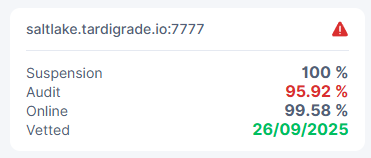
Saltlake Satellite Disqualified on one node only

Hi

On Saltlake Satellite Node: 12ngDut57JmeSMhpLQiGCXaA3uMtcMGvf4YcoudmUsVPqBPKUDr OR 1wFTAgs9DP5RSnCqKV1eLf6N9wtk4EAtmN5DpSxcs8EjT69tGE. Received both Node numbers??
I have been disqualified.
Works fine on another Node.

Can it be re-instated as all the other figure appear to be fine.

Thanks
wvander

Being disqualified is irreversible, and will happen if you fall under an audit score of 96%

Audit’s will be failed if the node is challenged for a piece that it does not have. If the node is not online, it cannot be challenged for a piece, and will take a hit to the online score instead.

Saltlake is the testing satelite, and currently houses ~5GB worth of data on all of my nodes, so I would not care too much about it.

But I would care that I’m having audit issues in the first place. Having audit issues means you have missing pieces, which could indicate bit rot, damaged files, missing files or something completely different.

I’ve been disqualified on a few nodes after migrating from one disk to another, and not doing it properly. This was my fault, and that’s OK. If audit score drops without you immediately being able to say “oh, that’s why”, you should investigate the underlying issue.

If this is a general purpose NAS, the issue could be affecting your other files as well.

3 Likes

Thanks for information.
I am using Windows.
Not sure how to check for “bit rot”. Any help appreciated.
Also would the log file give any clues?

Thanks
wvander

Hello @wvander,
Welcome back!

You can use this guide to troubleshoot a reason for audit failures:

If you used an USB connection, then I would like to suggest to check the cable, the external power supply and the enclosure or better to make an external drive to be internal.
Please stop the node and check the disk for errors and fix them. If check disk utility would find errors and fix them, you need to run it again, until all errors are gone.

Thanks Alexey. Not a USB drive. Drive checks out OK so far. Hopefully just a glitch.

There is no such thing as “just a glitch”.

You need to dig into logs and find reasons for disqualification and track down problematic pieces.

2 Likes

Unfortunately, @arrogantrabbit is right, there is no glitch, it’s a data loss/corruption and it may affect all other satellites on that node as well.
So, it’s better to figure out a reason and try to fix it.

1 Like

I love the phrasing :smiley:

5 Likes

OK I will check the logs.
But the disk did check out OK.

Thanks for the push. I will report back, probably with questions… :face_with_raised_eyebrow:

1 Like

Hi

The other satellites on the same Node and drive are all fine for AUDIT. Currently 99.77% and 100%

Checked the Harddrive and it checks out fine.

I have also been examining storagenode.log for the Saltlake statellite specifically Repair|Audit failures using the script for WindowsGUI Powershell.

Three "error"s appear “EOF”, “footer too small” and “footer length field too large: 64246 > 512”. Examples below.

Not sure what to deduce from this information.

Any advice gladly accepted.
wvander

C:\Program Files\Storj\Storage Node\storagenode.log:188399:2026-01-10T21:10:37+11:00 ERROR piecestore download failed
{“Piece ID”: “SZ2QVVCCXER6ATNJLECGZDUELFSNJSZLM2LBVHM5Z27EN6H4AGFQ”, “Satellite ID”:
“1wFTAgs9DP5RSnCqKV1eLf6N9wtk4EAtmN5DpSxcs8EjT69tGE”, “Action”: “GET_AUDIT”, “Offset”: 1611520, “Size”: 256, “Remote
Address”: “35.215.82.113:27519”, “error”: “EOF”, “errorVerbose”: “EOF\n\tstorj.io/common/rpc/rpcstatus.NamedWrap:106\n
tstorj.io/storj/storagenode/piecestore.(*Endpoint).sendData:874\n\tstorj.io/storj/storagenode/piecestore.(*Endpoint).Do
wnload.func7:772\n\tgolang.org/x/sync/errgroup.(*Group).Go.func1:93”}
C:\Program Files\Storj\Storage Node\storagenode.log:188769:2026-01-10T21:15:58+11:00 ERROR piecestore download failed
{“Piece ID”: “26S3L5ZTRKNDO34FERDXBP2F2O7AXUVBVZK46QPUS67AR4GYYODQ”, “Satellite ID”:
“1wFTAgs9DP5RSnCqKV1eLf6N9wtk4EAtmN5DpSxcs8EjT69tGE”, “Action”: “GET_REPAIR”, “Offset”: 0, “Size”: 2319360, “Remote
Address”: “178.156.150.202:40111”, “error”: “footer too small”, “errorVerbose”: “footer too small\n\tstorj.io/storj/sto
ragenode/piecestore.(*hashStoreReader).GetPieceHeader:393\n\tstorj.io/storj/storagenode/piecestore.pieceHashAndOrderLim
itFromReader:16\n\tstorj.io/storj/storagenode/piecestore.(*Endpoint).Download:711\n\tstorj.io/common/pb.DRPCPiecestoreD
escription.Method.func2:302\n\tstorj.io/drpc/drpcmux.(*Mux).HandleRPC:33\n\tstorj.io/common/rpc/rpctracing.(*Handler).H
andleRPC:62\n\tstorj.io/common/experiment.(*Handler).HandleRPC:43\n\tstorj.io/drpc/drpcserver.(*Server).handleRPC:166\n
\tstorj.io/drpc/drpcserver.(*Server).ServeOne:108\n\tstorj.io/drpc/drpcserver.(*Server).Serve.func2:156\n\tstorj.io/drp
c/drpcctx.(*Tracker).track:35”}
C:\Program Files\Storj\Storage Node\storagenode.log:379862:2026-01-11T16:40:08+11:00 ERROR piecestore download failed
{“Piece ID”: “NEON3JYIUG4WVDURAMZ4JQ4J6CJW7WEBHIP2JKGAKQRDA4I7OFGQ”, “Satellite ID”:
“1wFTAgs9DP5RSnCqKV1eLf6N9wtk4EAtmN5DpSxcs8EjT69tGE”, “Action”: “GET_REPAIR”, “Offset”: 0, “Size”: 2319360, “Remote
Address”: “178.156.150.202:15264”, “error”: “footer length field too large: 64246 > 512”, “errorVerbose”: “footer
length field too large: 64246 > 512\n\tstorj.io/storj/storagenode/piecestore.(*hashStoreReader).GetPieceHeader:397\n\ts
torj.io/storj/storagenode/piecestore.pieceHashAndOrderLimitFromReader:16\n\tstorj.io/storj/storagenode/piecestore.(*End
point).Download:711\n\tstorj.io/common/pb.DRPCPiecestoreDescription.Method.func2:302\n\tstorj.io/drpc/drpcmux.(*Mux).Ha
ndleRPC:33\n\tstorj.io/common/rpc/rpctracing.(*Handler).HandleRPC:62\n\tstorj.io/common/experiment.(*Handler).HandleRPC
:43\n\tstorj.io/drpc/drpcserver.(*Server).handleRPC:166\n\tstorj.io/drpc/drpcserver.(*Server).ServeOne:108\n\tstorj.io/
drpc/drpcserver.(*Server).Serve.func2:156\n\tstorj.io/drpc/drpcctx.(*Tracker).track:35”}

I had a similar issue with salt lake a month or so ago after changing hardware on one node. Saltlake decided it didn’t like this particular node - and similarly as with your situation, all the other satellites were and still are fine, having no issue.
This is mean the piece corruption. You may use this tool to check checksums:

No one disqualification reason is similar, unless it’s the same node.