Hey everyone,
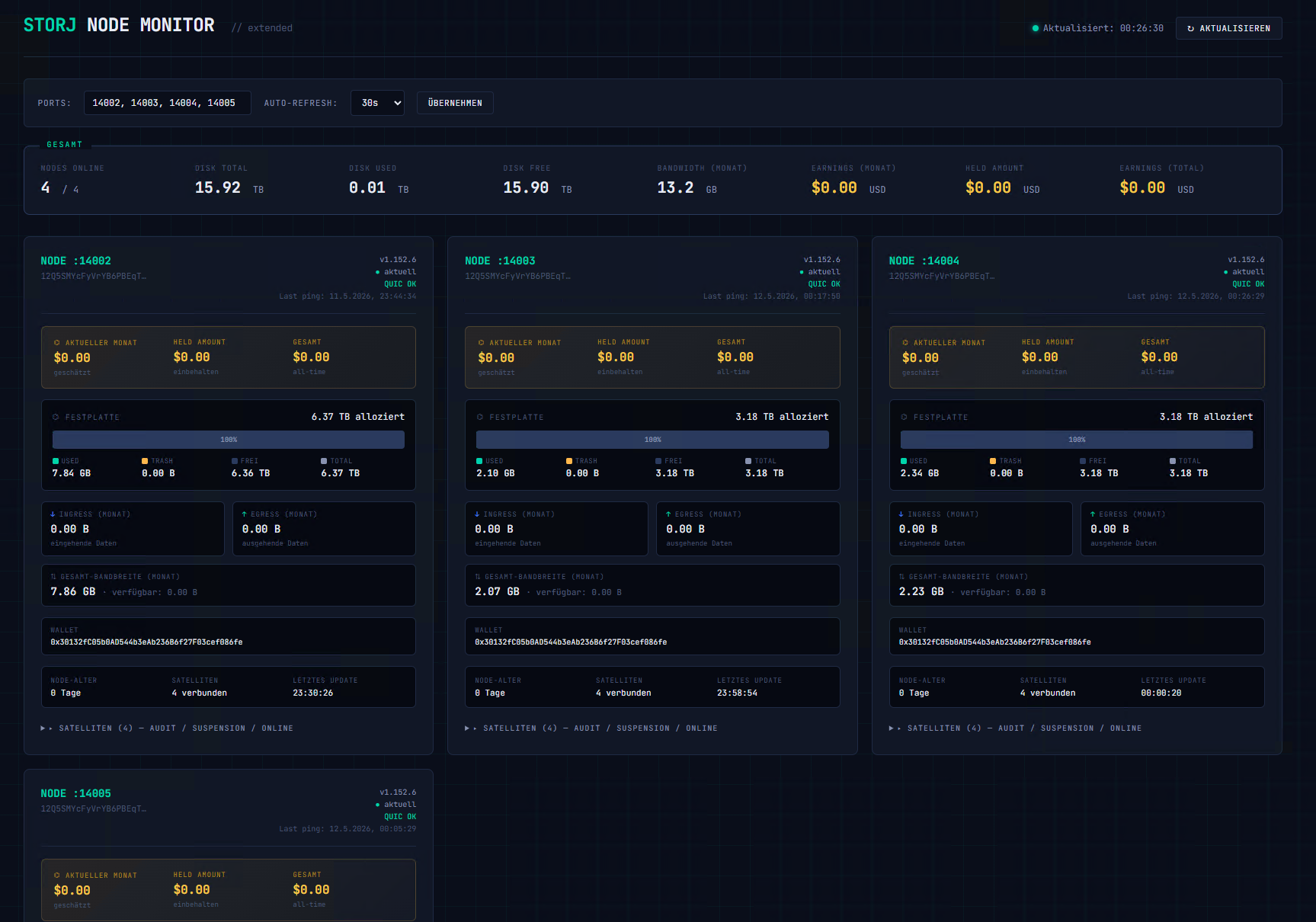
I’m running multiple storage nodes on the same machine and got tired of opening 4 browser tabs every time I wanted to check on them. So I built a small tool that aggregates all my node dashboards into a single overview page.
Sharing it here in case anyone else finds it useful.
What it does
It’s a tiny Python script that runs locally on your machine and acts as a proxy + dashboard in one. It queries the existing API of each of your nodes (/api/sno, /api/sno/satellites, /api/sno/estimated-payout) and displays everything on a single page.
For each node you get:
-
Disk space breakdown (used / trash / free) with a stacked bar
-
Bandwidth usage for the current month (ingress / egress)
-
Estimated earnings, held amount, and all-time earnings
-
Satellite scores (audit / suspension / online) for each connected satellite
-
Node age, version, QUIC status, last ping, wallet address
At the top there’s a “total” section that sums everything across all nodes: total disk, total bandwidth, combined earnings, etc.
The page auto-refreshes (configurable, default 30 seconds) and you can change which ports to monitor directly in the UI.
Why a proxy?
Browsers block direct cross-origin requests to localhost, so a static HTML file can’t talk to the node dashboards directly. The Python script acts as a middleman: your browser talks to the script, the script talks to the nodes. Solves the CORS problem cleanly.
Privacy
Everything runs locally on 127.0.0.1. No data leaves your machine. The only external resource the dashboard loads is Google Fonts for the typography — if you don’t want that, you can remove the <link> line at the top of the embedded HTML.
Requirements
-
Python 3 (standard library only, no
pip installneeded) -
Your nodes’ dashboards reachable on
127.0.0.1(the default Storj setup)
Installation
1. Install Python (if you don’t have it):
On Windows, open PowerShell and run:
winget install Python.Python.3.13
Then close and reopen PowerShell. Verify with py --version.
On Linux/macOS, Python 3 is usually already installed.
2. Save the script somewhere (e.g. Desktop) as storj-monitor.py.
3. Run it:
Start-Process py -ArgumentList "storj-monitor.py" -WindowStyle Hidden
(On Linux/macOS use python3 instead of py.)
4. Open your browser at http://localhost:8080
That’s it. By default it queries ports 14002, 14003, 14004, 14005. You can change the ports in the input field at the top of the page.
Running it permanently (Windows)
If you want it to start automatically with Windows and run in the background without a console window:
-
Press
Win+R, typeshell:startup, hit Enter -
Right-click in the folder → New → Shortcut
-
Target:
pyw "C:\path\to\storj-monitor.py" -
Done — restarts with Windows, no visible console
For a more robust setup with auto-restart on crash, you can register it as a scheduled task instead.