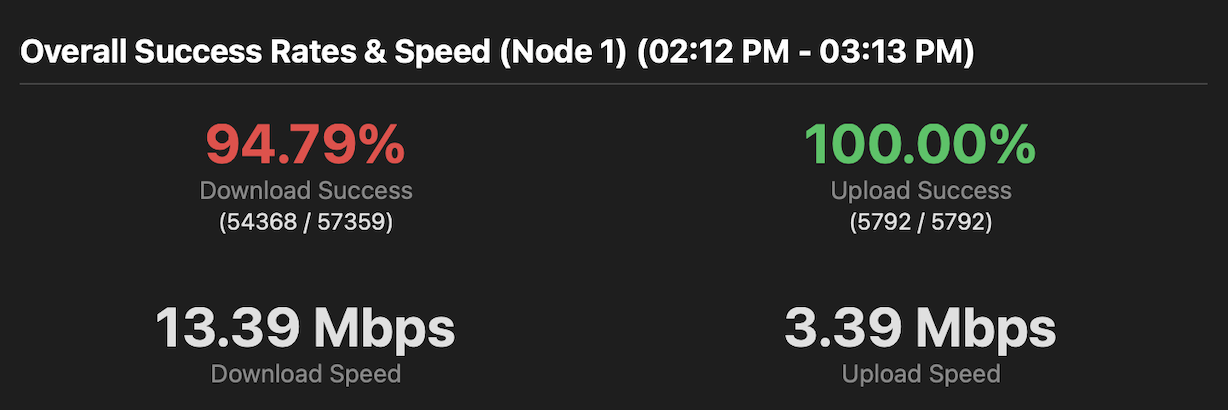
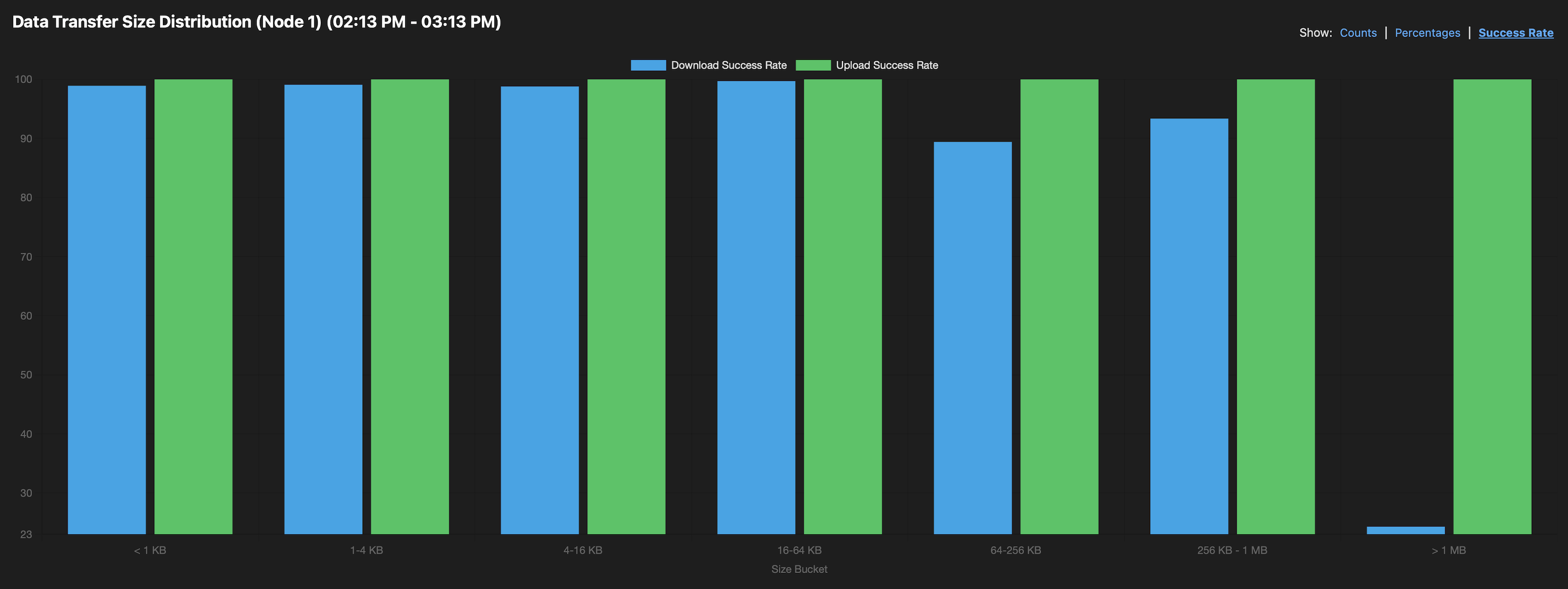
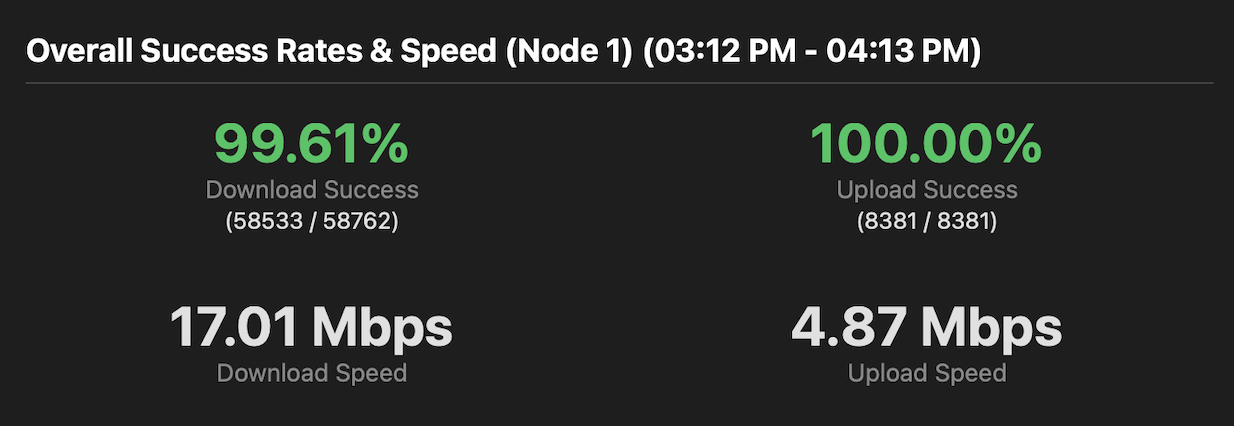
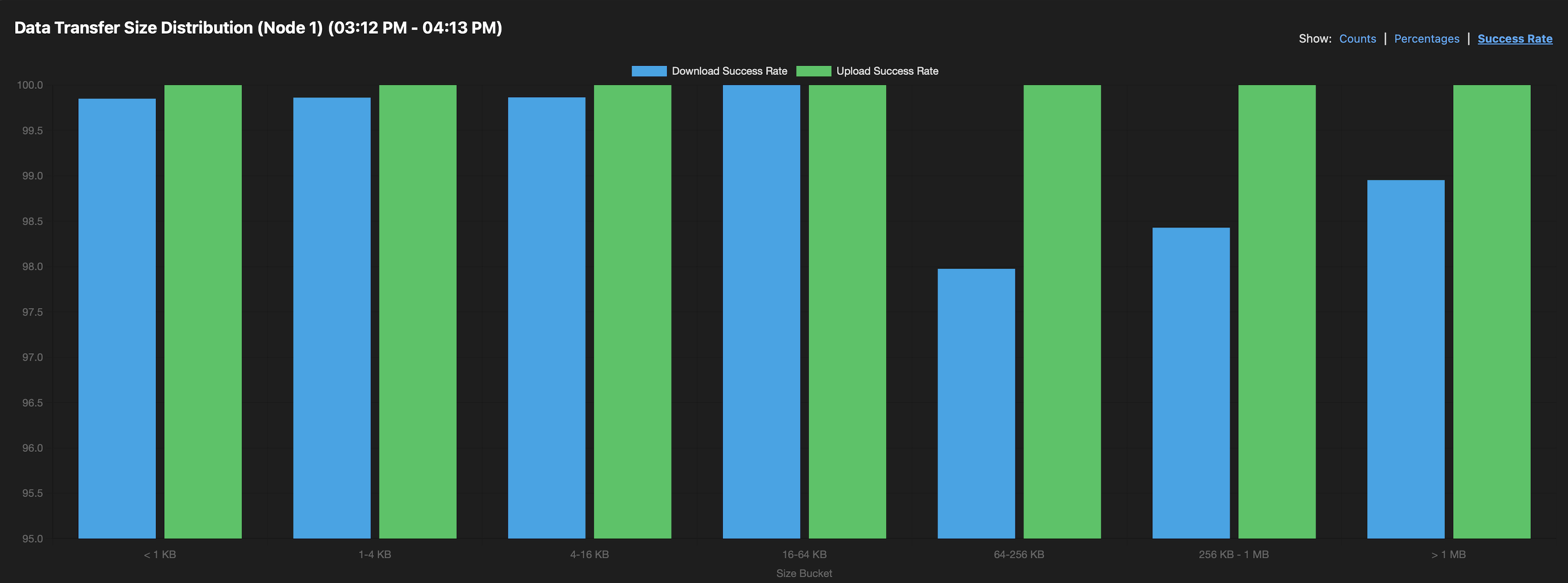
Not only success rate is higher, but effective throughput also increased, overall internet browsing speed increased, and everything feels more responsive, while consuming less bandwidth. Because the pipe isn’t bogged down by nonsense.
so, if you don’t SQM – you are missing out. There are no downsides. Turn on SQM now. And if your gateway does not support SQM – perform emergency defenestration and get the one that does.
If I were bandwidth-constrained, I’d probably implement some solution inside storagenode. Like, literally, even something as simple as “don’t continue with a new download (like, reading data from disk) if existing downloads already total up to some threshold uplink bandwidth value”. IIRC per Storj Inc. statements so far that would be acceptable behavior, and would make healthier I/O patterns too (-:
This will inevitably leave some bandwith unused. aka wasted. That’s why conventional QoS is bad. I want to use 100% of bandwidth. But fairly, and without increasing latency.
Probably depends on whether the “wasted” bandwidth contributes to races won, or lost. If the latter, reducing the threshold would let you win more races.
Right. Conventional QoS or bandwidth limiting is static, it is designed to partition availale resource and prevent the specific consumer from hogging the whole pipe. But this means that even when there is nobody else wanting to use the resource, the consumer is still prevented from hogging the whole pipe – even though it totally could with no ill effects.
SQM is designed to solve this – give everyone access to full pipe, allow to use evely last bit of bandwith, but prevent overuse and latency spikes.
So both things are true - you want low latency, and you want all available bandwith. SQM give you that. Classis QoS does not.
I’ll just add that this is useful only if your connection is near saturation or saturated. If you have, say, 500mbps connection and the traffic is 30mbps, SQM won’t do anything. It likely won’t hurt, but don’t expect any appreciable success rate increases.
Absolutely. In fact, it totally can hurt: most providers allow for much higher peak speeds (speed bursting) in the begining of the transfers.
For example, if you have 50Mbps channel, you can see 200Mbps bursts – this improves experience a lot on slow connections. But once you enable SQM – ypu will never see more than 48-49.
You are trading predictability and low latency for bursty peak performance.
So depending on what you do – you can turn it on or off.
My downstream is 1500Mbps. BUt if I enabel SQM – I barely get 800Mbps. My UDMP does not even allow to put anythign above 1000 into the configuration box. But the upstream is just 35Mbps. I do get 50Mbps, with horrible latency. So, for the most part I have SQM On – but if I really need to download something as fast as humanly possible – I temporarily disable it.
If your connection is so asymmetric, you can enable SQM just for the outgoing packets. No need to limit the incoming ones (trafic shaping does not work that well on receiving end anyway).
You are a genius. There is no way to only enable upstream sqm in UniFi UI, you have to specify both, but I could cheat and delete download queue manually. Will try this today.
Edit. Evidently, I could put 0 as download speed, and it accomplishes the same . It’s probably a new feature, because it tried it before, and UI would reject it.
My router is Linux, I can set queues for each card separately. I have set some priorities on my backup connection, since it is only 10mbps upload, not sqm though.
SQM or AQM is only effective for buufer bloat when the link on the other side is slower. So, on your downlink, it’s just a waste of CPU cycles (unless your LAN is slower than your Internet downlink).
I see reports that many Ubiqiti devices struggle at speeds over 300M and SQM.
Funny enough, most of my home network is 1 gigabit. And internet is 1.2-1.5Gbps. So yeah
On the other hand – bufferbloat is not an issue at such speeds because it’s close to design capacity of the equipment.
It depends on the device. The original USG-3 woudl max out at 30Mbps. When I had 12 Mbps upstream (lol) that was a lifesaver. USG-4-Pro I think could support up to 250Mbps. My (original) UDMP manages up to 750Mbps at least. But you can’t specify the limit higher than 1000 in the UI, and they don’t recommend using SQM at speeds above 300, so it’s sort of moot. Now that I can put 0 in there – it solved all the problems.
So true.. I switched from UBNT unifi gateways to Opnsense on a Protectli V1610 when I was able to get 2.5G internet at home.
If anyone considers one of these, it’s great but runs a little hot - so I’ve added a Noctua NV-FS2 on top.
I know.. they’re a marketing company, but this one actually runs dead silent and does the job well - though it’s overpriced.
Even at these speeds, I experienced gains in traffic flow using their much similar FQ-CoDel / FQ-PIE.
It’s causing a small loss in top-speed (100-150mbit) but the gains in responsiveness well outweighs that.
It is possible to use somethig like this in the opposite direction, but it’s less than ideal.
Basically, if I know that my connection is, say, 50mbps, I can use htb or something similar to limit the speed to 49mbps and then use SQM, priorities or whatever. This usually has to be done for upload as well, since the connection speed is slower than the interface speed (10M upload, but 100M interface). Basically, limit the speed so the queues start forming on my router (and not the ISPs equipment or the cable modem) and then manage the queues as I see fit.
Yes, but you can artificially move that spot to have better queue management. For example, let’s say the LAN connection to the cable modem is 1G, but the actual uplink is 100M down and 10M up.
That means, the queues will be forming on the cable modem (upload) and on the CMTS (download). I do not have control on the queues in either device.
So, what I can do is to limit the upload on my router to 9.9M and download to 99M. Now the upload speed goes something like this: LAN - 1G - router - 9.9M - cable modem - 10M - ISP. Download will go something like this Internet - 10G - CMTS - 100M - cable modem - 1G router - 99M - LAN
This will make upload queue to form on my router. The download queue will mostly form on my router as well, though not fully, but that’s the best I can do.
Then I can run any QoS or queue management on my router.
In practice, I only use priorities for the upload on my backup connection (which is 10M upload), so that browsing goes first and Storj goes last.
On some ISPs I have set up traffic shaping, I use htb and red for that.
For Buffer Bloat - There is little point to limiting your 100M download, if your LAN is 1000M, buffers should not fill - Your LAN can pass packets 10x faster than your WAN.
If your desire is to limit SMTP to 2M, or guarantee Storj 80M, give the Xbox highest priority and/or something else, then yes you may want/need queue/flow management in both directions.
Buffers will fill up in the ISP equipment though. If I, say, am downloading lots of torrents it may saturate the connection, fill the ISP buffers and then I will have problems. By artificially limiting download I make the buffers mostly fill up on my equipment and then can prioritize stuff.
It is generally not needed on 100M or faster connections though.
Another swing to my go-to appliances. After bashing my Synologies, now my Asus routers are targeted too.
I didn’t saw any SQM mentions in thier interface, only the QoS and bandwidth limiter.


 . It’s probably a new feature, because it tried it before, and UI would reject it.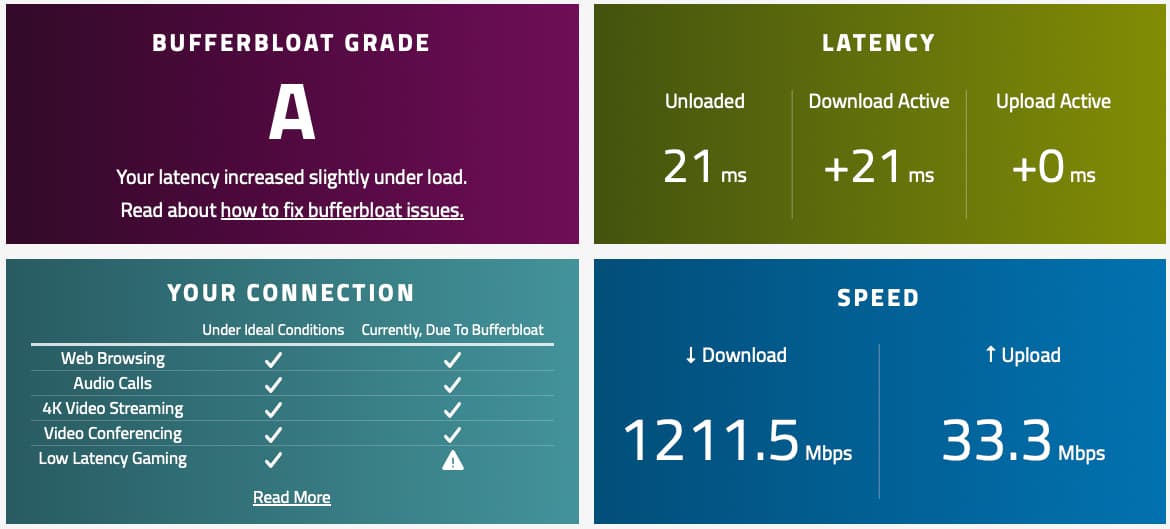

 )
) . We use to build routers for dial up connections. 14.4k…. Traffic shaping with traffic control, SFQ, Iptables.