У меня точно такая же ситуация


I think the garbage collection/bloom filter distribution might have been postponed for the last few weeks on certain satellites (maybe because of the bug present before 1.92, where it was exiting the loop when it encountered a file that didn’t exist), or it was configured in a way it did remove only a small portion of the actually deleted files.
I see the same thing on multiple nodes, where the trash was unusually low for a month or so and the satellite reported space usage for these nodes (the left graph) doesn’t correspond to actually used space on these nodes (the right graph).
Few days ago however it looks like the nodes received a bloom filter and are now in a process of deleting significant amount of files, so I think all these discrepancies will correct themselves in the coming weeks.
1 Like
Here is the link to forget the 2 decommissioned
You need to call a forget-satellite command like this:
This command will exit, when it will complete the data removal.
Please check again, when you remove the remained data of the untrusted satellites. If you would still have a discrepancy, then you need to search for errors, related to gc-filewalker, lazyfilewarker and retain.
Команда выше поможет удалить данные выключенных сателлитов. После этого проверьте, пожалуйста, останется ли расхождение. Если останется, нужно поискать в логах ошибки, связанные с gc-filewalker, lazyfilewarker и retain.
1 Like
Здравствуйте @Lyolin,
Добро пожаловать на форум!
У меня на одном из узлов по api - все хорошо и есть место, вот только физически места уже нет!
Были постоянно включены:
I have api on one of my nodes - everything is fine and there is space, but physically there is no more space!
The following were always included:
storage2.piece-scan-on-startup: true
pieces.enable-lazy-filewalker: true
Перерасход более 1,5Tb.
Я решил проверить дефрагментацию, с диском все ок и за 3-4 часа он весь перепроверялся, вот снимок:
Overconsumption of more than 1.5Tb.
I decided to check the defragmentation, everything was fine with the disk and in 3-4 hours it was completely rechecked and defragmented, here is a snapshot:

После этого я включил отладку и стал экспериментировать.
В итоге что включал обходчик, что включат ленивый, что отключал - результата нет.
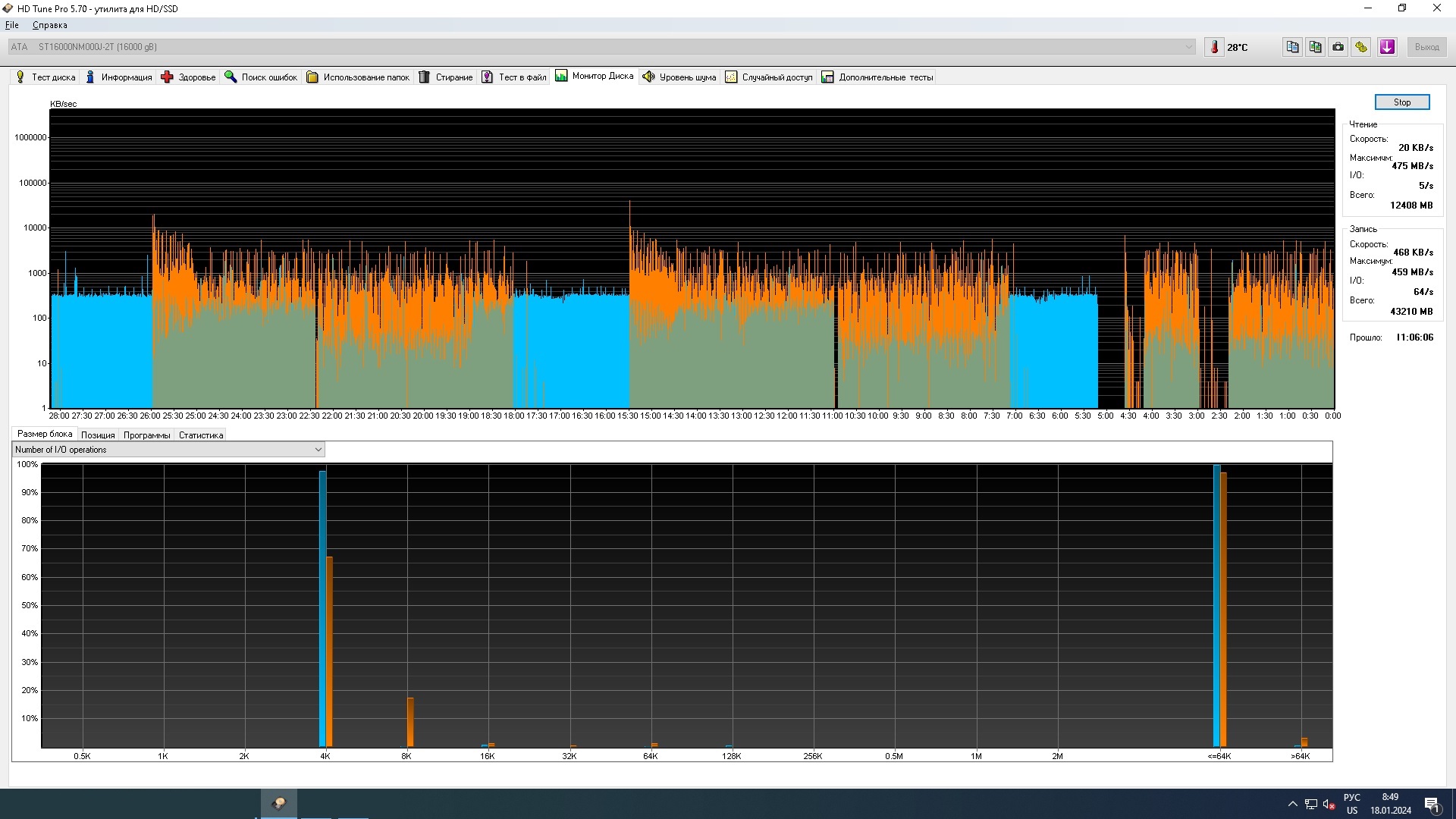
Вот снимок загрузки диска (места перезагрузки хорошо видны, менял конфиг и перегружал службу)
After that, I turned on debugging and began experimenting.
As a result, what the crawler turned on, what the lazy one turned on, what the lazy one turned off - there is no result (disk loading and the number of I/O operations are the same).
Here is a snapshot of the disk loading (the reboot locations are clearly visible, I changed the config and reloaded the service)
В итоге у меня сейчас в конфиге четко указано:
storage2.piece-scan-on-startup: true
storage2.enable-lazy-filewalker: false
При этом в логе при старте узла я вижу:
2024-01-18T10:00:12+03:00 INFO lazyfilewalker.used-space-filewalker starting subprocess {satelliteID: 1wFTAgs9DP5RSnCqKV1eLf6N9wtk4EAtmN5DpSxcs8EjT69tGE} 2024-01-18T10:00:12+03:00 INFO pieces:trash emptying trash started {Satellite ID: 121RTSDpyNZVcEU84Ticf2L1ntiuUimbWgfATz21tuvgk3vzoA6} 2024-01-18T10:00:12+03:00 INFO pieces:trash emptying trash started {Satellite ID: 12EayRS2V1kEsWESU9QMRseFhdxYxKicsiFmxrsLZHeLUtdps3S} 2024-01-18T10:00:12+03:00 WARN piecestore:monitor Disk space is less than requested. Allocated space is {bytes: 1324253151232} 2024-01-18T10:00:12+03:00 INFO lazyfilewalker.used-space-filewalker subprocess started {satelliteID: 1wFTAgs9DP5RSnCqKV1eLf6N9wtk4EAtmN5DpSxcs8EjT69tGE}
Помогите пожалуйста. Я хочу запустить максимально быструю проверку, а потом вернуть ленивый…
__
Help me please. I want to run the fastest possible free space check and delete unnecessary data (I have more than 1.5 TB more than needed), and then return lazy bypass…
Это говорит о том, что после изменения вы либо не перезапустили службу, либо не сохранили изменения в конфиге перед перезапуском. Lazy включаться не должен.
Потом необходимо несколько недель в таком режиме и чтобы ошибок для всех трёх filewalkers (used-space-filewalker, gc-filewalker, retain) не было ошибок для всех сателлитов.
That could mean that you either not restarted the service, or did not save the config before restarting the service, because it shouldn’t start a lazy filewalker in this case. The node should working for several weeks when the lazy filewlaker is disabled to see results. It’s important that all three filewalkers are completed their scans without errors related to used-space-filewalker, gc-filewalker and retain for all satellites.
-
Я перегружал службу с естественно сохраненной конфигурацией и прикладывал график загрузки акцентируя на это внимание.
-
Несколько недель это очень размыто звучит, а фактически у полностью исправного узнал есть время лишь до выхода обновлений ( GitHub - storj/storj: Ongoing Storj v3 development. Decentralized cloud object storage that is affordable, easy to use, private, and secure. - судя по ресурсу 2-3 недели в среднем, бывает и чаще)
-
Ленивый вроде как отключается и не указывается в логе если указать в конфигурации :
storage2.piece-scan-on-startup: true
pieces.enable-lazy-filewalker: false
Какие команды для обходчика и ленивого правильные?
- При таком отключении я не увидел возросшей нагрузки на диск которая свидетельствовала бы об активной работе обходчика
-
I overloaded the service with the naturally saved configuration and attached a loading schedule focusing on this.
-
This sounds very vague for several weeks, but in fact, a fully functional one has time only until updates are released (GitHub - storj/storj: Ongoing Storj v3 development. Decentralized cloud object storage that is affordable, easy to use, private, and secure. - judging by the resource, 2-3 weeks on average, it happens more often)
-
Lazy seems to be disabled and is not indicated in the log if specified in the configuration:
storage2.piece-scan-on-startup: true
pieces.enable-lazy-filewalker: false
What are the correct commands for the crawler and the lazy?
- With such a shutdown, I did not see an increased load on the disk, which would indicate the active work of the crawler
Несколько недель, потому что я не могу сказать, сколько понадобится успешных проходов до полного удаления мусора. Bloom filter покрывает не более 90% мусора за один раз. Фильтры посылаются сателлитами раз в неделю (иногда - два раза в неделю, если окно сдвинется). Поэтому - “несколько недель”.
Это без учёта аварийных и штатных перезапусков, которые могут прервать сканирование и обходчикам придётся начинать заново.
У вас настроено правильно.
I said “several weeks”, because I do not know, how long it may take. The Bloom filters are sending by satellites roughly once (sometimes - twice) a week, and the Bloom filter could cover not more than 90% of the garbage. So, it requires several successful loops to remove all garbage.
This is not accounting abruptly resets or usual restarts, when the scans will start over.
Your configuration options looks correct. Now we need to wait for several successful loops.
Спасибо
При этом будет происходить проверка файлов и ненужные удаляться?
Без ленивого проходчика будет больше приоритет у обычной проверки и она закончится быстрее?
Will the files be checked and unnecessary files deleted?
Without the lazy passer, will the regular check have more priority and will it end faster?
The lazy fw takes +50% longer time to complete, so yes, the non lazy will finish faster.
Да, обходчик будет работать с нормальным приоритетом, создавая больше нагрузки, и должен завершаться быстрее.
Yes, the filewalker will work with a normal priority and should finish the scan earlier.
1 Like