简体中文版本(Simplified Chinese version)
This article complements the official documentation; you still need to read the Storj Node Deployment Guide.
Preface
Storj is a rather niche project in China. According to statistics from storjnet.info, as of the writing date (December 24, 2025), there are only 48 nodes in mainland China, ranking 44th globally.
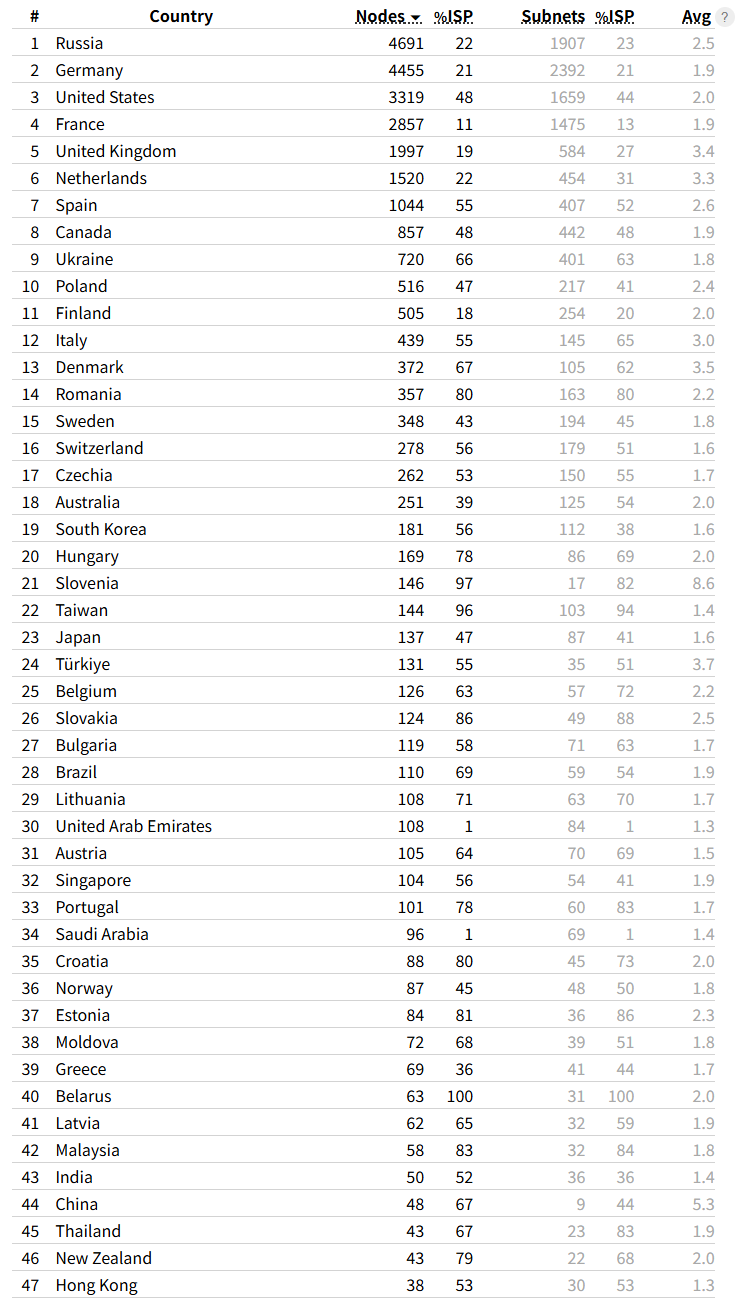
One contributing factor is the extremely high cost of commercial bandwidth in China, which has given rise to PCDN, a far more profitable alternative project.
Let me briefly explain the origin of PCDN. In 2015, Chinese Premier Li Keqiang launched a telecommunications reform campaign themed “Speed Up Broadband and Reduce Costs”. The initiative aimed to increase network speeds, reduce communication costs, accelerate the construction of high-speed broadband networks, and drive innovation and improve people’s well-being.
However, the substantial reduction in residential broadband fees left telecom operators struggling to balance their books, leading to exorbitant prices for commercial broadband in China. Below is a comparison of broadband prices within China, with an exchange rate defined as $1 = ¥7:
- Residential Broadband: 200 Mbps per year for ¥800 ($144)
- Verified via the China Telecom mobile app.
- Commercial Broadband: 20 Mbps per month for ¥600 ($85)
- Data obtained during my internship in a company
Thus, an innovative idea emerged: why not deploy commercial CDNs directly on users’ residential broadband connections to save significant costs? This gave birth to numerous PCDN nodes from providers like Dianxin Cloud and Onething Cloud (Wangxinyun). When users stream videos or perform similar activities, data is fetched directly from PCDN nodes rather than data centers.
According to data from PCDN forums, a 50 Mbps upstream connection yields approximately ¥2–3 ($0.28–0.42) in daily revenue. However, major telecom operators have been cracking down heavily on PCDN operations in recent years, making it increasingly challenging to profit from.
In contrast, Storj nodes have much lower hardware and bandwidth requirements and do not generate traffic patterns that attract strict ISP crackdowns. If you wish to learn cross-domain knowledge in Linux, computer networks, and cryptocurrency, Storj is an excellent project to explore.
Earnings
Important Note: Storj recommends running nodes using spare hardware and equipment you already own. Do not make large dedicated investments solely for node operation, as profit margins are extremely low.
Rates as of December 24, 2025:
- Storage Capacity (per TB/month): $1.50
- Egress Bandwidth (per TB): $2.00
- Audits/Repairs (per TB): $2.00
External Port Configuration
Clients require an external IP address and port to access your node. If you can obtain a public IPv6 address from major ISPs, follow the official tutorial.
If a public IP is unavailable, an alternative solution is Intranet Penetration technology. This technology enables direct external access to internal network devices by establishing a communication link between internal and external networks:
- The internal device actively connects to a penetration server with a public IP
- The penetration server assigns a public access identifier (domain + port) to the internal device
- External devices access this identifier, and the server forwards requests to the corresponding internal device
Recommended Solutions (links lead to pricing pages):
- frp: Self-deploy on a VPS with a public IP, or use managed frp services
- ngrok: An established tunneling service
- Cloudflare Tunnel: A free tier is available with no explicit speed or bandwidth limits. Limitation: No UDP forwarding. However, forum research shows that less than 5% of traffic/functions require UDP for QUIC—TCP works reliably for storage leasing, making it suitable for testing purposes.
- Oray PeanutHull: Not recommended (overpriced with strict speed and bandwidth caps)
- ZeroTier
I use the managed frp service chmlfrp, which offers unlimited traffic and flexible bandwidth limits: 128 Mbps for international traffic and 32 Mbps for domestic traffic.
Tunnel Configuration
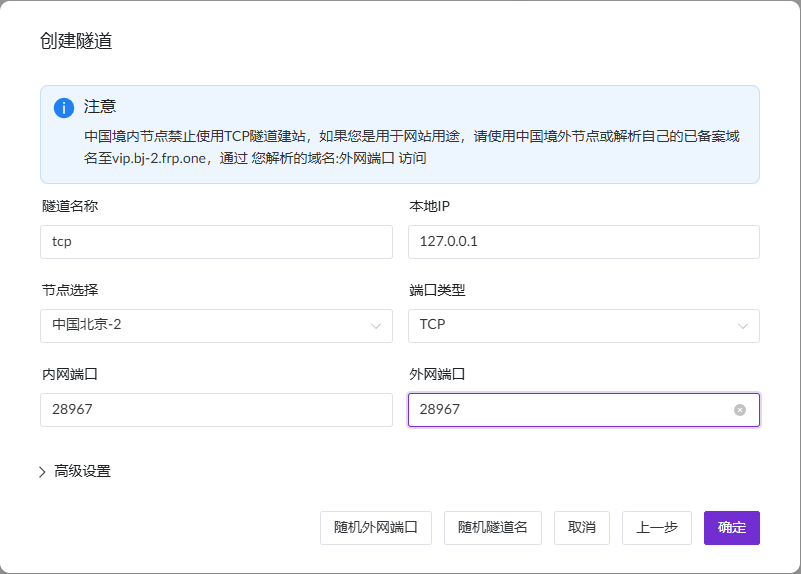
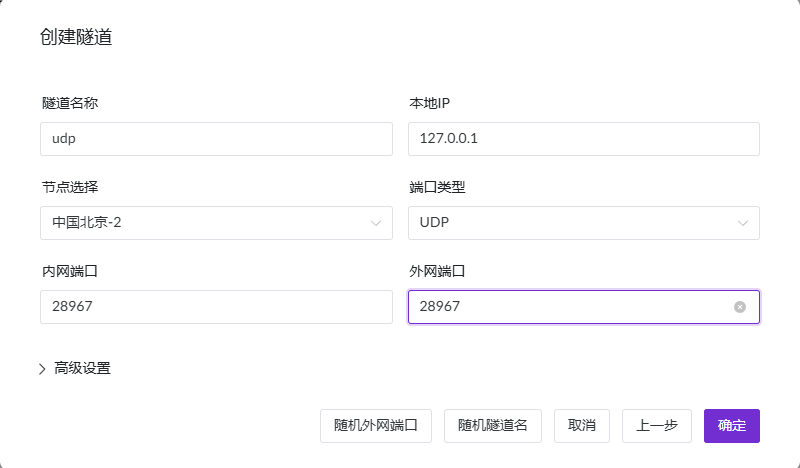
You can copy my configuration directly or adjust it as needed.
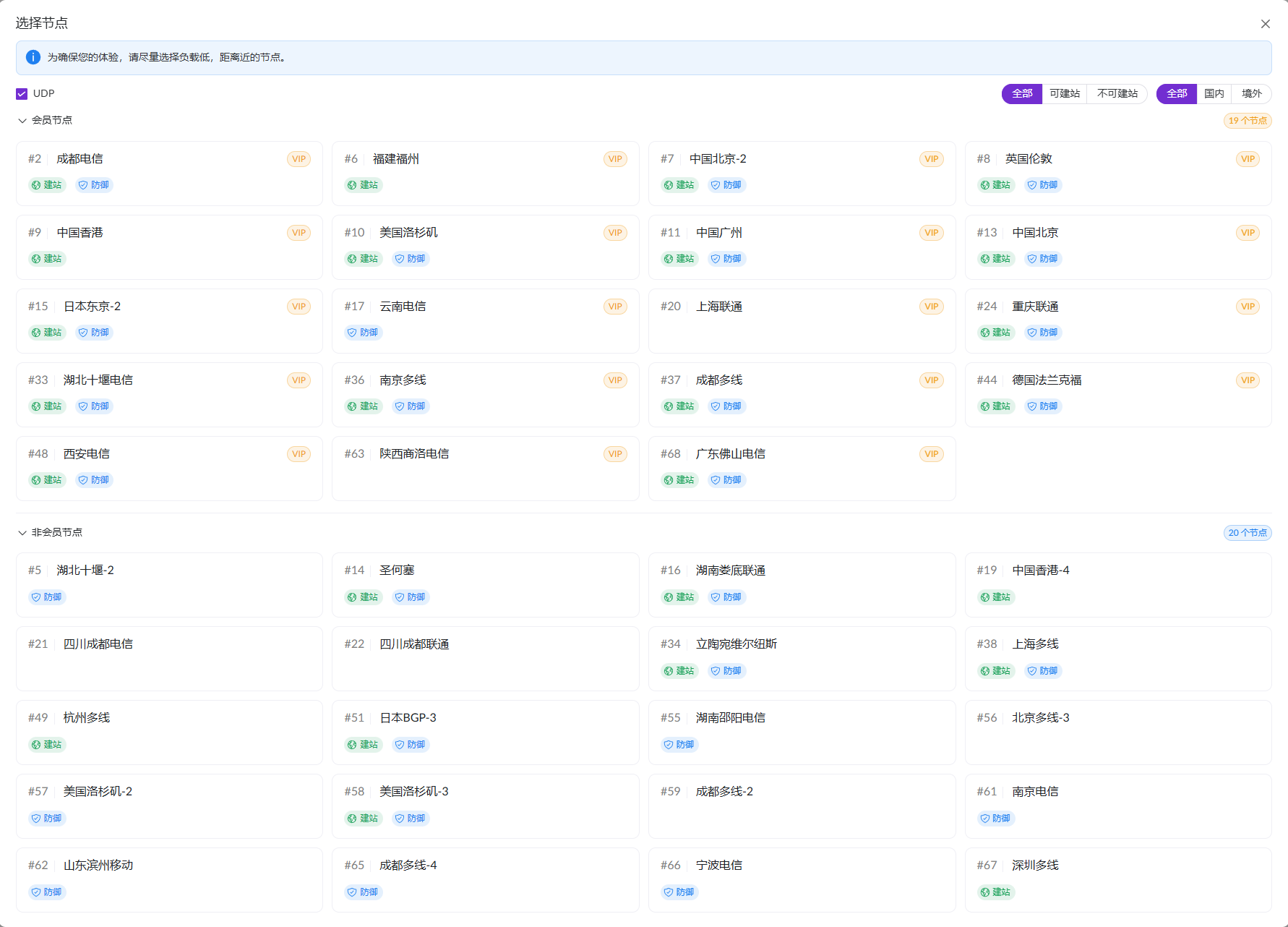
Add a tunnel and select a node that supports UDP.
Create two separate tunnels with identical internal and external ports, using TCP and UDP protocols respectively.
Generate your frpc configuration file (example below):
[common]
server_addr = <ip>
server_port = <port>
tls_enable = false
user = <user>
token = <token>

[storj_tcp]
type = tcp
local_ip = 127.0.0.1
local_port = 28967
remote_port = 28967

[storj_udp]
type = udp
local_ip = 127.0.0.1
local_port = 28967
remote_port = 28967
Save the file to /opt/frp/storj.ini.
Software Installation
- Download the frp package from GitHub Releases
- Extract the package and move
frpcto/usr/local/binto enable global command-line access - Create a systemd service to manage the frpc process for Storj tunneling. Use a text editor (e.g., nano) to create the file
/etc/systemd/system/storj.service. The official systemd setup guide only covers frps—use the configuration below instead:
[Unit]
Description=FRP Client
After=NetworkManager-wait-online.service
Wants=NetworkManager-wait-online.service

[Service]
Type=simple
# Update the path to your frpc executable
ExecStart = /usr/local/bin/frpc -c /opt/frp/storj.ini
Restart=always
RestartSec=5
[Install]
WantedBy=multi-user.target
Note: For some systems, replace NetworkManager-wait-online.service with network-online.target to ensure frp starts only after network connectivity is established. Consult AI for system-specific adjustments.
Service Management Commands:
# Start frp
sudo systemctl start storj
# Stop frp
sudo systemctl stop storj
# Restart frp
sudo systemctl restart storj
# Check status
sudo systemctl status storj
# Enable auto-start on boot
sudo systemctl enable storj
Docker Acceleration
Proceed with steps 3–5 in the official tutorial. You may encounter issues pulling images from Docker Hub—resolve this by configuring registry mirrors.
Edit the Docker daemon configuration file (create it if it does not exist):
sudo nano /etc/docker/daemon.json
Add the following mirrors (replace with your preferred mirrors if needed):
{
  "registry-mirrors": [
    "https://docker.1panel.live",
    "https://dockerpull.cn"
  ]
}
Restart Docker to apply changes:
sudo systemctl daemon-reload
sudo systemctl restart docker
Proxy Setup
Direct access to Storj satellite servers is blocked in China, preventing node registration and operation. Use a proxy (or VPN) to bypass these restrictions.
Deploy a proxy tool on your server—popular options include:
- Mihomo (Clash Meta)
- V2Ray
- Sing-box
I recommend V2RayA, a web-based V2Ray client. Install it via Docker (refer to the v2rayA Docker install documentation):
docker run -d \
  --restart=always \
  --privileged \
  --network=host \
  --name v2raya \
  -e V2RAYA_LOG_FILE=/tmp/v2raya.log \
  -e V2RAYA_V2RAY_BIN=/usr/local/bin/v2ray \
  -e V2RAYA_NFTABLES_SUPPORT=off \
  -e IPTABLES_MODE=legacy \
  -v /lib/modules:/lib/modules:ro \
  -v /etc/resolv.conf:/etc/resolv.conf \
  -v /etc/v2raya:/etc/v2raya \
  mzz2017/v2raya
After logging in, configure the following settings:
- Transparent Proxy: Enabled (ensure split rules match the rule port)
- Transparent Proxy Implementation: system tun
- Rule Port Split Mode: RoutingA
- Prevent DNS Pollution: Forward DNS requests
Configure the RoutingA rule list. My node occasionally experiences connection issues, so I use redundant rules for saturated domain matching (refer to the RoutingA Documentation for syntax details):
default: direct
domain(us1.storj.io) -> proxy
domain(eu1.storj.io) -> proxy
domain(ap1.storj.io) -> proxy
domain(domain:storj.io) -> proxy
port(7777)->proxy
domain(docker.io)->proxy
domain(github.com) -> proxy
domain(debian.org)->proxy
Verify normal operation by checking container logs—look for INFO entries without ERROR messages:
2025-12-21T15:18:24Z	INFO	Current binary version	{"Process": "storagenode-updater", "Service": "storagenode", "Version": "v1.142.7"}
2025-12-21T15:18:24Z	INFO	Version is up to date	{"Process": "storagenode-updater", "Service": "storagenode"}
2025-12-21T15:18:24Z	INFO	Current binary version	{"Process": "storagenode-updater", "Service": "storagenode-updater", "Version": "v1.142.7"}
2025-12-21T15:18:24Z	INFO	Version is up to date	{"Process": "storagenode-updater", "Service": "storagenode-updater"}
2025-12-21T15:18:59Z	INFO	piecestore	uploaded	{"Process": "storagenode", "Piece ID": "BNERV6D3IQGORXMICYMR6FGFMLOVV6MUB3XMM6IRXDJBVDPJZ2KQ", "Satellite ID": "12EayRS2V1kEsWESU9QMRseFhdxYxKicsiFmxrsLZHeLUtdps3S", "Action": "PUT", "Remote Address": "172.17.0.1:41080", "Size": 32512}
2025-12-21T15:21:09Z	INFO	piecestore	downloaded	{"Process": "storagenode", "Piece ID": "QHDD2YN7WG7JNBOFX3PJZ5FZQM423KWU3JLHML5KRFWCNAO7MRJQ", "Satellite ID": "1wFTAgs9DP5RSnCqKV1eLf6N9wtk4EAtmN5DpSxcs8EjT69tGE", "Action": "GET_AUDIT", "Offset": 758272, "Size": 256, "Remote Address": "172.17.0.1:41318"}
2025-12-21T15:23:00Z	INFO	piecestore	download canceled	{"Process": "storagenode", "Piece ID": "G55JQHFQYHGF63SEVF2Y2WE3IX62NLD7LSHDRQR52TRKQCOSTJ4Q", "Satellite ID": "12EayRS2V1kEsWESU9QMRseFhdxYxKicsiFmxrsLZHeLUtdps3S", "Action": "GET", "Offset": 0, "Size": 7936, "Remote Address": "172.17.0.1:48620", "reason": "downloaded size (0 bytes) does not match received message size (7936 bytes)"}
2025-12-21T15:43:38Z	INFO	piecestore	upload canceled	{"Process": "storagenode", "Piece ID": "VKEVYEKTPFUNEGQWKX56S4QILEOXOQFE7IZMGZS2TVPPIQRPN5UQ", "Satellite ID": "12EayRS2V1kEsWESU9QMRseFhdxYxKicsiFmxrsLZHeLUtdps3S", "Action": "PUT", "Remote Address": "172.17.0.1:53694", "Size": 2293760}
2025-12-21T15:19:03Z	INFO	orders	finished	{"Process": "storagenode", "satelliteID": "1wFTAgs9DP5RSnCqKV1eLf6N9wtk4EAtmN5DpSxcs8EjT69tGE", "count": 13}
2025-12-21T15:19:03Z	INFO	orders	finished	{"Process": "storagenode", "satelliteID": "12L9ZFwhzVpuEKMUNUqkaTLGzwY9G24tbiigLiXpmZWKwmcNDDs", "count": 118}
2025-12-21T15:19:03Z	INFO	orders	finished	{"Process": "storagenode", "satelliteID": "121RTSDpyNZVcEU84Ticf2L1ntiuUimbWgfATz21tuvgk3vzoA6", "count": 63}
2025-12-21T15:19:03Z	INFO	orders	finished	{"Process": "storagenode", "satelliteID": "12EayRS2V1kEsWESU9QMRseFhdxYxKicsiFmxrsLZHeLUtdps3S", "count": 461}
Log Explanations:
- Version checks run approximately every 10 minutes
piecestore uploaded: Clients upload data to your nodepiecestore downloaded: Clients download data from your nodepiecestore download canceled: Download aborted (may be due to high latency compared to other nodes or client-initiated termination)piecestore upload canceled: Upload abortedorders finished: The node submits completed order counts to satellite servers
Post-Deployment (Withdrawals, etc.)
Planning to withdraw funds via OKX? Register with my referral code: 81522149—both of us will receive rewards! Thank you for your support!
If this article helped you, consider a small donation: 0x5deab148f542cab91574a6be1b641788703ed712
Community Groups
You can find me here if you need to. My personal contact details are available on my blog.
Matrix: #cn_storj_sno:mozilla.org
QQ Group: 300842907