I have many folders with the date 2024-10-20.
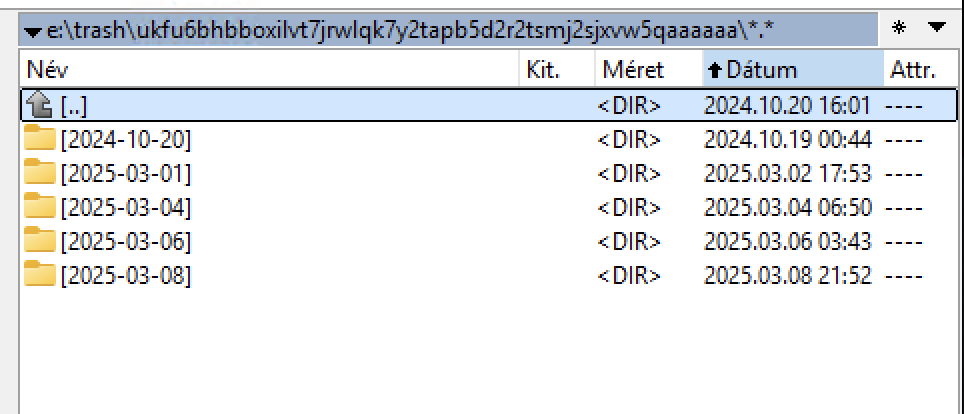
Delete any older than 2025-02-28
And restart the node with the enabled scan on startup to update databases.
Solved for me. Suspect filewalker has not been running automatically and a forced restart to trigger scan on start was required. Much of my trash is now gone.
CC

Where can it be turned on and off? As far as I remember, it is turned off on my system.
2025-03-09T12:04:06+01:00 INFO lazyfilewalker.used-space-filewalker subprocess exited with status {“satelliteID”: “12L9ZFwhzVpuEKMUNUqkaTLGzwY9G24tbiigLiXpmZWKwmcNDDs”, “status”: 1, “error”: “exit status 1”}
2025-03-09T12:04:06+01:00 ERROR pieces used-space-filewalker failed {“Satellite ID”: “12L9ZFwhzVpuEKMUNUqkaTLGzwY9G24tbiigLiXpmZWKwmcNDDs”, “Lazy File Walker”: true, “error”: “lazyfilewalker: exit status 1”, “errorVerbose”: “lazyfilewalker: exit status 1\n\tstorj.io/storj/storagenode/pieces/lazyfilewalker.(*process).run:85\n\tstorj.io/storj/storagenode/pieces/lazyfilewalker.(*Supervisor).WalkAndComputeSpaceUsedBySatellite:134\n\tstorj.io/storj/storagenode/pieces.(*Store).WalkAndComputeSpaceUsedBySatellite:774\n\tstorj.io/storj/storagenode/pieces.(*CacheService).Run.func1:86\n\tgolang.org/x/sync/errgroup.(*Group).Go.func1:78”}
2025-03-09T12:04:06+01:00 ERROR pieces used-space-filewalker failed {“Satellite ID”: “12L9ZFwhzVpuEKMUNUqkaTLGzwY9G24tbiigLiXpmZWKwmcNDDs”, “Lazy File Walker”: false, “error”: “filewalker: used_space_per_prefix_db: context canceled”, “errorVerbose”: “filewalker: used_space_per_prefix_db: context canceled\n\tstorj.io/storj/storagenode/storagenodedb.(*usedSpacePerPrefixDB).Get:81\n\tstorj.io/storj/storagenode/pieces.(*FileWalker).WalkAndComputeSpaceUsedBySatelliteWithWalkFunc:96\n\tstorj.io/storj/storagenode/pieces.(*FileWalker).WalkAndComputeSpaceUsedBySatellite:83\n\tstorj.io/storj/storagenode/pieces.(*Store).WalkAndComputeSpaceUsedBySatellite:783\n\tstorj.io/storj/storagenode/pieces.(*CacheService).Run.func1:86\n\tgolang.org/x/sync/errgroup.(*Group).Go.func1:78”}
2025-03-09T12:04:06+01:00 ERROR piecestore:cache encountered error while computing space used by satellite {“error”: “filewalker: used_space_per_prefix_db: context canceled”, “errorVerbose”: “filewalker: used_space_per_prefix_db: context canceled\n\tstorj.io/storj/storagenode/storagenodedb.(*usedSpacePerPrefixDB).Get:81\n\tstorj.io/storj/storagenode/pieces.(*FileWalker).WalkAndComputeSpaceUsedBySatelliteWithWalkFunc:96\n\tstorj.io/storj/storagenode/pieces.(*FileWalker).WalkAndComputeSpaceUsedBySatellite:83\n\tstorj.io/storj/storagenode/pieces.(*Store).WalkAndComputeSpaceUsedBySatellite:783\n\tstorj.io/storj/storagenode/pieces.(*CacheService).Run.func1:86\n\tgolang.org/x/sync/errgroup.(*Group).Go.func1:78”, “SatelliteID”: “12L9ZFwhzVpuEKMUNUqkaTLGzwY9G24tbiigLiXpmZWKwmcNDDs”}
2025-03-09T12:04:06+01:00 ERROR piecestore:cache error getting current used space for trash: {“error”: “filestore error: failed to walk trash namespace 7b2de9d72c2e935f1918c058caaf8ed00f0581639008707317ff1bd000000000: context canceled”, “errorVerbose”: “filestore error: failed to walk trash namespace 7b2de9d72c2e935f1918c058caaf8ed00f0581639008707317ff1bd000000000: context canceled\n\tstorj.io/storj/storagenode/blobstore/filestore.(*blobStore).SpaceUsedForTrash:302\n\tstorj.io/storj/storagenode/pieces.(*CacheService).Run.func1:105\n\tgolang.org/x/sync/errgroup.(*Group).Go.func1:78”}
2025-03-09T12:04:07+01:00 INFO lazyfilewalker.gc-filewalker subprocess exited with status {“satelliteID”: “12L9ZFwhzVpuEKMUNUqkaTLGzwY9G24tbiigLiXpmZWKwmcNDDs”, “status”: 1, “error”: “exit status 1”}
2025-03-09T12:04:07+01:00 ERROR pieces lazyfilewalker failed {“error”: “lazyfilewalker: exit status 1”, “errorVerbose”: “lazyfilewalker: exit status 1\n\tstorj.io/storj/storagenode/pieces/lazyfilewalker.(*process).run:85\n\tstorj.io/storj/storagenode/pieces/lazyfilewalker.(*Supervisor).WalkSatellitePiecesToTrash:164\n\tstorj.io/storj/storagenode/pieces.(*Store).WalkSatellitePiecesToTrash:625\n\tstorj.io/storj/storagenode/retain.(*Service).retainPieces:412\n\tstorj.io/storj/storagenode/retain.(*Service).Run.func3:297\n\tgolang.org/x/sync/errgroup.(*Group).Go.func1:78”}
2025-03-09T12:04:07+01:00 ERROR filewalker failed to get progress from database
Your disk seems to be slow.
Always troubleshoot for any possible issues before claiming 
If trash is not removed then its a bug for which devs work tirelessly. They work towards a solution faster if you provide them bug reports or better help them reproduce the bug. Just because node has been working fine for so long doesn’t mean it wont develop bugs later.
On by default in the config, which I have left alone, but a restart forces it to run on startup
Logs confirmed no issues, and 1.1TB of trash removed
CC
This one for the databases integrity, but it is not an equivalent of the SQLite command PRAGMA integrity_check;.
The parameter which enables scan on startup is:
# if set to true, all pieces disk usage is recalculated on startup (default true)
storage2.piece-scan-on-startup: true
it’s true by default, so if it’s absent in your config.yaml, then it’s enabled. Usually SNOs are disabling it to do not have a filewalker on restart.
| 2025-03-10T09:51:34+01:00 | ERROR | piecestore:cache | error getting current used space for trash: | {error: filestore error: failed to walk trash namespace a28b4f04e10bae85d67f4c6cb82bf8d4c0f0f47a8ea72627524deb6ec0000000: context canceled, errorVerbose: filestore error: failed to walk trash namespace a28b4f04e10bae85d67f4c6cb82bf8d4c0f0f47a8ea72627524deb6ec0000000: context canceled\n\tstorj.io/storj/storagenode/blobstore/filestore.(*blobStore).SpaceUsedForTrash:302\n\tstorj.io/storj/storagenode/pieces.(*CacheService).Run.func1:105\n\tgolang.org/x/sync/errgroup.(*Group).Go.func1:78} |
|---|---|---|---|---|
| 2025-03-10T09:51:34+01:00 | INFO | lazyfilewalker.trash-cleanup-filewalker | subprocess exited with status | {satelliteID: 12EayRS2V1kEsWESU9QMRseFhdxYxKicsiFmxrsLZHeLUtdps3S, status: 1, error: exit status 1} |
| 2025-03-10T09:51:34+01:00 | ERROR | pieces:trash | emptying trash failed | {error: pieces error: lazyfilewalker: exit status 1, errorVerbose: pieces error: lazyfilewalker: exit status 1\n\tstorj.io/storj/storagenode/pieces/lazyfilewalker.(*process).run:85\n\tstorj.io/storj/storagenode/pieces/lazyfilewalker.(*Supervisor).WalkCleanupTrash:196\n\tstorj.io/storj/storagenode/pieces.(*Store).EmptyTrash:486\n\tstorj.io/storj/storagenode/pieces.(*TrashChore).Run.func1.1:86\n\tstorj.io/common/sync2.(*Workplace).Start.func1:89} |
It’s still not emptying for me. And its size keeps increasing.
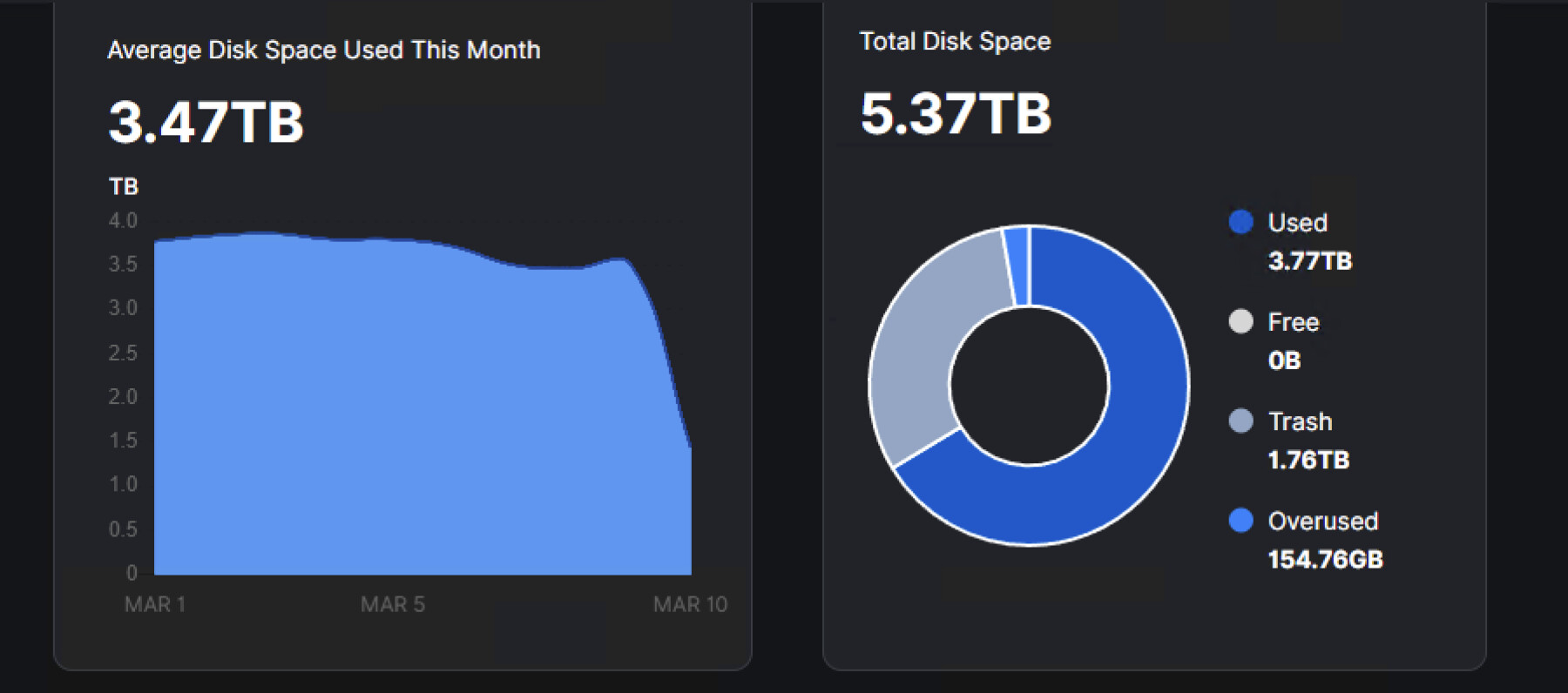
Strange, because there is space on the drive, so something is stuck—I’m sure of it!
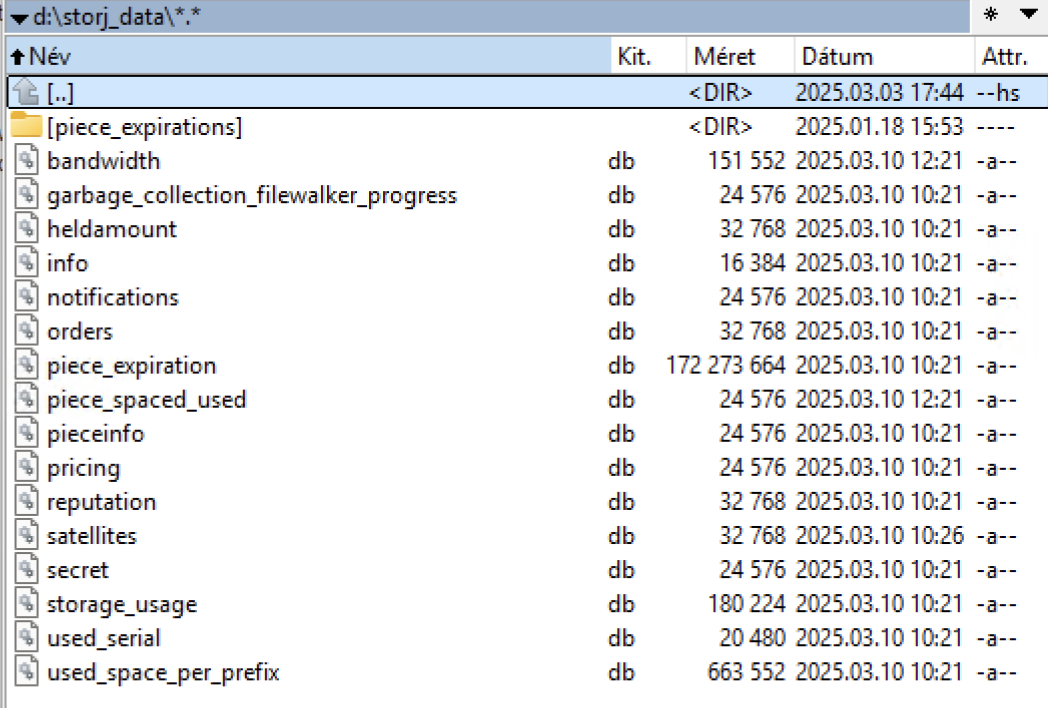
Stop node, delete all db-es except the dir-verification file, which is not a db, restart node and let the startup piecescan to complete on all sats (log level info).
storage-dir-verification
write-test
Did you check your disk for errors?
My storage-dir-verification file is located elsewhere. Can I delete all the files shown in the picture?
I tried it, and all my data was lost. After restoring from a backup, it continued.
One weak sector was found on one of the hard drives. The purchase of another high-capacity hard drive is already in progress. Could this cause issues?
This happened when you checked the disk for errors?
Maybe
No.
Sorry, but I am using the help of a translator. I will try to describe it simply.
1., As a first step, I stopped the node.
2., As a second step, I made a backup of the entire database.
3., I deleted the database and started the node. The storage-dir-verification remained untouched; it is in the main folder.
4., All my statistics and data on the dashboard have disappeared.
5., I quickly stopped and restored the database. Now everything is back to normal. The large size of the trash remained, for understandable reasons.
Am I right in thinking that I didn’t do it correctly? 
HDD error: I noticed with an analyzing program that one of the hard drives has a weak sector. In theory, it hasn’t affected performance yet. (RAID, 2x 3TB) WD RED + Toshiba L300
That’s an older image; I deleted the trash folders from before 03.01. Currently, only folders from after 03.01 are in the trash folder.
What I noticed is that there is actually 1TB of free space on the hard drive, but the Dashboard says there is no free space. There might be an issue here; it can’t update the data. That’s why I think the database needs to be refreshed or repaired. This is where I got stuck.
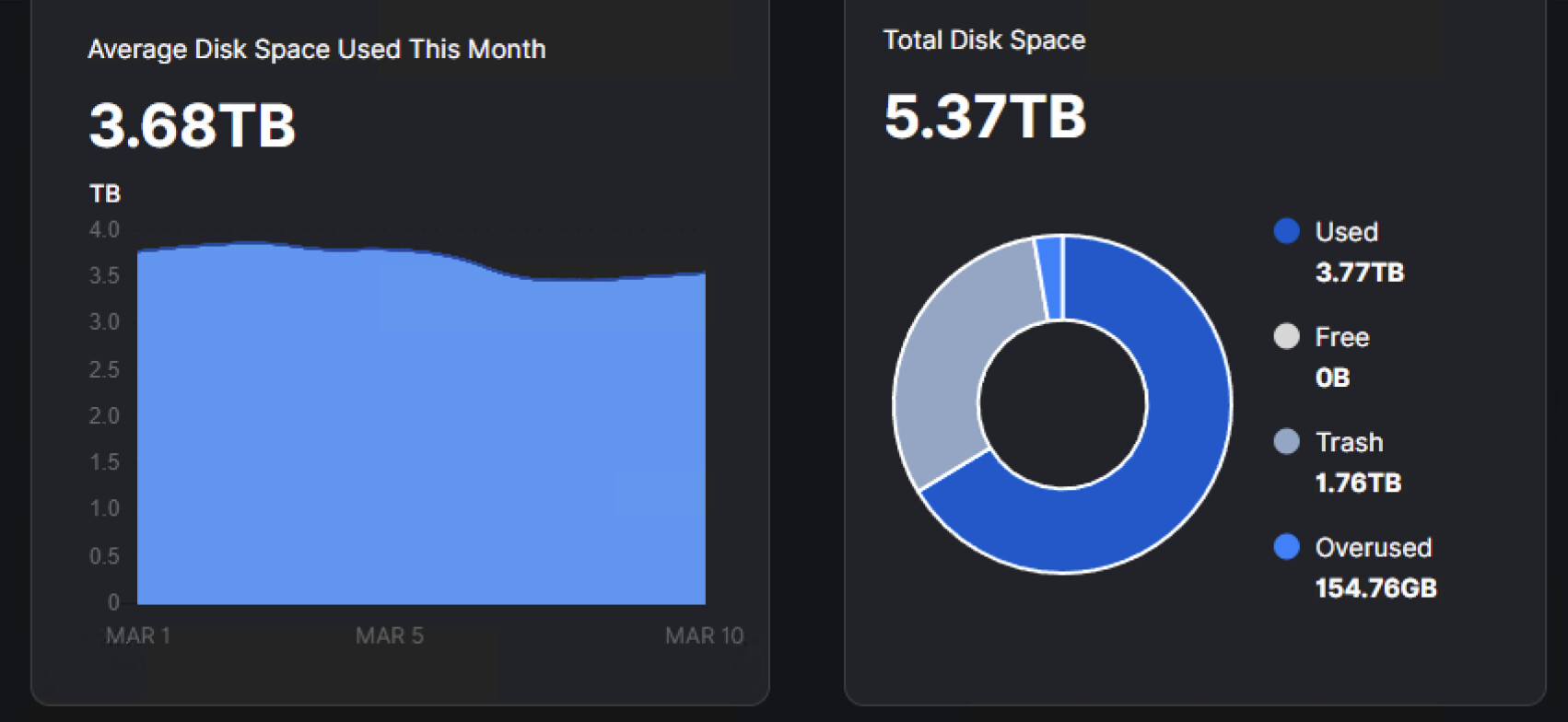
Free 0byte

918 GB free