The Satellite Console is the web-based customer portal of the satellite, for customer to sign up and log into satellite dashboard.
Minimum Console Command
./satellite-modular console \
--identity-dir ./id/satellite/ \
--database-options.url "cockroach://my_role:123456@rendezvous.example.com:26257/my_database?sslmode=verify-full&sslrootcert=ca.crt" \
--metainfo.database-url "cockroach://my_role:123456@rendezvous.example.com:26257/my_metainfo_database?sslmode=verify-full&sslrootcert=ca.crt" \
--live-accounting.storage-backend redis://127.0.0.1:6379 \
--mail.template-path=./emails \
--mail.from "no-reply@localhost" \
--console.auth-token-secret "4G3G17lzZvvZ5/v3kMQ/+7fmlTFQRQVWwTJBiaRbdU0=" \ # not a real key
--key-management.provider local \
--key-management.key-infos "1:master_key_1,2524231573" \
--key-management.default-master-key=1 \
--console.static-dir=./
--mail.template-path: similar with admin service, point path to directory from storj/web/satellite/static/emails at main · storj/storj · GitHub. Note that, this copy and paste operation need to be done on every deployment in case emails changed.
--console.auth-token-secret: generate this key with this command openssl rand -base64 32
Master Key:
When customer using managed project in storj, they don’t hold the secret key, you are the one holding their key for them, but we are also not storing plain secret key in our database.
StorJ using a master key to encrypt and store the encrypted version of customer secret key (the same master key used for all customers). To generate a master key: openssl rand 32 > master_key_1
And calculate crc32c (Castagnoli) of the key with this script:
import crcmod
data = open('master_key_1', 'rb').read()
crc32c = crcmod.predefined.mkCrcFun('crc-32c')
print(crc32c(data))
--key-management.key-infos: semicolon-separated key-id:version,checksum. With ‘gsm’ provider, version is the resource name. With ‘local’, it is the file path. Checksum is the integer crc32c checksum of the key data (eg: 1:master_key_1,2524231573;2:master_key_2,4524233543).
--key-management.default-master-key: it is the key-id in --key-management.key-infos
--console.static-dir: need two directories, static-dir is the parent of both static and dist dir, static dir from storj/web/satellite/static at 0adb45503fd3315cb9f4e06ee39cc5774625e8d5 · storj/storj · GitHub and dist dir from storj/web/satellite at 0adb45503fd3315cb9f4e06ee39cc5774625e8d5 · storj/storj · GitHub (generate by npm run build).
The default port for console is 10100, if you want to split between back-end server and front-end endpoints, in that case see (./satellite-modular console -h | grep frontend).
Trademark Material
Unlike admin service where only you could see it, console could be seen by your customers, it is important that you fix all trademark material in console service.
As I understand so far, you can mention storj as the underlying technology but have to make clear that you are not affiliated with or endorsed by StorJ in any shape or form.
Have a look at this: ./satellite-modular console -h | grep '\-\-console' | grep storj, where you could fix some of it.
Here a screenshot of login console:
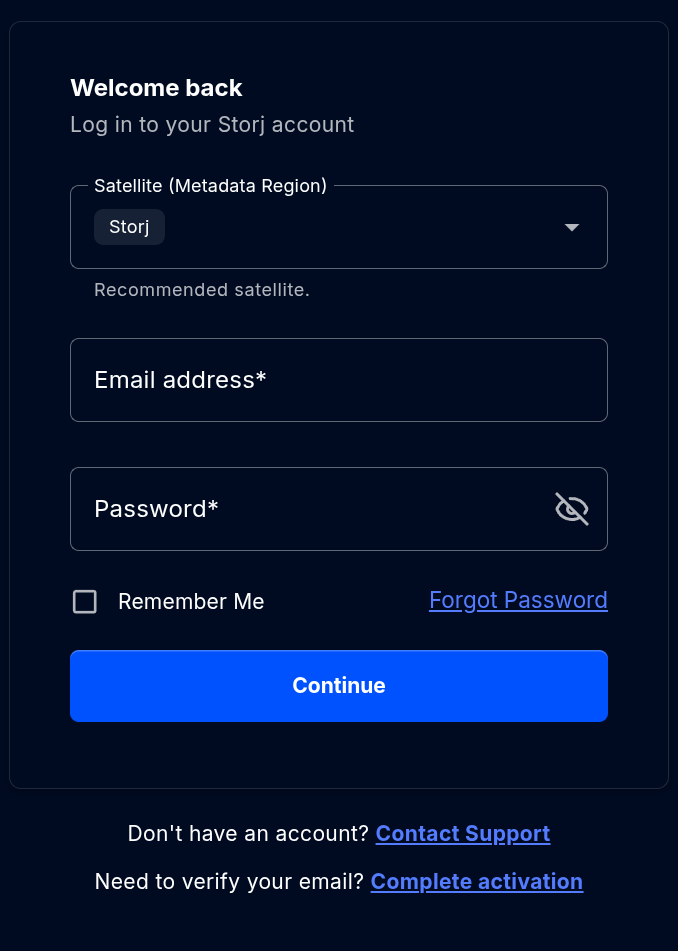
Also, this is not taking into account email yet, need to register an email service provider to run a production sat (see config at ./satellite-modular console -h | grep mail).
Good luck and see you in part 14.