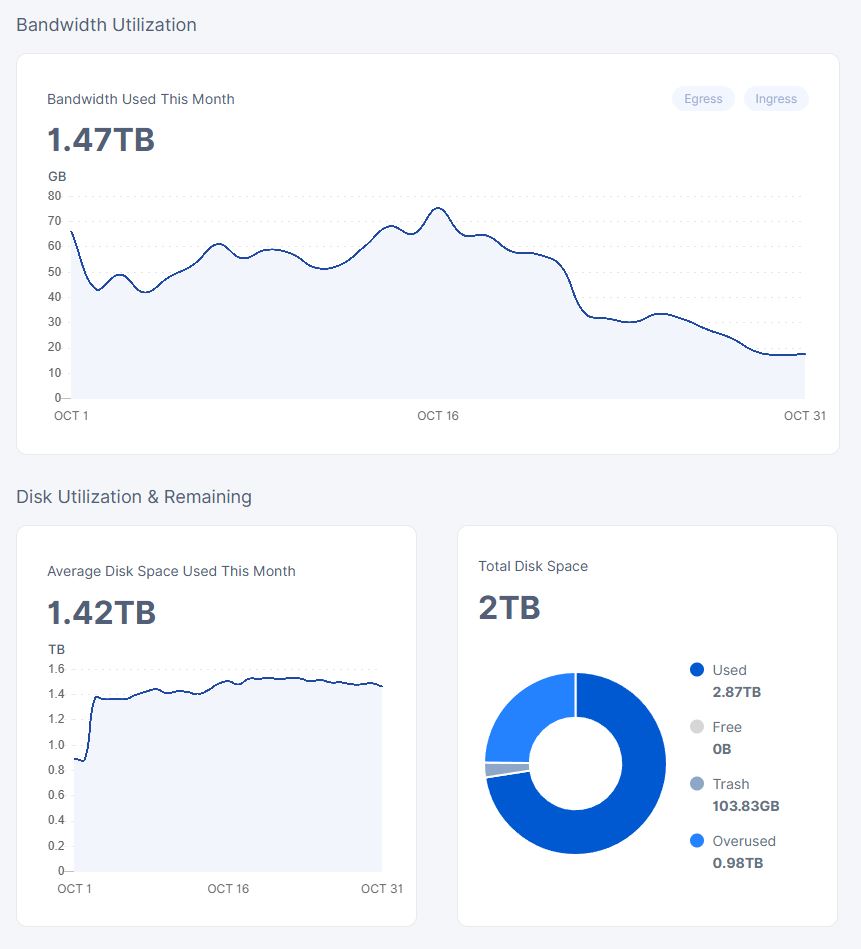
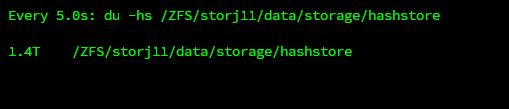
Used Space doubled after hashstore migration

I fully migrated my test-node to hashstore. After that, the space doubled, and now I have overused space, and not getting any inbound traffic. Is there a way to fix this? Do I have to fix the used space DB?


storj_blobs

For a quick and dirty fix I can just increase the available space in my docker stack, but in this state I don’t want to fully migrate all my nodes.

TiA

Stop node. Delete used_space_per_prefix.db. Start node again.

5 Likes

I had to do this on 2 nodes.

So far it happens on nodes which have had restarts during migration.
The workaround is still the same.

It is better to do this after the migration is complete.

My testnode was running fine, it migrated 1.4TB in around 3-4 Days, with no hard restards.

Can you confirm that with logs? And when is it started to show the double size?

I have a 159MB logfile, what do I have to look for?

When the node is started, for example:

cat /mnt/storj/storagenode1/storagenode.log | grep " NodeID"

It should show dates when your node has been restarted.
But after what action it’s started to show a double size only you can remember, it could be after restart as well or something else (e.g. no restarts, just yesterday was X, today become 2X).

Did you stop the node, and delete the use-by-prefix db. The double up is usually caused when node restarts during conversion, but I have seen it happen whilst node is running.