When will "Uncollected Garbage" be deleted?

I checked a 2TB node, otherwise the find command would have taken forever.

I don’t know which pairs belong together. I guess pieces uploaded on 2024-07-07 expire on 2024-08-06 and so on. All output is from saltlake only

sqlite3 piece_expiration.db "SELECT piece_expiration FROM piece_expirations WHERE hex(satellite_id) = '7B2DE9D72C2E935F1918C058CAAF8ED00F0581639008707317FF1BD000000000' AND piece_expiration LIKE '2024-08-07%' "|wc -l
0

sqlite3 piece_expiration.db "SELECT piece_expiration FROM piece_expirations WHERE hex(satellite_id) = '7B2DE9D72C2E935F1918C058CAAF8ED00F0581639008707317FF1BD000000000' AND piece_expiration LIKE '2024-08-08%' "|wc -l
3772

sqlite3 piece_expiration.db "SELECT piece_expiration FROM piece_expirations WHERE hex(satellite_id) = '7B2DE9D72C2E935F1918C058CAAF8ED00F0581639008707317FF1BD000000000' AND piece_expiration LIKE '2024-08-09%' "|wc -l
10502

sqlite3 piece_expiration.db "SELECT piece_expiration FROM piece_expirations WHERE hex(satellite_id) = '7B2DE9D72C2E935F1918C058CAAF8ED00F0581639008707317FF1BD000000000' AND piece_expiration LIKE '2024-08-10%' "|wc -l
6742
find . -type f -newermt "2024-07-07 00:00:00" ! -newermt "2024-07-07 23:59:59"|wc -l
0
find . -type f -newermt "2024-07-08 00:00:00" ! -newermt "2024-07-08 23:59:59"|wc -l
171
find . -type f -newermt "2024-07-09 00:00:00" ! -newermt "2024-07-09 23:59:59"|wc -l
44789
2 Likes

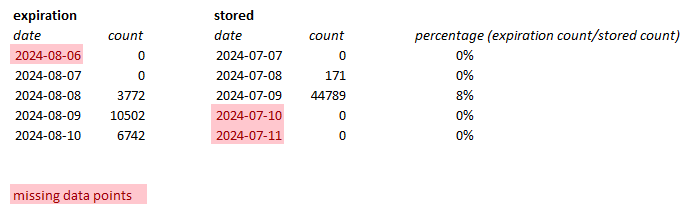
Hi @donald.m.motsinger, thanks for sharing your results! I’ve put them into a table for easier comparison, similar to how I organized my data:

Based on what we have, it seems we can only match one day’s results so far — those expiring on August 8, with uploads from July 9. There, we see only an 8% match, which could indicate DB insert failures (with 44,789 files received but only 3,772 recorded in the DB). Or either there is an issue with the way you have determined the number of uploaded pieces, or the expiration for these days were less than 30 days.

Before we draw any conclusions, could you provide a few more data points? It would help us get a clearer picture.

1 Like

Did you find insert failures in your logs?
Some confirmed, that they are piece by piece basis, not batched.

Could you please fill the form?

or

zgrep -v INFO /mnt/storagenode7/node/node.log-2024-07.gz
2024-07-07T05:13:59Z    WARN    piecestore:monitor      Used more space than allocated. Allocated space is      {"Process": "storagenode", "bytes": 1000000000000}
2024-07-07T05:18:55Z    WARN    reputation:service      node scores worsened    {"Process": "storagenode", "Satellite ID": "1wFTAgs9DP5RSnCqKV1eLf6N9wtk4EAtmN5DpSxcs8EjT69tGE", "Total Audits": 8427, "Successful Audits": 7978, "Audit Score": 1, "Online Score": 0.9642857142857143, "Suspension Score": 1, "Audit Score Delta": 0, "Online Score Delta": -0.0357142857142857, "Suspension Score Delta": 0}
2024-07-07T05:18:55Z    WARN    reputation:service      node scores worsened    {"Process": "storagenode", "Satellite ID": "121RTSDpyNZVcEU84Ticf2L1ntiuUimbWgfATz21tuvgk3vzoA6", "Total Audits": 51257, "Successful Audits": 48134, "Audit Score": 1, "Online Score": 0.9758301376230556, "Suspension Score": 1, "Audit Score Delta": 0, "Online Score Delta": -0.02271477663230237, "Suspension Score Delta": 0}
2024-07-07T05:18:56Z    WARN    reputation:service      node scores worsened    {"Process": "storagenode", "Satellite ID": "12EayRS2V1kEsWESU9QMRseFhdxYxKicsiFmxrsLZHeLUtdps3S", "Total Audits": 66217, "Successful Audits": 61677, "Audit Score": 1, "Online Score": 0.9743768693918246, "Suspension Score": 1, "Audit Score Delta": 0, "Online Score Delta": -0.024731069948050632, "Suspension Score Delta": 0}
2024-07-07T05:18:56Z    WARN    reputation:service      node scores worsened    {"Process": "storagenode", "Satellite ID": "12L9ZFwhzVpuEKMUNUqkaTLGzwY9G24tbiigLiXpmZWKwmcNDDs", "Total Audits": 95577, "Successful Audits": 88848, "Audit Score": 1, "Online Score": 0.9746806732775776, "Suspension Score": 1, "Audit Score Delta": 0, "Online Score Delta": -0.023725981620718484, "Suspension Score Delta": 0}
2024-07-07T08:39:31Z    FATAL   Unrecoverable error     {"Process": "storagenode", "error": "context canceled"}
2024-07-07T18:11:49Z    WARN    piecestore:monitor      Used more space than allocated. Allocated space is      {"Process": "storagenode", "bytes": 1000000000000}
2024-07-07T18:12:08Z    WARN    reputation:service      node scores worsened    {"Process": "storagenode", "Satellite ID": "121RTSDpyNZVcEU84Ticf2L1ntiuUimbWgfATz21tuvgk3vzoA6", "Total Audits": 51762, "Successful Audits": 48274, "Audit Score": 1, "Online Score": 0.9640551550933559, "Suspension Score": 1, "Audit Score Delta": 0, "Online Score Delta": -0.011774982529699662, "Suspension Score Delta": 0}
2024-07-07T18:12:09Z    WARN    reputation:service      node scores worsened    {"Process": "storagenode", "Satellite ID": "12EayRS2V1kEsWESU9QMRseFhdxYxKicsiFmxrsLZHeLUtdps3S", "Total Audits": 66427, "Successful Audits": 61731, "Audit Score": 1, "Online Score": 0.962890876634392, "Suspension Score": 1, "Audit Score Delta": 0, "Online Score Delta": -0.011485992757432562, "Suspension Score Delta": 0}
2024-07-07T18:12:09Z    WARN    reputation:service      node scores worsened    {"Process": "storagenode", "Satellite ID": "12L9ZFwhzVpuEKMUNUqkaTLGzwY9G24tbiigLiXpmZWKwmcNDDs", "Total Audits": 96094, "Successful Audits": 89022, "Audit Score": 1, "Online Score": 0.9638140066109109, "Suspension Score": 1, "Audit Score Delta": 0, "Online Score Delta": -0.010866666666666691, "Suspension Score Delta": 0}
2024-07-08T02:13:33Z    WARN    reputation:service      node scores worsened    {"Process": "storagenode", "Satellite ID": "1wFTAgs9DP5RSnCqKV1eLf6N9wtk4EAtmN5DpSxcs8EjT69tGE", "Total Audits": 8441, "Successful Audits": 7989, "Audit Score": 1, "Online Score": 0.9571428571428572, "Suspension Score": 1, "Audit Score Delta": 0, "Online Score Delta": -0.0071428571428571175, "Suspension Score Delta": 0}
2024-07-08T02:13:33Z    WARN    reputation:service      node scores worsened    {"Process": "storagenode", "Satellite ID": "121RTSDpyNZVcEU84Ticf2L1ntiuUimbWgfATz21tuvgk3vzoA6", "Total Audits": 51996, "Successful Audits": 48492, "Audit Score": 1, "Online Score": 0.9545372831066561, "Suspension Score": 1, "Audit Score Delta": 0, "Online Score Delta": -0.009517871986699844, "Suspension Score Delta": 0}
2024-07-08T02:13:34Z    WARN    reputation:service      node scores worsened    {"Process": "storagenode", "Satellite ID": "12EayRS2V1kEsWESU9QMRseFhdxYxKicsiFmxrsLZHeLUtdps3S", "Total Audits": 66509, "Successful Audits": 61806, "Audit Score": 1, "Online Score": 0.9528468361439015, "Suspension Score": 1, "Audit Score Delta": 0, "Online Score Delta": -0.010044040490490458, "Suspension Score Delta": 0}
2024-07-08T02:13:34Z    WARN    reputation:service      node scores worsened    {"Process": "storagenode", "Satellite ID": "12L9ZFwhzVpuEKMUNUqkaTLGzwY9G24tbiigLiXpmZWKwmcNDDs", "Total Audits": 96304, "Successful Audits": 89224, "Audit Score": 1, "Online Score": 0.9542578471906211, "Suspension Score": 1, "Audit Score Delta": 0, "Online Score Delta": -0.009556159420289756, "Suspension Score Delta": 0}
2024-07-08T04:33:23Z    FATAL   Unrecoverable error     {"Process": "storagenode", "error": "context canceled"}
2024-07-12T12:38:13Z    WARN    reputation:service      node scores worsened    {"Process": "storagenode", "Satellite ID": "1wFTAgs9DP5RSnCqKV1eLf6N9wtk4EAtmN5DpSxcs8EjT69tGE", "Total Audits": 8544, "Successful Audits": 8092, "Audit Score": 1, "Online Score": 0.9571428571428572, "Suspension Score": 1, "Audit Score Delta": 0, "Online Score Delta": -0.000765306122448961, "Suspension Score Delta": 0}
2024-07-13T16:08:07Z    WARN    contact:service Your node is still considered to be online but encountered an error.    {"Process": "storagenode", "Satellite ID": "121RTSDpyNZVcEU84Ticf2L1ntiuUimbWgfATz21tuvgk3vzoA6", "Error": "contact: failed to ping storage node using QUIC, your node indicated error code: 0, rpc: quic: lookup london.thomas-boehm.net on 10.91.0.10:53: read udp 10.85.10.2:47684->10.91.0.10:53: i/o timeout"}
2024-07-14T00:35:19Z    WARN    reputation:service      node scores worsened    {"Process": "storagenode", "Satellite ID": "12L9ZFwhzVpuEKMUNUqkaTLGzwY9G24tbiigLiXpmZWKwmcNDDs", "Total Audits": 99911, "Successful Audits": 92831, "Audit Score": 1, "Online Score": 0.9557548531786448, "Suspension Score": 1, "Audit Score Delta": 0, "Online Score Delta": -0.00000000000000011102230246251565, "Suspension Score Delta": 0}

That’s all I have around these days without the INFO lines from this node. Nothing about databases.

I’m running the node with these custom loglevels

--log.custom-level=piecestore=FATAL,collector=FATAL,orders=WARN,reputation=WARN,bandwith=WARN

I did fill the form already for my biggest node. Will do it for this node too.
1 Like

I was running my SQL query with the wrong satellite ID. I corrected that and can see the ongoing uploads now.

storagenode@pi5node2:~ $ sqlite3 /home/storagenode/ssd/sn8/dbs/piece_expiration.db "SELECT count(1) FROM piece_expirations WHERE hex(satellite_id)='7B2DE9D72C2E935F1918C058CAAF8ED00F0581639008707317FF1BD000000000' AND piece_expiration>'2024-09-05 22:00:00';"
81264


grep uploaded /home/storagenode/logs/storagenode8.log | grep 2024-08-07 | grep "1wFTAgs9DP5RSnCqKV1eLf6N9wtk4EAtmN5DpSxcs8EjT69tGE" | wc -l
95114

So there is a difference in numbers. It could be something simple like timezone (UTC+2 in my case) or repair uploads.

Ah, good point. I’m on UTC+1. I’ll redo my numbers.

I already gave it an extra hour and still I am missing 10% of the TTL entries in my database. My storage node didn’t crash and I didn’t restart it. I can also see that the latest entry in the database is just 3 minutes old. I don’t think there are 10K uploads in the last 3 minutes so that also doesn’t explain the difference in numbers. I did filter out repair uploads (grep ‘“PUT”’) but that only changes the numbers by a few hundert.

Up next I could try to convert the hex pieceIDs and run a script to find the uploads that don’t have an entry in the database. That sounds like a bigger challenge.

Do all upladed pieces have TTL of 30 days at the moment? It would be important if we want to get to the bottom of this.

1 Like

Difference may be because file was uploaded but canceled, but stayed on disk.

2 Likes

Yes, and how do we know for sure it is TTL and not regular uploads? Or is this to be expected rare at the moment?

On SLC the answer should be yes. Maybe a few files here and there for an healthcheck but not 10K in a few hours.

My grep command was for uploaded. That log line doesn’t appear for failed or canceled uploads.

1 Like

That actually sounds like an interesting script to write. You may find orphaned uploads!

The last couple of days, I’ve also been checking whether files were successfully deleted based on their expiration dates in the pieces expiration DB. It seems to be functioning properly, as the expired pieces were deleted from my node’s hard disk. This suggests that the TTL collector process might be working fine. So, let’s shift our focus to the second question: Why is the uncollected garbage not being deleted by BFs?

We know that due to a bug at the start of the influx of test TTL data, some pieces were not collected by the process and needed to be cleaned up by the BFs. What if, for some reason, they didn’t get processed correctly? This could mean that the uncollected garbage is mainly data that remained on the node because of that bug. @littleskunk, any thoughts on this thesis? Could there be any reason that the BFs did not catch the data caused by the bug somehow? Is there any way we can debug the BF process?

If that would be the case the amount should not change. I have the feeling the amount is increasing over time which would indicate it is an ongoing issue. Ofc that is just my personal feeling and I have no data to verify it.

Good news is that the issue will get fixed simply by the new upload pattern. Since a few weeks the test uploads are 64MB segments. That means our nodes end up with the same used space but a lower number of pieces. And with lower number of pieces the bloom filter will be more effective. On top of increasing the maximum bloom filter size. That will buy us time. I would not call it a fix because one day customers might repeat this experiment on US1 and we get into a similar situation.

3 Likes

I would not run so much forward and accept that the TTL collector is OK.
I have a node which became full around the mid of July. Since that it is only accepting new data when it manages to clear some trashed data (and able to report it as free space). In august it means TTL ~100GB ingress from SLC.
I’m not an expert of databases and such, so simply looked at basic things:

  • in SLC satellite’s blobs folders, I can see now around 24k files (in each folder), so in total, I have around 24M files.
  • I used to receive BF files around 19-20 MBs. All of them are processed quite quickly. Well the first one was a bit of challange, becouse it moved around 7k files/folder, but the next one was better with 3k/folder and so on…

As of now, I see these file numbers in the trash folders (with file creation dates):
07-30: 500 files (06.01 - 07.22)
08-01: 150 files (06.07 - 07.24)
08-03: 170 files (06.15 - 07.25)
08-05: 100 files (06.15 - 07.28)

This is my last retain run:
2024-08-05T21:30:49+02:00 INFO retain Moved pieces to trash during retain {“cachePath”: “C:\Program Files\Storj\Storage Node/retain”, “Deleted pieces”: 89996, “Failed to delete”: 0, “Pieces failed to read”: 0, “Pieces count”: 24480097, “Satellite ID”: “1wFTAgs9DP5RSnCqKV1eLf6N9wtk4EAtmN5DpSxcs8EjT69tGE”, “Duration”: “5h59m59.7291252s”, “Retain Status”: “enabled”}

However, if I look into the blobs folders, these are the files’ creation dates:
The oldest one is from 2020 october… :slight_smile:
38 files were created before 2024.05.18th
100 files were created in 2024 May
2000 files were created between 2024.06.01 - 06.10
9400 files were created between 2024.06.11 - 06.20
7200 files were created between 2024.06.21 - 06.30
3200 files were created between 2024.07.01 - 07.07

2200 files were created since 2024.07.08

I did not had database warnings, lockups on this node. The piece_exp db file is 2,4GB. I checked the DBs for errors before I updated the node to version 1.109.2.
In my understanding, if the TTL collector would work perfectly, then it had to delete about 21800 files already, which were created between 06.01 and 07.07 (out of the 24k total in the folder).

On the other hand, there is something wrong with the BF as well, becouse it deletes only 1-200 files instead of the massive thousands which were left behind by the TTL collector.

I have other, smaller nodes, the share of the numbers are similar on these as well.
Maybe the recently uploaded files are deleted properly by the TTL collector as you mentioned, but the old ones are not for sure.

I’m sorry if my explanation is not as professional as yours, but I do my best to help.

4 Likes

Thanks @littleskunk for your input, appreciate it!

Can you explain though how the issue for us with full nodes of uncollected garbage will simply get fixed? Without a properly working GC my nodes will remain full and not accepting new data.

your Data will expire and will be deleted with ttl

Hi @Balage76, no need to apologize at all! Thank you so much for your input. I’m experiencing the same issues as you, as all my nodes have been full for over a month, and GC is only deleting a tiny portion of the garbage.

I agree and do believe it’s important to continue investigating the TTL collection process, although I suggest we should first prioritize analyzing what’s going wrong with GC and BFs. Because even if we fix the TTL collector process, we still need to address the uncollected garbage issue to prevent our nodes from remaining full and not being able to accept new data.

I’ll definitely take a closer look at your findings as soon as I have some spare time. Thanks again for sharing your insights!

1 Like