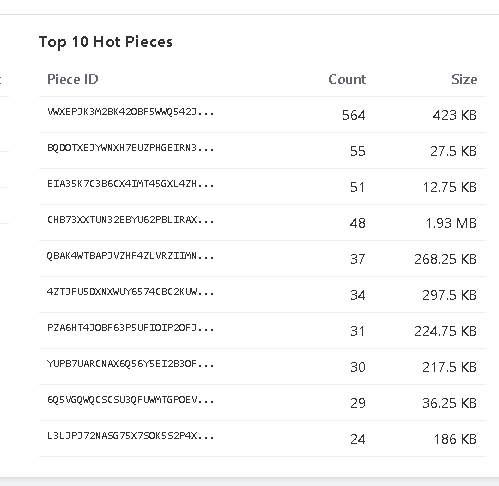
For some reason live performance graph has been empty for about the last two or three versions. As well, the live traffic heatmap cycles only about once every 4 seconds on a 3.13 <–edited (current) 64 bit python WINDOWS version and an older 3.09x version. Might be something to do with a UTC error.
re:
2025-09-30 16:22:57 [ERROR] [StorjMonitor] Could not parse websocket message:
Traceback (most recent call last):
  File "C:\_OS.SYS\Rabbit5\websies.py", line 1282, in websocket_handler
    historical_data = await loop.run_in_executor(
  File "C:\Python39\lib\concurrent\futures\thread.py", line 52, in run
    result = self.fn(*self.args, **self.kwargs)
  File "C:\_OS.SYS\Rabbit5\websies.py", line 1098, in blocking_get_historical_performance
    "timestamp": datetime.datetime.fromtimestamp(ts_unix, tz=datetime.UTC).isoformat(),
AttributeError: module 'datetime' has no attribute 'UTC'
Ok just for Windows users following along, and interested in this. Since there are 17 dependencies now…
UV Package manager for windows, installation
Using Windows Powershell powershell -ExecutionPolicy ByPass -c "irm https://astral.sh/uv/install.ps1 | iex"
or
install using wget winget install --id=astral-sh.uv -e
ARs Original code worked fine with a Python version as old as 3.9.6. Back when that installer/version (~2020 or 2021) was active it never properly added path variables during install, so that had to be manually done. Therefore, variables weren’t deleted when I uninstalled it to test newer version. With ARs latest updates, thought I would see if it was not working properly due to internal python functions, so updated to 3.13.7150.1013.
So rather than manually re-install all dependencies ARs app requires, I installed the package manager above.
That’ll get all required libraries installed and run the app, just add the --node “NAME:\Program Files...\storagenode.log” and away you go.
Traffic heatmap still no longer realtime, however, this fixed the ‘Live Performance’ graph again…so progress!
Hopefully that also helps others.
Thanks again AR, will look at that cycle/update delay tomorrow if I get time.
That’s because on windows with docker storagenode runs on a different filesystem in a different OS. You can try running node natively, or run log forwarder inside the container.
(Or abandon windows. Seriously. If you have some app you must run on windows — wine and crossover exist. I feel qualified to give this non-negotiable advice as a former windows user and a developer on this retched platform, both in user space and kernel. Don’t walk, run. Where to? If you can stomach GPL — one of modern Linux based distributions is an option. Rocky or Alma Linux. Or Ubuntu. Ubuntu server is pretty good. If you can’t, like me, and if you want full coherent OS — FreeBSD and/or macOS).
Hello,
I saw you dashboard and it’s quite nice looking. As I only read part of this topic I got some questions:
Is this only for single node purposes or is it possible to use it with more than one node?
Is it safe to publish? I saw that you published the dashboard, did you run into any problems?
How much recourses does the dashboard need? My logs grow quite fast, so I don’t want to run out of storage.
Supports reading local logs, and receiving log data streamed by log forwarder.
You can also mount remote log locally – but then animations will look like crap.
I asked AI to improve the Readme file. It turned it into a pretty good tutorial.
I do… the client is javascript that runs in your browser, the server is a python app that cliens fetch data from via websockets, the app runs under restricted user, good luck hacking into it. The whole thing is behind cloudflare – so also good luck ddosing it.
But I generally don’t worry much about anything – so whetehr this is safe is a personal decision
Nope. It runs on a rasbberry pi, that also runs HomeBridge. The process consumes about 5-50% under 10% CPU, when watching 7 nodes. The sqlite local database is about 7GB in size. I keep it on an USB connected SATA SSD.
I keep finding bugs and keep asking (different) AI(s) to fix them. All the time. Once the fequency of bug fixes diminishes - it may be indicative of some sort of stability.. But the point of this venture is to
satifying my curiosity of wtf is the node doing
not having to learn javascripts or web technologies (this is so far outside of my interests its not even funny)
Have something done without actually writing code. I don’t look at generated code on purpose, and don’t edit it by hand. I treat it as a black box.
It’s hillarios to interact with AI – they are like literal toddlers with a degree in computer science.
I can actually ask the AI to find security holes in it That what I’ll do tonight
Yeah, I don’t have the possibility for that. If someone gets access to my server somehow, he can generate that much traffic within a short time, that it gets quite expensive for me. At all, security has to stand on the first place, if you do anything that can be publicly accessed. Bots will try anything to break in.
Ps: I will try to install it later and report back, if I find anything. And give feedback of course
Still, it’s always a trade off between security and convenience, and for me convenience almost always wins by a huge margin. I just assume that everything can get compromised any time, so this is no longer a problem.
Either way, you can put the web application behind authentication on CloudFlare, if you don’t want others to access it or just don’t expose it to the internet in the first place.
I use cloudflare zero trust somewhat too. But mine looks different than yours?
I have the multinode dashboard behind zero trust for example: https://data.marvibiene.de/
But i want a dashboard that others can look at too. I like dashboard and so do others, it think:)
@arrogantrabbit this is really cool, gotta admit. I’m trying it out (windows) and everything seems to work with multinode (all local) except for hashstore compacting. I’ll let it run a bit more to see if it picks up some events or I can dig into my own local to see what’s up. working now
That being said, am I right in understanding that events are read from the storage.log files and copied into the internal db for this app. This DB is then trimmed to keep only past 2 days of events?
If yes, it would be really nice to expand this out to have more settings in the website to control that amount, and also other stuff (like directly copy over the logs elsewhere/rotate them and have a nice way to browse them).
One concern I have for this project is the file size. I won’t even mention that having everything in one .py file isn’t great for managing it later on. But I’m more worried about context size. Right now the file is 87k characters. Once you start crossing 150k some AI agents might not be able to recall things correctly, and if it grows to 250,500K+ even more so. You might want to get a headstart and have it start splitting it into subfiles so you can later feed-in just the files having issues (i.e a file to do heatmap logic)
But that’s my thoughts - if this keeps being maintained I might open some PR’s if I get bored enough
Interesting. At your link I don’t even have an option to login. I don’t know why it does not work.
For myself I setup the only authentication via GitHub, and turned off all other authentication providers. And then in the application setup I specified which user (email) can have access to the app.
Yes. The amount of data is configurable via constants at the top of the py file.
This is just for now, as if more features are added - they can work right away and process data retroactively. Later we can only store the aggregate data which will be much smaller.
It’s not too much data — for my seven nodes it’s under 10GB.
Having a configuration panel is an interesting idea. Perhaps on another port, to avoid introducing the whole authentication and security shenanigans to the dashboard.
Copying, rotating, and browsing logs is out of scope — there are already dedicated tools that do that superbly well. In fact, switching from manually watching log events to running tail process saved quite a bit of cpu: tail is very well optimized. AI-vomited bicycle for doing the same thing on interpreted language no less — not so much. The right way to use Python is to use as little of it as possible. Python is essentially is a front end to C
The original idea for this was for me to get quick answers to some questions I had about what is node doing. It was not (still isn’t) intended to be edited or maintained by a human.
But I agree, ai too will start struggling with the size at some point, so it’s perhaps indeed best to have it refactored sooner than later.
I will get bored of it soon I’m sure, and I’m definitely not looking at or editing that code manually either way. On the other hand it’s available — so anyone can shove it to their ai of choice to add features they need
Yeah this is the big one, while it’s manageable to start that to make sure AI’s can still handle it. It does depend how far you want to take this. If you are basicaly almost done, then :shrug: you can prob just leave it and keep going until no ai can do it
I honestly have no idea what’s stored there. But I suspect raw events are part of it. The extent of optimizing it was me capturing flame graph and giving it to AI to optimize – which resulted in CPU utilization reduction from 50% to under 5%.
I use RooCode (and occasionally Claude Code). It is smart enough to not attempt to ingest the whole file, and Anthropic AI is smart enough to construct smart grep queries to inspect the code. but it has 200k token context window, so it has to. Gemini has 1M tokens window, but I did observe it loses its mind after 2-3 iterations. So I tend to do 1 request - 1 context. Wipe, start over.
I had an idea - sometimes compaction takes a long time, and it would be great to know which nodes are currently running a compaction task.
Perhaps something like “running/started” with a counter for the so-far run time could be nice?
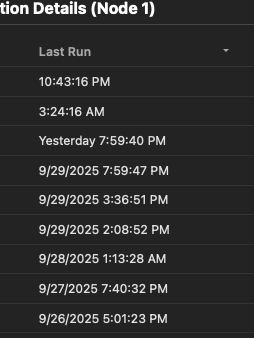
Also, a date field for the compaction history. Currently it’s showing time of run, but with multiple days in history it’s a little hard to know when it was run.
I think it is because I set authentication only via warp identity. So if you are not in a warp vpn and your identity is not listed in my account, you won’t get access. (Additionally you have to renew the identity every 30 days).
I asked ChatGPT to review you code and the only insecurities are so insignificant, that you can ignore them (like wtf, why would it rule a ddos attack as a security risk. Of course it is always a problem if you get ddosed). I will now attemp to install it and publish the website here, if it is working. The only thing that I will change is the location of some files