Cleanup before Hashstore and migration to it

Hello guys,

as you have already probably read there will be a migration to Hashstore soon. I have some old (2023) and new (2025-August) nodes running and compare the state between them.

For Hashstore to work well it’s time to clean-up especially the old nodes.

Here are my questions regarding the clean-up:

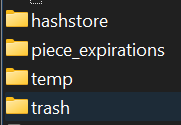
  1. Is the folder “garbage” not beeing used anymore and can be deleted? I don’t see it on my new nodes and I assume all the mechanics from “garbage” went into “trash”.

  2. I assume everything in “temp” can be deleted which is older than 10 days? I had there files from 2023 and 2024 and deleted them. But I stopped the node for sure and restarted it

  3. The storage-dir-verification is still beeing used or? It’s actually a very vital file, if you lose it, it cannot be restored and the node is lost by my knowledge. Does anyone know a restore-method?

    grafik

Then let’s move to the migration to hashstore.

I’m running the new nodes with Linux and Docker.

  1. How do I manually start the active or complete migration to Hashstore? Is it in the docker run command or config.yaml-file? I know it’s a one way ticket but I would try it with the new nodes from 2025-August. Then I can check if I like it or am more lined towards post-poning.

Thanks and kind regards,

Walter

The migration is kinda easy to initiate, I figured it out now.

Stop the docker node: sudo docker stop STORJ-1

Then remove it: sudo docker rm STORJ-1

When you have the STORJ-1 folder, with your STORJ-Content just go to there with cd STORJ-1 → cd storage → hashstore → meta

Then with the echo-orders you are just re-writing the values of the files from false to true. You could also just enter the files with a file-manager like WinSCP and write true into them.

Here for all four sattelites:

echo ‘{“PassiveMigrate”:true,“WriteToNew”:true,“ReadNewFirst”:true,“TTLToNew”:true}’ > 1wFTAgs9DP5RSnCqKV1eLf6N9wtk4EAtmN5DpSxcs8EjT69tGE.migrate
echo ‘{“PassiveMigrate”:true,“WriteToNew”:true,“ReadNewFirst”:true,“TTLToNew”:true}’ > 12EayRS2V1kEsWESU9QMRseFhdxYxKicsiFmxrsLZHeLUtdps3S.migrate
echo ‘{“PassiveMigrate”:true,“WriteToNew”:true,“ReadNewFirst”:true,“TTLToNew”:true}’ > 12L9ZFwhzVpuEKMUNUqkaTLGzwY9G24tbiigLiXpmZWKwmcNDDs.migrate
echo ‘{“PassiveMigrate”:true,“WriteToNew”:true,“ReadNewFirst”:true,“TTLToNew”:true}’ > 121RTSDpyNZVcEU84Ticf2L1ntiuUimbWgfATz21tuvgk3vzoA6.migrate

echo -n ‘true’ > 1wFTAgs9DP5RSnCqKV1eLf6N9wtk4EAtmN5DpSxcs8EjT69tGE.migrate_chore
echo -n ‘true’ > 12EayRS2V1kEsWESU9QMRseFhdxYxKicsiFmxrsLZHeLUtdps3S.migrate_chore
echo -n ‘true’ > 12L9ZFwhzVpuEKMUNUqkaTLGzwY9G24tbiigLiXpmZWKwmcNDDs.migrate_chore
echo -n ‘true’ > 121RTSDpyNZVcEU84Ticf2L1ntiuUimbWgfATz21tuvgk3vzoA6.migrate_chore

Then re-run with docker run.

If you forget to set the log-level back to info, like I did, you can still guess the progress with:

iostat -xz 1

There check the device which is having high read rate and when it drops to the normal you can guess it is finished.

Correct - it was a temp location after bloom/gc.

Yes.
It’s used for temp storage during uploads. Some versions of the node was worse at keeping crap in there :slight_smile:

It is still used, and indeed vital.
When a node start it checks for it, and if not found refuses to start. However, if deleted by mistake I would expect it can just be recreated as an empty file. It looks like its populated with content (all 32 bytes) when the read checks are running every x minutes.

1 Like

Thanks alot for the answers!

I have started the migration on a newer node and by the data it is completed. Somehow in the log info I’m getting the message that still piecestore is beeing used. Why is hashstore not being used?

Is the migration not fully complete? I got .restore-files for three satellites, saltlake is missing. Or is the node too new? Just started some days ago, not even vetted on AP1. The vetting is really fast nowadays, took only two days for most satellites.

Lets see the logs

Also, do you have any data in the storage/blobs/ folders or are they all empty after migration?

If the migration is complete, you should see something like this in the logs:

2025-08-28T21:07:57Z INFO piecemigrate:chore enqueued for migration {“Process”: “storagenode”, “sat”: “12L9ZFwhzVpuEKMUNUqkaTLGzwY9G24tbiigLiXpmZWKwmcNDDs”}
2025-08-28T21:07:57Z INFO piecemigrate:chore enqueued for migration {“Process”: “storagenode”, “sat”: “1wFTAgs9DP5RSnCqKV1eLf6N9wtk4EAtmN5DpSxcs8EjT69tGE”}
2025-08-28T21:07:57Z INFO piecemigrate:chore enqueued for migration {“Process”: “storagenode”, “sat”: “121RTSDpyNZVcEU84Ticf2L1ntiuUimbWgfATz21tuvgk3vzoA6”}
2025-08-28T21:07:57Z INFO piecemigrate:chore enqueued for migration {“Process”: “storagenode”, “sat”: “12EayRS2V1kEsWESU9QMRseFhdxYxKicsiFmxrsLZHeLUtdps3S”}
2025-08-28T21:07:57Z INFO piecemigrate:chore all enqueued for migration; will sleep before next pooling {“Process”: “storagenode”, “active”: {“12L9ZFwhzVpuEKMUNUqkaTLGzwY9G24tbiigLiXpmZWKwmcNDDs”: true, “1wFTAgs9DP5RSnCqKV1eLf6N9wtk4EAtmN5DpSxcs8EjT69tGE”: true, “121RTSDpyNZVcEU84Ticf2L1ntiuUimbWgfATz21tuvgk3vzoA6”: true, “12EayRS2V1kEsWESU9QMRseFhdxYxKicsiFmxrsLZHeLUtdps3S”: true}, “interval”: “10m0s”}

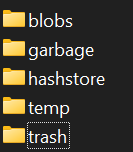
Yeah the storage blobs were all empty. I just took the risk and deleted all the folders, each per satellite and then the whole blobs folder as well.

Only these four folders remain:

Hopefully the screenshot is readable.

2025-08-28T21:08:33Z INFO piecestore uploaded {“Process”: “storagenode”, “Piece ID”: “”, “Satellite ID”: “12EayRS2V1kEsWESU9QMRseFhdxYxKicsiFmxrsLZHeLUtdps3S”, “Action”: “PUT”, “Remote Address”: “”, “Size”: }
2025-08-28T21:08:33Z INFO piecestore uploaded {“Process”: “storagenode”, “Piece ID”: “”, “Satellite ID”: “12L9ZFwhzVpuEKMUNUqkaTLGzwY9G24tbiigLiXpmZWKwmcNDDs”, “Action”: “PUT”, “Remote Address”: “”, “Size”: }
2025-08-28T21:08:33Z INFO piecestore uploaded {“Process”: “storagenode”, “Piece ID”: “”, “Satellite ID”: “12EayRS2V1kEsWESU9QMRseFhdxYxKicsiFmxrsLZHeLUtdps3S”, “Action”: “PUT”, “Remote Address”: “”, “Size”: }
2025-08-28T21:08:33Z INFO piecestore downloaded {“Process”: “storagenode”, “Piece ID”: “”, “Satellite ID”: “12EayRS2V1kEsWESU9QMRseFhdxYxKicsiFmxrsLZHeLUtdps3S”, “Action”: “GET”, “Offset”: 0, “Size”: , “Remote Address”: “”}
2025-08-28T21:08:33Z INFO piecestore uploaded {“Process”: “storagenode”, “Piece ID”: “”, “Satellite ID”: “12EayRS2V1kEsWESU9QMRseFhdxYxKicsiFmxrsLZHeLUtdps3S”, “Action”: “PUT”, “Remote Address”: “”, “Size”: }
2025-08-28T21:08:34Z INFO piecemigrate:chore enqueued for migration {“Process”: “storagenode”, “sat”: “12EayRS2V1kEsWESU9QMRseFhdxYxKicsiFmxrsLZHeLUtdps3S”}
2025-08-28T21:08:34Z INFO piecemigrate:chore enqueued for migration {“Process”: “storagenode”, “sat”: “12L9ZFwhzVpuEKMUNUqkaTLGzwY9G24tbiigLiXpmZWKwmcNDDs”}
2025-08-28T21:08:34Z INFO piecemigrate:chore enqueued for migration {“Process”: “storagenode”, “sat”: “1wFTAgs9DP5RSnCqKV1eLf6N9wtk4EAtmN5DpSxcs8EjT69tGE”}
2025-08-28T21:08:34Z INFO piecemigrate:chore enqueued for migration {“Process”: “storagenode”, “sat”: “121RTSDpyNZVcEU84Ticf2L1ntiuUimbWgfATz21tuvgk3vzoA6”}
2025-08-28T21:08:34Z INFO piecemigrate:chore all enqueued for migration; will sleep before next pooling {“Process”: “storagenode”, “active”: {“12EayRS2V1kEsWESU9QMRseFhdxYxKicsiFmxrsLZHeLUtdps3S”: true, “12L9ZFwhzVpuEKMUNUqkaTLGzwY9G24tbiigLiXpmZWKwmcNDDs”: true, “1wFTAgs9DP5RSnCqKV1eLf6N9wtk4EAtmN5DpSxcs8EjT69tGE”: true, “121RTSDpyNZVcEU84Ticf2L1ntiuUimbWgfATz21tuvgk3vzoA6”: true}, “interval”: “10m0s”}
2025-08-28T21:08:35Z INFO piecestore uploaded {“Process”: “storagenode”, “Piece ID”: “”, “Satellite ID”: “12L9ZFwhzVpuEKMUNUqkaTLGzwY9G24tbiigLiXpmZWKwmcNDDs”, “Action”: “PUT”, “Remote Address”: “”, “Size”: }
2025-08-28T21:08:35Z INFO piecestore uploaded {“Process”: “storagenode”, “Piece ID”: “”, “Satellite ID”: “12EayRS2V1kEsWESU9QMRseFhdxYxKicsiFmxrsLZHeLUtdps3S”, “Action”: “PUT”, “Remote Address”: “”, “Size”: }
2025-08-28T21:08:36Z INFO piecestore uploaded {“Process”: “storagenode”, “Piece ID”: “”, “Satellite ID”: “12L9ZFwhzVpuEKMUNUqkaTLGzwY9G24tbiigLiXpmZWKwmcNDDs”, “Action”: “PUT”, “Remote Address”: “”, “Size”: }
2025-08-28T21:08:37Z INFO piecestore uploaded {“Process”: “storagenode”, “Piece ID”: “”, “Satellite ID”: “12EayRS2V1kEsWESU9QMRseFhdxYxKicsiFmxrsLZHeLUtdps3S”, “Action”: “PUT”, “Remote Address”: “”, “Size”: }

I’m a bit scared about the piecestore after the blue INFO. I’ve seen screenshots here in the forum where it switched to hashstore.

Thats just the way the node logs it. You are fine, all is hashstore :smiley:
Mine looks the exact same, and I know it’s all hashstore. Here’s the realtime files being used:

storage/blobs# fatrace -ct
23:39:08.663140 storagenode(2958155): W /opt/sn275/storage/hashstore/12L9ZFwhzVpuEKMUNUqkaTLGzwY9G24tbiigLiXpmZWKwmcNDDs/s0/b6/log-00000000000005b6-00000000
23:39:08.663424 storagenode(2958155): W /opt/sn275/storage/hashstore/12L9ZFwhzVpuEKMUNUqkaTLGzwY9G24tbiigLiXpmZWKwmcNDDs/s0/meta/hashtbl-000000000000005f
23:39:08.739380 storagenode(2958155): R /opt/sn275/storage/hashstore/12EayRS2V1kEsWESU9QMRseFhdxYxKicsiFmxrsLZHeLUtdps3S/s1/90/log-0000000000000290-00000000
23:39:08.752506 storagenode(2958155): R /opt/sn275/storage/hashstore/12EayRS2V1kEsWESU9QMRseFhdxYxKicsiFmxrsLZHeLUtdps3S/s1/ba/log-00000000000007ba-00000000

I’m not sure if it causes issues to delete the entire blobs folder, in my case I’ve just left it in place including the sat folders, but all the subfolder 22…z7 I’ve removed.

2 Likes

So you are also getting the lines of piecestore after INFO and not hashstore? blobs deletion shouldn’t be a problem, it all just writes and reads into hashstore and subfolders, this was at least my immediate impression.

Yes - same logs, your node is using hashstore even though it writes piecestore in the logs.

1 Like

It will not. To re-create it you need to use the setup command, which is dangerous for the same reason - without a secure check like this you may also place it in a wrong location or from the other identity and the node will be disqualified.

2 Likes

The migration is still running for the HDD-Nodes. The SSD-Nodes, the new one, read with 6000 r/s in iostat the HDD just with ~100 and ~95% utilization, basicly 100% usage of the HDD while migrating.

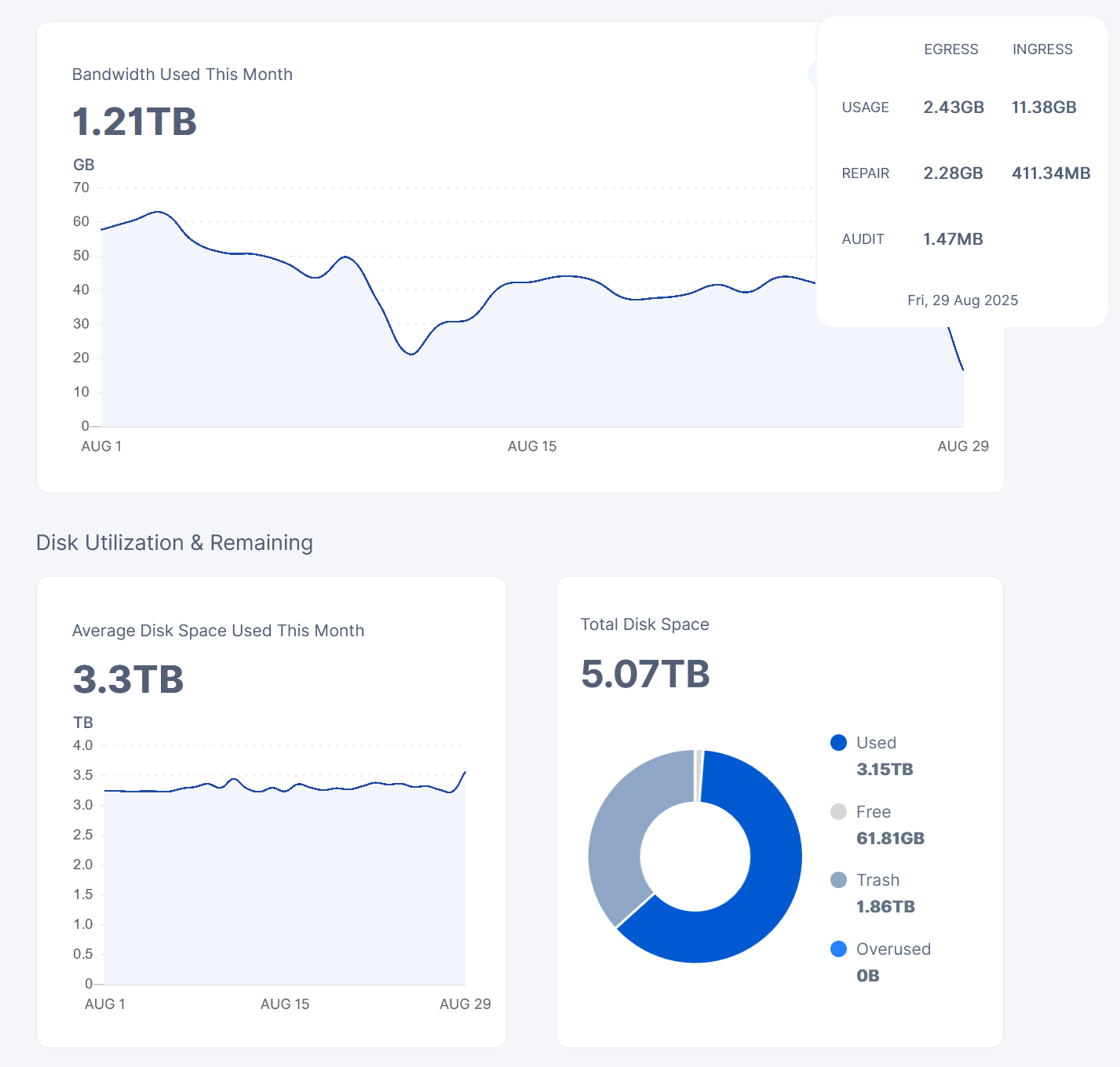
Is there some formula to calculate the bunch of pieces into TB? The node has like 5 TB total usage. It has 3,15 TB in usage and a whopping 1,85 TB in trash. Can’t explain the high trash amount. That’s why I’ve chosen it for migration, hopefully the trash get’s lower.

grafik

Am currently at bunch 780.000. Can this number translated into TB?

size is in bytes - translate it to TB

2 Likes

piecemigrate:chore processed a bunch of pieces {“Process”: “storagenode”, “successes”: 800000, “size”: 153411985920}

So 153411985920 just eqals 153 GB? It’s then like a month migrating 5 TB (5000 GB / 200 GB daily = 25 days).

Somehow I still receive new Ingress traffic for it:

correct. if YOU initiated the migration, then you’ll still receive ingress.

They are discussing if they will put ingress on hold if migration is started “central”.

1 Like

Stopping the node, removing it and change the config-file should be possible while it is migrating? Or would it be better to let it now run through the ~30 days?

If, for migration purposes, a piece is equal to a single ‘blob file on the old file system (i don’t know if it’s the same meaning) I was just recently trying to copy over a 2.5 or 3TB node across disks and it was over 30 million files. So… a lot!

1 Like

We do not discussing to make it, I believe that’s a bug. The node should handle all operations normally.
The migration process is slow on purpose to make a room for the customers.

2 Likes

Then the used space should not grow to make ingress stop.

Especially when we have nodes which doesn’t behave like this. So, it must be some factors happening together.
I shared those reports with the team, however, it would be better to find a way how to reproduce.

Thanks alot. :slightly_smiling_face:
But the node can be stopped while migrating and the restarted? It should be, because there will be new verion rollouts and by upgrading, like 1.136 the node would also restart.