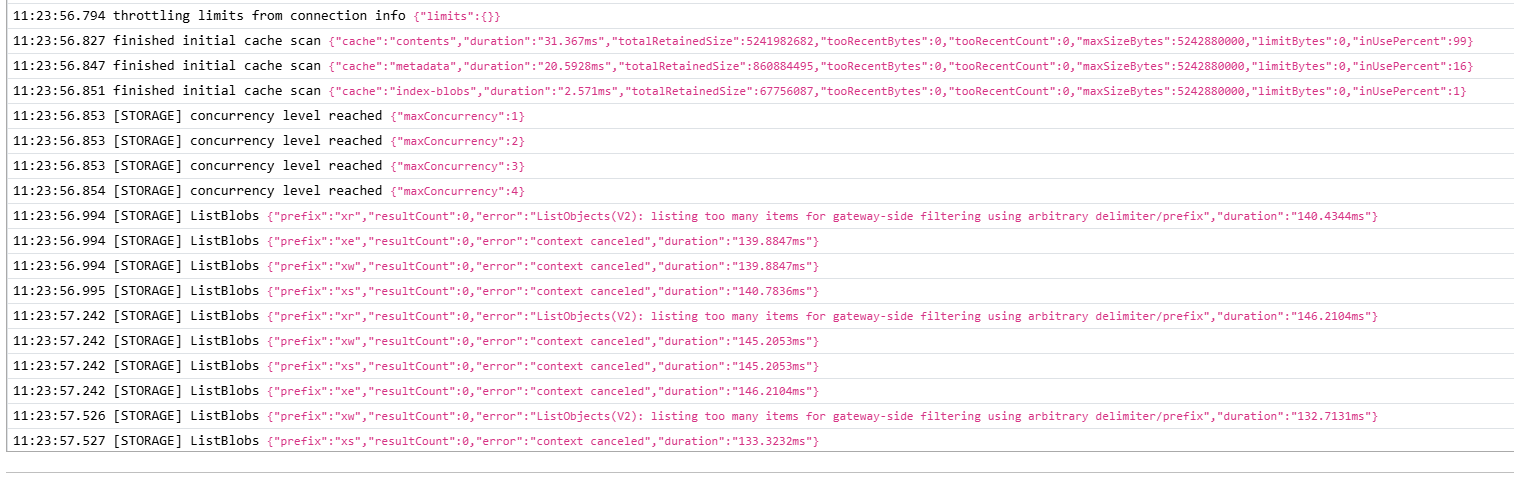
I’ve been using Storj (among many other things) as a backend for Kopia (a backup service; https://kopia.io/) for quite a while now. I’ve backed up large amounts of data with many snapshots over the course of over a year. It has always been working fine until a few days ago when it suddenly stopped connecting. At first I thought it was just a random hangup but Kopia kept failing to connect to the repository despite several restarts of both Kopia and my PC, and several attempts at reconnecting to the repository. So I’ve checked the logs and found the (suspected) reason there: Apparently, the large repository is causing the request to hit some sort of API or gateway limit in the background (see screenshot below). The error message reads:
“refresh attempt failed: error refreshing: error loading write epoch: error listing all blobs: ListObjects(V2): listing too many items for gateway-side filtering using arbitrary delimiter/prefix”
Since this has never happened before, I’m not sure what could cause it. If there’s such a limit, is there a way to (temporarily) disable it?
I’d really appreciate any help with this since I’m currently unable to recover any of the backups.
Looks like kopia is not using / as a delimiter and/or does not end prefix with /, so gateway has to do full list instead of an optimized fetch when getting data with a prefix. Looks like a Kopia issue.
I would suggest switching to native storj integration. Kopia does not support it (of course, why support something useful, when you can tickle developers egos by feature creeping 200 gimmicks instead), but you can use it through rclone. Note, Kopia hasn’t reached stability, I would not rely on it in production or trust it with data you care about.
Storj is meant to be accessed via uplink library, that talks to satellites and nodes directly, and allows to achieve all the promised impressive performance.
However a lot of apps don’t support native uplink yet, for those storj runs S3 gateways. This helps adoption by making it almost a drop in replacement of AWS s3, but It’s an extra layer; it can introduce performance bottleneck, and when used incorrectly can result in issues like you are seeing.
Some other backup tools, like duplicacy, support native storj endpoint. Kopia does not. But Kopia supports rclone connection, which, in turn, supports storj natively.
So, you can connect rclone to storj, and Kopia to rclone, and thus bypass S3 gateway entirely.
Interesting idea. However, if I’m not mistaken native integration always results in the 2.68x overhead in uploads due to the local encryption and erasure coding. For this kind of backup, fast upload is much more important than slightly faster download. My internet connection certainly can’t max out the S3 Gateway but uploading 2.68x the amount of data will certainly slow down the backup process substantially.
Yes, that’s certainly a concern, if you have slow uplink. On the other hand, if it manages to transfer all the new data in-between backup runs it shall be good enough. I assume you are taking a snapshot and then backing up that snapshot, right (which, last I checked, required custom scripting with Kopia – because… well,… I really dislike kopia as you might tell)
The more pressing issue would be whether routers and potentially modems can handle the large number of connections uplink will create. I believe they use a pool of 2000 or so connections, and I have seen consumer routers suffocate and offline themselves under the pressure.
On the other hand – if S3 does not work, but uplink is capped by upstream bandwidth – it’s at least uploading.
But if you were thinking to eventually replace your backup program with something more reliable and less obnoxious – this may be a nudge you needed
In general, this is a major drawback of native Storj integration in my opinion. I actually use Storj as a “universal” object store, similar to how you would usually use S3 or Blob storage. I use it for many applications and I really like it. But the native 2.68x upload overhead is a massive problem for most applications, esp. when you work with large datasets and/or you encounter massive egress costs (like with many common cloud providers). I almost always need to resort to the S3 gateway via rclone.
I’ve also made the experience that rclone is more reliable than Uplink. I’m not sure if I’m doing anything wrong but with rclone I rarely if ever have problems with uploads failing or being incomplete. With Uplink that’s almost always the case, esp. for large batches of files.
Is there an alternative to Kopia that you’d recommend? Honestly, I’ve been quite happy with Kopia so far and it seemed to be one of the most mature of these kinds of applications.
This is almost universally due to some resource limits – be that on the host sending, or network equipment somewhere in between. There must be some logging somewhere – see if you can catch any resource exhaustion. Maybe as simple as ulimit. I was playing with another backup program with native integration, and I rented amazon instance with 10GBps network and 16CPU cores – and the CPU cores got saturated before the network did I’m not sure how much of that was backup program vs uplink, but I’d imagine quite a large chunk – because with S3 CPU was miniscule. And so was the performance.
It’s a compromise: just like long tail cancellation, this allows to get the maximum possible throughput at the expense of extra resource usage. I’d agree it’s absolutely not needed for backup. But this is what allows storj to achieve impressive performance.
Duplicacy. I’ve tested all of the backup apps in existence, and kopia (albeit early version) allowed me to corrupt their datastore more than once. Kopia major version is still 0: by definition, it’s not stable, it can change API/format/break any time, and they promise backward compatibility only with a few recent versions. And the feature creep, oh the feature creep. Per-file compression parameters you can have, and yet, no support for snapshots out of the box,… Do they still use Electron for the two-page HTML UI? It’s not ready for production use.
Duplicacy, on the other hand, is build on the same general idea (CAS) but it’s much simpler and is stable, the only recent changes were when Google Drive changed API, or Dropbox changed OAUTH, all that backend nonsense. The core functionality hasn’t changed for a while. It also supports storj natively. I’ve been using it for years, very happy with it. There are some known cosmetic issues, but they don’t affect data integrity. I would give it a try.
The main thing here – if kopia datastore corrupts – I lose data. With duplicacy – it’s trivial to recover what’s recoverable, and often even repair the datastore. Not that I ever had to outside of tests – but it’s reassuring that I can if I have to. It does not use locking database and therefore much less prone to corruption, it’s completely lockless design. Moreover, this allows an interesting usecase where you can backup to the same datastore from multiple machines, and deduplicate across.
Story time. For some testing I took c7gn.16xlarge: 64 Graviton3 cores, 200 Gbps of networking. Just downloading from S3 at full network saturation eats ~60% CPU with rclone (official AWS tooling was not able to saturate ). If you do just simple table scans with Trino, it saturates that specific VM type’s CPU at ~25 Gbps, so it’s not worth paying extra 100% (compared to c7g.16xlarge) for better network, despite that what Trino does is just downloading files and barely processing them.
If Trino was fast enough? Sure, 7× improvement for 2× the cost.
You may also use restic, it has a similar concept like Duplicacy, but has locks (so the repository will be used exclusively during backup). It can work with S3 and with rclone.
Kopia lists objects using arbitrary prefixes which don’t mix well with storj’s encrypted object keys. To prevent the too many items error you can disable object key encryption Enabling Lexicographic Sorting of Object Listings - Storj Docs. Unfortunately I think you’d need to create a fresh bucket and re-upload your repository using the new credentials.
Did you have any success recovering your existing backups? Perhaps you could copy the repository locally and restore a snapshot from there. Another option would be to setup a self-hosted gateway configured with --s3.fully-compatible-listingSetting Up a Self-Hosted S3 Compatible Gateway - Storj Docs
Hey all. I landed here because I use velero to back up my kubernetes cluster to a storj bucket. Velero uses kopia under the hood.
Similarly to OP I had no issues for more than a year but recently ran into this listing problem. What’s ironic is that storj used to provide a native plugin for velero but abandoned the project because of the S3 gateway. I suppose this thread proves that there is indeed a need for a native plugin after all (as @arrogantrabbit was advocating for).
You can also use an rclone (native) target for Kopia or generate credentials for it with disabled paths encryption. However, both workarounds are not compatible with a previous backups and requires to use a different bucket or prefix.
For the first workaround there is no way to migrate your previos backups, the rclone target is incompatible by a structure (due to implementation of that in Kopia).
For the second workaround you can migrate your data though. You can configure rclone with two remotes, one will use your current credentials, the second one will use credentials with a disabled paths encryption, and move your data from one to another to keep a compatibility when you would switch Kopia to credentials with disabled paths encryption.
But the optimal way would be a suggested solution above (use a new project with an automatic encryption). The migration method is the same - use two rclone remotes and move data from one to another.
Please note, both migration methods will use your egress limit (and will be billed as download) if you need these previous backups.
My “solution” to the problem was to simply create a new bucket and be more selective about what I backed up and how often. This way, I could ensure I stayed way below the 100k items limit that caused the problems originally (with ListObjectsV2).
However, recently, the connection to both this new repository and another separate one started failing as well. This time it produced different error logs (see screenshot) but again mentioning issues with listing too many objects. This is even the case for a repository that has just 12k objects which shouldn’t be an issue at all.
Given that two repositories of different size and in different projects have failed simultaneously, I’m suspecting this has to do with some changes by Storj itself. Have there been any gateway-related changes, new rate limits etc. recently?
Regarding encryption: The project does not use managed encryption but that wasn’t a problem before either. I don’t think that option even existed when I first created the project and bucket.
For a manual managed encryption projects the amount of listing objects with prefixes without a delimiter has now more strict value.
It’s highly recommended either to migrate to a new project with an automatic encryption (there is a path encryption disabled by default) or create credentials without keys (paths) encryption.
See
To generate credentials without paths encryption you need to use uplink CLI:
Use these credentials in your Kopia and use different bucket or prefix, because Kopia will become not compatible with encrypted paths.
You can migrate the existing repository, but you need to reupload it to a new bucket/prefix which you would use later with credentials without paths encryption. You can also use the same bucket/prefix, but need to remove previous data. For that you can use rclone:
Configure a first remote with your current S3 credentials and call it “old”
Configure a second remote with your new S3 credentials without paths encryption and call it “new”
Move data from the “old” to a “new”:
rclone move -P old:my-bucket new:my-bucket
It will use your egress limit though. A migration to a new project can be done like this too.
You can also configure rclone with a native Storj integration and use it as a target in Kopia, but Kopia will use an incompatible format in this case, so you again need to use a different bucket or prefix. It also means that you cannot migrate the old repository to a new one.
Thank you for the detailed response. It seems that I have to move over to managed encryption to get this to work reliably.
Since restic has been recommended as an alternative and is even mentioned in the Storj docs, I’m wondering if that has the same potential issues (too many files listed, hitting server limits etc.)?
If it’s the more reliable option, I may just move over to restic since this experience has so far been very messy.
No, restic doesn’t have this issue. The problem is in a Kopia’s implementation - they heavily relay on unlimited prefixes, which causes much more list requests and forced the gateway to decrypt paths then order them and this consumes a lot of resources.
If the paths are not encrypted - they already ordered, so no heavy load on the gateway. The same would happen if Kopia will use the limited prefixes (“folder/” vs “folder”), but they decided to make it wrong.
restic would work much better. You may also try to use Duplicacy:
Thank you! After running into this issue repeatedly now, I’ll move over to restic.
The thing with the unlimited prefixes came up before. I’m wondering what led them to the decision to use unlimited prefixes when it’s common practice to not do so? Is there any advantage to it? Is there some aspect of Kopia’s implementation that requires this choice?
While I don’t know for sure, I suspect there is no malice or ill intent, they just did not think of this, being busy implementing 4781 features nobody asked for.
Here is a curious discussion on duplicacy forum, in the thread dedicated to harsh critique of duplicacy itself, no less, a tangent about Kopia:
[kopia] suffers from featurecreep (support per file compression algorithm?!), while lacking basic necessities (support for filesystem snapshots), and the UI is written on Electron — just look at resource utilization of a simple two page UI.


 I’m not sure how much of that was backup program vs uplink, but I’d imagine quite a large chunk – because with S3 CPU was miniscule. And so was the performance.
 ). If you do just simple table scans with